
Join the Conversation
- Find Answers
- :
- Using Splunk
- :
- Splunk Search
- :
- Re: Timechart with multiple where like statements
- Subscribe to RSS Feed
- Mark Topic as New
- Mark Topic as Read
- Float this Topic for Current User
- Bookmark Topic
- Subscribe to Topic
- Mute Topic
- Printer Friendly Page
- Mark as New
- Bookmark Message
- Subscribe to Message
- Mute Message
- Subscribe to RSS Feed
- Permalink
- Report Inappropriate Content

Hello Guys,
I'm trying to plot multiple values onto a time chart. These values are collected through a Where Like statement.
For Example:
host=* time count(where like(COMMAND,"% MKDIR%")) as "MKDIR", count(where like(COMMAND,"% LS%")) as "LS", count(where like(COMMAND,"CHMOD")) as "CHMOD"
the output i'm getting is a blank time chart.
Thank you
- Mark as New
- Bookmark Message
- Subscribe to Message
- Mute Message
- Subscribe to RSS Feed
- Permalink
- Report Inappropriate Content

Hi @Marco , I have updated the query , could you try this and see it that works?
...| eval MKDIR=If(Like(COMMAND,"%MKDIR%"),1,0),LS=if(Like(COMMAND,"% LS%"),1,0),CHMOD=if(Like(COMMAND,"%CHMOD%"),1,0)
| timechart sum(MKDIR) as MKDIR sum(LS) as LS sum(CHMOD) as CHMOD
- Mark as New
- Bookmark Message
- Subscribe to Message
- Mute Message
- Subscribe to RSS Feed
- Permalink
- Report Inappropriate Content
Hi @Marco have you tried
host=* COMMAND="* MKDIR*" OR COMMAND="* LS*" OR COMMAND="*CHMOD*" | timechart count by COMMAND
- Mark as New
- Bookmark Message
- Subscribe to Message
- Mute Message
- Subscribe to RSS Feed
- Permalink
- Report Inappropriate Content
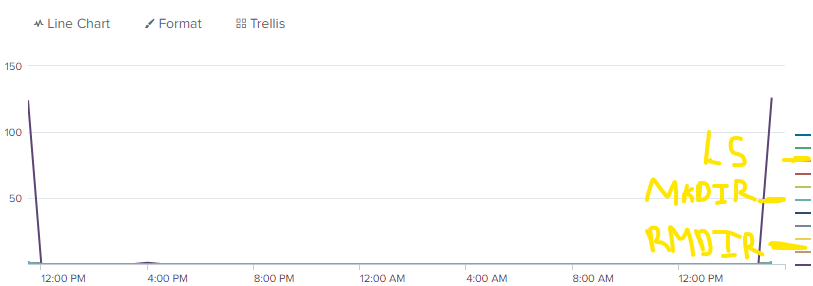
That's a bit closer to what I was looking for except its plotting out users that issued the command versus the count of how many people issued each different command.
What i'm looking for is something more like this:
- Mark as New
- Bookmark Message
- Subscribe to Message
- Mute Message
- Subscribe to RSS Feed
- Permalink
- Report Inappropriate Content
Hi @Marco , I have updated the query , could you try this and see it that works?
...| eval MKDIR=If(Like(COMMAND,"%MKDIR%"),1,0),LS=if(Like(COMMAND,"% LS%"),1,0),CHMOD=if(Like(COMMAND,"%CHMOD%"),1,0)
| timechart sum(MKDIR) as MKDIR sum(LS) as LS sum(CHMOD) as CHMOD
- Mark as New
- Bookmark Message
- Subscribe to Message
- Mute Message
- Subscribe to RSS Feed
- Permalink
- Report Inappropriate Content
- Mark as New
- Bookmark Message
- Subscribe to Message
- Mute Message
- Subscribe to RSS Feed
- Permalink
- Report Inappropriate Content
ok, so it appears like the COMMAND field is not just containing the command but the user info as well who requested it ? If so, we can first extract a new field from the COMMAND field to separate out the commands and then perform a timechart on that. Can you share a few values of the COMMAND field?
- Mark as New
- Bookmark Message
- Subscribe to Message
- Mute Message
- Subscribe to RSS Feed
- Permalink
- Report Inappropriate Content
Hi @Nisha18789
Correct the Command field contains a whole string
ex:
COMMAND="Aug 18 13:01:59 RMDIR (userid) "
COMMAND="Aug 18 13:00:04 MKDIR (JOHNDOE) "
COMMAND="Aug 18 13:00:06 LS(SALLY) "
COMMAND="Aug 18 13:00:09 MKDIR (TOM)"
Which is why I originally used the Where Like functions since in a way it searches the string to see if a part of the string matches the given parameters. Followed by the count function to count each occurrence.
Unfortunately the solution you suggested gave me a blank time chart.
- Mark as New
- Bookmark Message
- Subscribe to Message
- Mute Message
- Subscribe to RSS Feed
- Permalink
- Report Inappropriate Content
@Marco , please try the updated query and let me know if that works.


Join the Splunk Community Slack to learn, troubleshoot, and make connections with fellow Splunk practitioners in real time!
Join Splunk User Groups to connect and learn in-person by region or remotely by topic or industry.
SOC4Kafka - New Kafka Connector Powered by OpenTelemetry
Rounding off the Splunk Dashboard Contest
A Four Part Event Series: AI + Observability: AI Agents, LLMs, Apps, & Infrastructure
