
Join the Conversation
- Find Answers
- :
- Using Splunk
- :
- Splunk Search
- :
- Re: Timechart on Bar graph showing null space
- Subscribe to RSS Feed
- Mark Topic as New
- Mark Topic as Read
- Float this Topic for Current User
- Bookmark Topic
- Subscribe to Topic
- Mute Topic
- Printer Friendly Page
- Mark as New
- Bookmark Message
- Subscribe to Message
- Mute Message
- Subscribe to RSS Feed
- Permalink
- Report Inappropriate Content

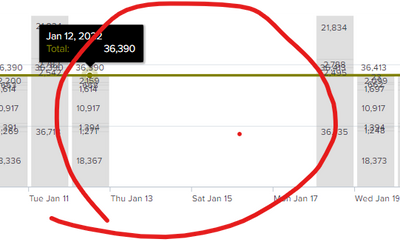
In timechart command used cont=false and in table statatics its not showing data on empty values but in bar graph . the empty/not present days showing gap in the graph
| timechart cont=false span=d sum(Negotiate) as "Negotiate", sum(Submitted) as "Submitted", sum(Draft) as "Draft",sum(Agreed) as "Agreed" sum(PartlyAgreed) as "Partly Agreed", sum(Empty) as "Empty", sum(Rejected) as "Rejected",sum(Obsolete) as "Obsolete", sum(NA) as "N/A", values(Total) as Total
- Mark as New
- Bookmark Message
- Subscribe to Message
- Mute Message
- Subscribe to RSS Feed
- Permalink
- Report Inappropriate Content


timechart fills in the times between earliest and latest and _time is given special treatment in some charts so that the whole time line is shown. To undo the "helpfulness" of timechart you may have to do something like this
| bin span=d _time as Time
| chart cont=false sum(Negotiate) as "Negotiate", sum(Submitted) as "Submitted", sum(Draft) as "Draft",sum(Agreed) as "Agreed" sum(PartlyAgreed) as "Partly Agreed", sum(Empty) as "Empty", sum(Rejected) as "Rejected",sum(Obsolete) as "Obsolete", sum(NA) as "N/A", values(Total) as Total by Time
| fieldformat Time=strftime(Time,"%F %T")- Mark as New
- Bookmark Message
- Subscribe to Message
- Mute Message
- Subscribe to RSS Feed
- Permalink
- Report Inappropriate Content
timechart fills in the times between earliest and latest and _time is given special treatment in some charts so that the whole time line is shown. To undo the "helpfulness" of timechart you may have to do something like this
| bin span=d _time as Time
| chart cont=false sum(Negotiate) as "Negotiate", sum(Submitted) as "Submitted", sum(Draft) as "Draft",sum(Agreed) as "Agreed" sum(PartlyAgreed) as "Partly Agreed", sum(Empty) as "Empty", sum(Rejected) as "Rejected",sum(Obsolete) as "Obsolete", sum(NA) as "N/A", values(Total) as Total by Time
| fieldformat Time=strftime(Time,"%F %T")
Join the Splunk Community Slack to learn, troubleshoot, and make connections with fellow Splunk practitioners in real time!
Join Splunk User Groups to connect and learn in-person by region or remotely by topic or industry.
Make Your Machine Data AI-Ready in Splunk
Splunk Asynchronous Forwarding Explained
How to Monitor AI Agents with Splunk Agent Observability
