
Join the Conversation
- Find Answers
- :
- Using Splunk
- :
- Splunk Search
- :
- Sysmon Event Parsing
- Subscribe to RSS Feed
- Mark Topic as New
- Mark Topic as Read
- Float this Topic for Current User
- Bookmark Topic
- Subscribe to Topic
- Mute Topic
- Printer Friendly Page
- Mark as New
- Bookmark Message
- Subscribe to Message
- Mute Message
- Subscribe to RSS Feed
- Permalink
- Report Inappropriate Content
Sysmon Event Parsing

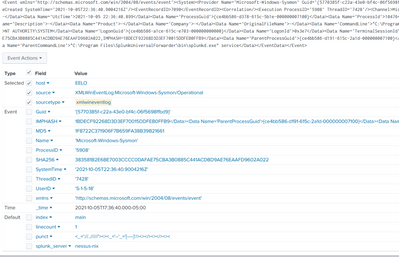
I'm having trouble getting all the fields from sysmon automatically parse with the microsoft sysmon add in could someone tell me what i might be missing?
The events are coming into my home splunk instance (8.2.2) but not being fully parsed correctly, I'm pretty sure i need to use a transform, but the one I've tried isn't working (I'm pretty sure i did it wrong but *shrug* no idea if i did or not)
I've installed sysmon on my home computer and have the universal forwarder pointed to my home splunk instance.
I followed the guide i found here: https://hurricanelabs.com/splunk-tutorials/splunking-with-sysmon-series-part-1-the-setup/
As you can see in the screenshot it only extracted some of the fields and the IMPHASH value carried over into some other data.
inputs.conf for sysmon
[WinEventLog://Microsoft-Windows-Sysmon/Operational]
disabled = false
renderXml = true
source = XMLWinEventLog:Microsoft-Windows-Sysmon/Operational
output of my transform with the path:
cat /opt/splunk/etc/apps/search/default/transforms.conf

[geo_us_states]
external_type = geo
filename = geo_us_states.kmz

[geo_countries]
external_type = geo
filename = geo_countries.kmz

[geo_attr_us_states]
filename = geo_attr_us_states.csv

[geo_attr_countries]
filename = geo_attr_countries.csv

[geo_hex]
external_type=geo_hex

[xmlwineventlog]
REGEX = "Data Name\=\'(?<_KEY_1>[A-Za-z]+)\'>(?<_VAL_1>[^<]+)<\/Data>"
DELIMS = "'>"
Here's a sample event straight from _raw (looked this event over nothing seemed overly sensitive)
<Event xmlns='http://schemas.microsoft.com/win/2004/08/events/event'><System><Provider Name='Microsoft-Windows-Sysmon' Guid='{5770385f-c22a-43e0-bf4c-06f5698ffbd9}'/><EventID>1</EventID><Version>5</Version><Level>4</Level><Task>1</Task><Opcode>0</Opcode><Keywords>0x8000000000000000</Keywords><TimeCreated SystemTime='2021-10-05T22:36:40.9004216Z'/><EventRecordID>7090</EventRecordID><Correlation/><Execution ProcessID='5908' ThreadID='7428'/><Channel>Microsoft-Windows-Sysmon/Operational</Channel><Computer>eelo</Computer><Security UserID='S-1-5-18'/></System><EventData><Data Name='RuleName'>-</Data><Data Name='UtcTime'>2021-10-05 22:36:40.899</Data><Data Name='ProcessGuid'>{ce4bb586-d378-615c-5b1e-000000007100}</Data><Data Name='ProcessId'>10476</Data><Data Name='Image'>C:\Program Files\SplunkUniversalForwarder\bin\splunk-powershell.exe</Data><Data Name='FileVersion'>-</Data><Data Name='Description'>-</Data><Data Name='Product'>-</Data><Data Name='Company'>-</Data><Data Name='OriginalFileName'>-</Data><Data Name='CommandLine'>"C:\Program Files\SplunkUniversalForwarder\bin\splunk-powershell.exe"</Data><Data Name='CurrentDirectory'>C:\WINDOWS\system32\</Data><Data Name='User'>NT AUTHORITY\SYSTEM</Data><Data Name='LogonGuid'>{ce4bb586-a1ce-615c-e703-000000000000}</Data><Data Name='LogonId'>0x3e7</Data><Data Name='TerminalSessionId'>0</Data><Data Name='IntegrityLevel'>System</Data><Data Name='Hashes'>MD5=1F8722C371906F7B659FA38B39B21661,SHA256=383581B2E6BE7003CCCC0DAFAE75CBA3B0885C441ACDBD9AE76EAAFD9602A022,IMPHASH=1BDECF92268D3D3EF70015DDFEB0FFB9</Data><Data Name='ParentProcessGuid'>{ce4bb586-d191-615c-2a1d-000000007100}</Data><Data Name='ParentProcessId'>18812</Data><Data Name='ParentImage'>C:\Program Files\SplunkUniversalForwarder\bin\splunkd.exe</Data><Data Name='ParentCommandLine'>"C:\Program Files\SplunkUniversalForwarder\bin\splunkd.exe" service</Data></EventData></Event>
- Mark as New
- Bookmark Message
- Subscribe to Message
- Mute Message
- Subscribe to RSS Feed
- Permalink
- Report Inappropriate Content
i think i fixed it on my own, i had some other sysmon apps installed and disabled all but Splunk_TA_microsoft_sysmon
AND installed
Splunk Add-on for Microsoft Windows (pretty sure this is what did it)


Join the Splunk Community Slack to learn, troubleshoot, and make connections with fellow Splunk practitioners in real time!
Join Splunk User Groups to connect and learn in-person by region or remotely by topic or industry.
SOC4Kafka - New Kafka Connector Powered by OpenTelemetry
Event Series: Level up your SOC: Advancing with Splunk Enterprise Security
Announcing Modern Navigation: A New Era of Splunk User Experience
