
Join the Conversation
- Find Answers
- :
- Using Splunk
- :
- Splunk Search
- :
- Re: Subtotal percentage with stats
- Subscribe to RSS Feed
- Mark Topic as New
- Mark Topic as Read
- Float this Topic for Current User
- Bookmark Topic
- Subscribe to Topic
- Mute Topic
- Printer Friendly Page
- Mark as New
- Bookmark Message
- Subscribe to Message
- Mute Message
- Subscribe to RSS Feed
- Permalink
- Report Inappropriate Content

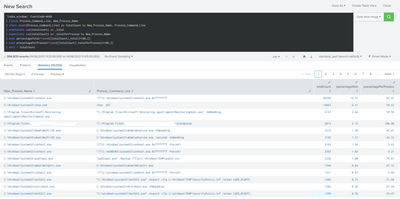
I'm working with Windows events, and want to make following report/search:
process1 Total XX XX%
command_line1 XX%
command_line2 XX%
…
process4 Total XX XX%
command_line1 XX%
command_line2 XX%
What I come up with:
`index_windows` EventCode=4688
| fields Process_Command_Line, New_Process_Name
| stats count(Process_Command_Line) as totalCount by New_Process_Name, Process_Command_Line
| eventstats sum(totalCount) as _total
| eventstats sum(totalCount) as _totalPerProcess by New_Process_Name
| eval percentageTotal=round((totalCount/_total)*100,2)
| eval precentagePerProcess=round((totalCount/_totalPerProcess)*100,2)
| sort - totalCount
The only thing is that I can't figure out how to merge fields by New_Process_Name
- Mark as New
- Bookmark Message
- Subscribe to Message
- Mute Message
- Subscribe to RSS Feed
- Permalink
- Report Inappropriate Content


`index_windows` EventCode=4688
| fields Process_Command_Line, New_Process_Name
| stats count(Process_Command_Line) as totalCount by New_Process_Name, Process_Command_Line
| eventstats sum(totalCount) as _total
| eventstats sum(totalCount) as _totalPerProcess by New_Process_Name
| eval percentageTotal=round((totalCount/_total)*100,2)
| eval precentagePerProcess=round((totalCount/_totalPerProcess)*100,2)
| stats list(Process_Command_Line) as Process_Command_line list(percentageTotal) as percentageTotal values(percentagePerProcess) as percentagePerProcess by New_Process_Name
| sort - totalCount- Mark as New
- Bookmark Message
- Subscribe to Message
- Mute Message
- Subscribe to RSS Feed
- Permalink
- Report Inappropriate Content
`index_windows` EventCode=4688
| fields Process_Command_Line, New_Process_Name
| stats count(Process_Command_Line) as totalCount by New_Process_Name, Process_Command_Line
| eventstats sum(totalCount) as _total
| eventstats sum(totalCount) as _totalPerProcess by New_Process_Name
| eval percentageTotal=round((totalCount/_total)*100,2)
| eval precentagePerProcess=round((totalCount/_totalPerProcess)*100,2)
| stats list(Process_Command_Line) as Process_Command_line list(percentageTotal) as percentageTotal values(percentagePerProcess) as percentagePerProcess by New_Process_Name
| sort - totalCount- Mark as New
- Bookmark Message
- Subscribe to Message
- Mute Message
- Subscribe to RSS Feed
- Permalink
- Report Inappropriate Content
Thank you, so simple! 🙄 Changed list to values though, as it hit the limit.
- Mark as New
- Bookmark Message
- Subscribe to Message
- Mute Message
- Subscribe to RSS Feed
- Permalink
- Report Inappropriate Content
The reason for list rather than values is to keep the count and process in line because values sorts them. If you can't use list, you should consider creating a concatenated field before using values.


Join the Splunk Community Slack to learn, troubleshoot, and make connections with fellow Splunk practitioners in real time!
Join Splunk User Groups to connect and learn in-person by region or remotely by topic or industry.
Best Practices: Splunk auto adjust pipeline queue
Splunk Auto Ingestion Parallel Pipeline Scaling
A Four-Part Event Series: Full Stack Observability For the AI Era
