
Join the Conversation
- Find Answers
- :
- Using Splunk
- :
- Splunk Search
- :
- Re: Subsearch NOT with dbxquery
- Subscribe to RSS Feed
- Mark Topic as New
- Mark Topic as Read
- Float this Topic for Current User
- Bookmark Topic
- Subscribe to Topic
- Mute Topic
- Printer Friendly Page
- Mark as New
- Bookmark Message
- Subscribe to Message
- Mute Message
- Subscribe to RSS Feed
- Permalink
- Report Inappropriate Content
Subsearch NOT with dbxquery

Hello Team,
I do have dbquery from mysql:
|dbxquery query="SELECT mac FROM pc.pc" connection=MYSQL shortnames=true | fields - _*
This one displayes all the mac addresses from mysql.
I also have:
host="10.62.140.64" MACAddress
This one is displaying syslogs with all MACAddress values like MACAddress=00:01:02:03:04:05
I wanted to combine both and have a search which displays only syslogs with MACAddresses which are not in mysql database.
I have tried:
host="10.62.140.64" MACAddress NOT [dbxquery query="SELECT mac FROM pc.pc" connection=MYSQL shortnames=true | fields - _*]
But still all MACAddresses are being displayed. It looks like i can not correlate MACAddress with mac from subsearch. Could you help ?
Thanks,
Michal
- Mark as New
- Bookmark Message
- Subscribe to Message
- Mute Message
- Subscribe to RSS Feed
- Permalink
- Report Inappropriate Content

Try this
host="10.62.140.64" MACAddress NOT [|dbxquery query="SELECT mac as MACAddress FROM pc.pc" connection=MYSQL shortnames=true | fields MACAddress ]
What goes around comes around. If it helps, hit it with Karma 🙂
- Mark as New
- Bookmark Message
- Subscribe to Message
- Mute Message
- Subscribe to RSS Feed
- Permalink
- Report Inappropriate Content
Hi Renjith.Nair
I can not since then mysql column name is different, so my real query has to remane this field:
host="10.62.140.64" MACAddress NOT [dbxquery query="SELECT mac FROM pc.pc" connection=MYSQL shortnames=true | fields mac | rename mac as MACAddress ]
But what i find interesting is that it looks like dbxquery is searching only for 100 000 entries ? (while i have 171K) ? But when i try to:
add "search MACAddress=00:50:B6:11:EA:CE" to my dbxquery that entry is being returned correctly.
Let me paste dbquery results:

We can see that mac, while the combined search still returns that record while it should not:
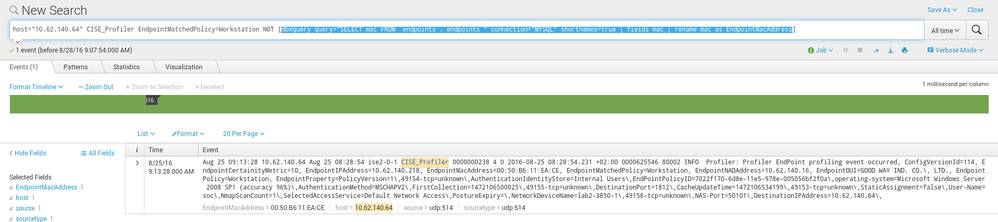
So maybe it is the issue with max 100k records ? Can i change it somehow ?
Thanks,
Michal
- Mark as New
- Bookmark Message
- Subscribe to Message
- Mute Message
- Subscribe to RSS Feed
- Permalink
- Report Inappropriate Content
I thought you could rename in the select itself ,like mac as MACAddress in SQL. Anyway if you are able to change it somehow it's fine. Subquery limit is 10k and you can change it in http://docs.splunk.com/Documentation/Splunk/latest/Admin/Limitsconf (be careful).
Also try adding format at the end of your subquery ie dbxquery query="SELECT mac FROM pc.pc" connection=MYSQL shortnames=true | fields mac | rename mac as MACAddress|format
What goes around comes around. If it helps, hit it with Karma 🙂




Join the Splunk Community Slack to learn, troubleshoot, and make connections with fellow Splunk practitioners in real time!
Join Splunk User Groups to connect and learn in-person by region or remotely by topic or industry.
Defend at Machine Speed: Your Guide to Security Sessions at .conf26
Where Innovation Takes Flight: The Splunk4Aviation Flight Sim Lands at .conf26
Turn Cisco Telemetry Into Action with Cisco Data Fabric, powered by the Splunk ...
