
Join the Conversation
- Find Answers
- :
- Using Splunk
- :
- Splunk Search
- :
- Re: Splunk Alert when search result drop below def...
- Subscribe to RSS Feed
- Mark Topic as New
- Mark Topic as Read
- Float this Topic for Current User
- Bookmark Topic
- Subscribe to Topic
- Mute Topic
- Printer Friendly Page
- Mark as New
- Bookmark Message
- Subscribe to Message
- Mute Message
- Subscribe to RSS Feed
- Permalink
- Report Inappropriate Content

Hello fellow splunkers,
i want to create an alert for the following search.
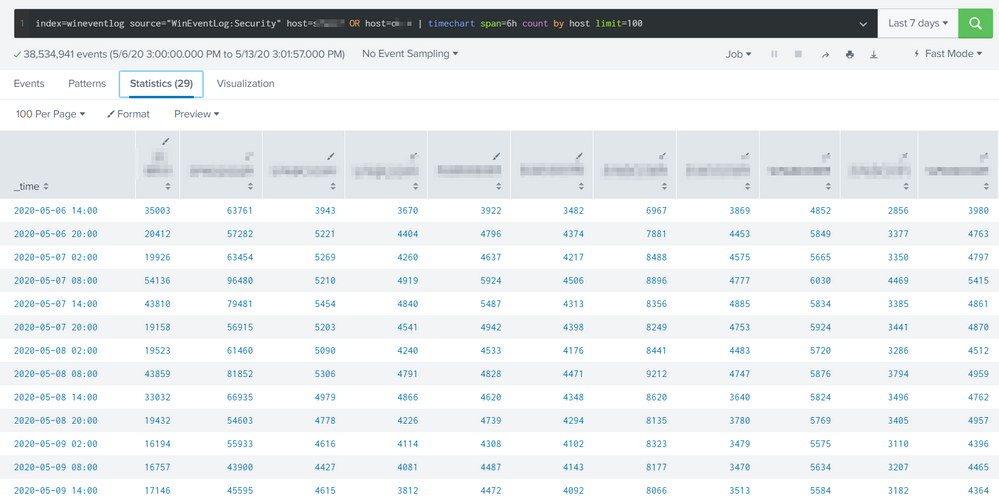
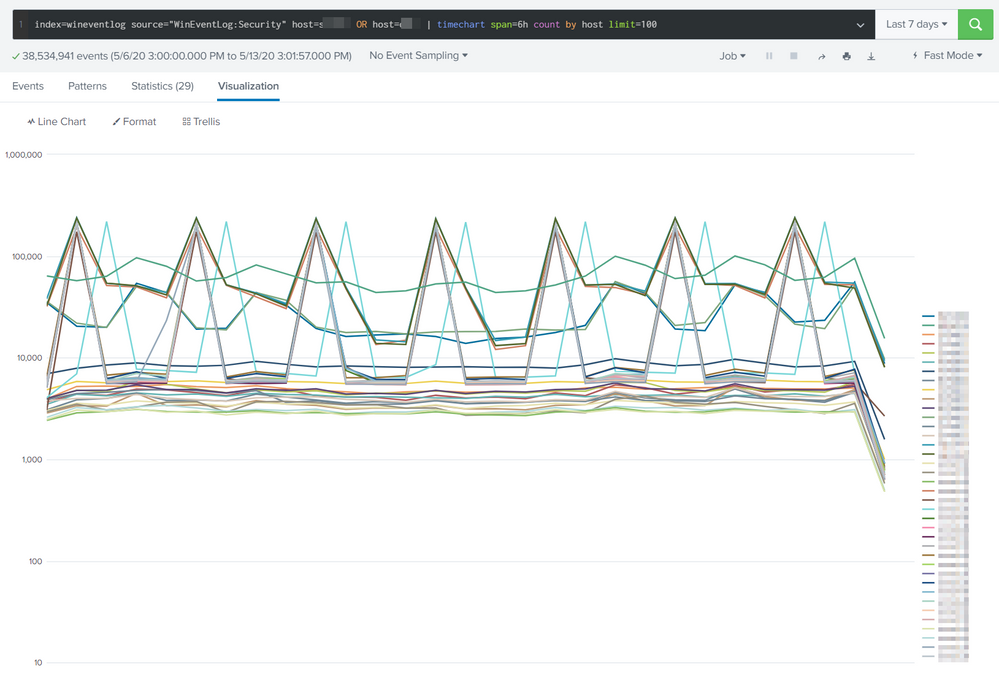
The search creates a statistics matrix which list the number of events from a host for the timespan defined in the search.
index=wineventlog source="WinEventLog:Security" host=testsrv1 OR host=dc* | timechart span=6h count by host limit=100
I want to define a threshold value for events in that timespan. If one of the host would drop below this threshold in my 6h timespan an alert should be triggered. There i could define a Email/SMS Messaging etc.
I've attached a picture - my goal would be to detect an unnormal behaviour like a drop or a very high peak. I'm not sure if i can have a dynamic threshold or somehting like that - but a static threshold would be good for the moment.
BR vess


- Mark as New
- Bookmark Message
- Subscribe to Message
- Mute Message
- Subscribe to RSS Feed
- Permalink
- Report Inappropriate Content


Lots and lots of ways to go about this. It all depends on skill level and complexity for what solution to implement.
If you wanted to use a static threshold, then its as simple as adding this
| eval threshold_high=150000
| eval threshold_low=1000
| eval ALERT=if(FIELD>threshold_high OR FIELD<threshold_low, "ALERT" , "GOOD")
If you wanted a more complex moving average threshold, then you can use timewrap (assuming you remove the split by host). I see you're using timechart here, this is going to add a lot of columns and also increase resource usage to monitor all these entities rather than the aggregate.
https://docs.splunk.com/Documentation/SplunkCloud/latest/SearchReference/Trendline
Option 3 is to do something more sophisticated like this which allows you to monitor each entity and have a good dynamic threshold
https://answers.splunk.com/answers/590464/how-you-detect-an-anomaly-from-a-time-frame-the-pr.html
- Mark as New
- Bookmark Message
- Subscribe to Message
- Mute Message
- Subscribe to RSS Feed
- Permalink
- Report Inappropriate Content

| tstats count where index=wineventlog source="WinEventLog:Security" host=testsrv1 OR host=dc* by _time span=6h host
| @skeolpin method.
tstats is better for this.
- Mark as New
- Bookmark Message
- Subscribe to Message
- Mute Message
- Subscribe to RSS Feed
- Permalink
- Report Inappropriate Content
It was the combination of @skoelpin and your answer which was a success.
Thanks!
- Mark as New
- Bookmark Message
- Subscribe to Message
- Mute Message
- Subscribe to RSS Feed
- Permalink
- Report Inappropriate Content
Lots and lots of ways to go about this. It all depends on skill level and complexity for what solution to implement.
If you wanted to use a static threshold, then its as simple as adding this
| eval threshold_high=150000
| eval threshold_low=1000
| eval ALERT=if(FIELD>threshold_high OR FIELD<threshold_low, "ALERT" , "GOOD")
If you wanted a more complex moving average threshold, then you can use timewrap (assuming you remove the split by host). I see you're using timechart here, this is going to add a lot of columns and also increase resource usage to monitor all these entities rather than the aggregate.
https://docs.splunk.com/Documentation/SplunkCloud/latest/SearchReference/Trendline
Option 3 is to do something more sophisticated like this which allows you to monitor each entity and have a good dynamic threshold
https://answers.splunk.com/answers/590464/how-you-detect-an-anomaly-from-a-time-frame-the-pr.html
- Mark as New
- Bookmark Message
- Subscribe to Message
- Mute Message
- Subscribe to RSS Feed
- Permalink
- Report Inappropriate Content
I've merged the two answers.
But i'm not quite sure how to configure an "alert" when a specific filed has the string "alert" in it.
| tstats count where index=wineventlog source="WinEventLog:Security" host=s*wdc* OR host=dc-* by _time span=60min host
| eval threshold_high=400000
| eval threshold_low=10
| eval ALERT=if( count>threshold_high OR count<threshold_low, "ALERT" , "GOOD")
- Mark as New
- Bookmark Message
- Subscribe to Message
- Mute Message
- Subscribe to RSS Feed
- Permalink
- Report Inappropriate Content
You can create a custom alert condition so if it sees the field ALERT have a value of ALERT then fire. You can make it numerical instead, you can even have the alert fire if the number of results is greater than 0 etc.. Tons and tons of ways to make this work
- Mark as New
- Bookmark Message
- Subscribe to Message
- Mute Message
- Subscribe to RSS Feed
- Permalink
- Report Inappropriate Content
I used:
search ALERT="ALERT"
as "custom" trigger, that worked pretty well for me.
I added | sort + ALERT to my search string which allowed me to see the important parts in the mail i've triggered.
Thanks for your help!
BR vess

Join the Splunk Community Slack to learn, troubleshoot, and make connections with fellow Splunk practitioners in real time!
Join Splunk User Groups to connect and learn in-person by region or remotely by topic or industry.
Make Your Machine Data AI-Ready in Splunk
Splunk Asynchronous Forwarding Explained
How to Monitor AI Agents with Splunk Agent Observability
