
Turn on suggestions
Auto-suggest helps you quickly narrow down your search results by suggesting possible matches as you type.
Splunk Search
×
Join the Conversation
Without signing in, you're just watching from the sidelines. Sign in or Register to connect, share, and be part of the Splunk Community.
- Find Answers
- :
- Using Splunk
- :
- Splunk Search
- :
- Sort column headers in timechart - customize
Options
- Subscribe to RSS Feed
- Mark Topic as New
- Mark Topic as Read
- Float this Topic for Current User
- Bookmark Topic
- Subscribe to Topic
- Mute Topic
- Printer Friendly Page
- Mark as New
- Bookmark Message
- Subscribe to Message
- Mute Message
- Subscribe to RSS Feed
- Permalink
- Report Inappropriate Content

martin86
Engager
07-02-2021
02:45 AM
Hi,
I would like to ask you, of there is some possibility order column based on requirement.
Case:
<search>
|eval lower_raw = lower(_raw)
|rex field=lower_raw "^.*d=(?<opentask>[0-9]+).*"
|rex field=lower_raw "^.*pm\s(?<trace>[0-9a-z-]+).*"
|rex field=lower_raw "^.*taskid=(?<opentask>[0-9]+).*"
|rex field=lower_raw "^.*uuid=(?<trace>[0-9a-z-]+).*"
| eval task=opentask ."_".trace
| transaction task
| eval timedelay=case(duration>=0 AND duration<2,"1 sec",duration>=2 AND duration<6,"2-5 sec",duration>=6 AND duration<11,"6-10 sec",duration>=11,"11 and more sec",1=1,"error")
| timechart span=10m count avg(duration) as avg  by timedelay
| sort by _time timedelay desc
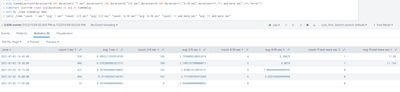
I would like to have sorted by group (count event) and AVG duration
I mean, first column time (ok now)
second will be "count: 1sec"
third: "avg: 1sec"
forth: "count: 2-5sec"
fifth: "avg: 2-5sec"
etc.
Current it looks like this

which is not nice
expectation:

Thank you
1 Solution
- Mark as New
- Bookmark Message
- Subscribe to Message
- Mute Message
- Subscribe to RSS Feed
- Permalink
- Report Inappropriate Content

kamlesh_vaghela

SplunkTrust
07-02-2021
03:53 AM
I suggest to use table command to rearrange the columns.
Like
| timechart span=10m count avg(duration) as avg  by timedelay
| sort by _time timedelay desc
|table LIST OF COLUMNS YOU NEED
KV
- Mark as New
- Bookmark Message
- Subscribe to Message
- Mute Message
- Subscribe to RSS Feed
- Permalink
- Report Inappropriate Content
martin86
Engager
07-02-2021
04:01 AM
- Mark as New
- Bookmark Message
- Subscribe to Message
- Mute Message
- Subscribe to RSS Feed
- Permalink
- Report Inappropriate Content
kamlesh_vaghela
SplunkTrust
07-02-2021
03:53 AM
I suggest to use table command to rearrange the columns.
Like
| timechart span=10m count avg(duration) as avg  by timedelay
| sort by _time timedelay desc
|table LIST OF COLUMNS YOU NEED
KV

Got questions? Get answers!
Join the Splunk Community Slack to learn, troubleshoot, and make connections with fellow Splunk practitioners in real time!
Meet up IRL or virtually!
Join Splunk User Groups to connect and learn in-person by region or remotely by topic or industry.
Get Updates on the Splunk Community!
[Puzzles] Solve, Learn, Repeat: Classic British Rock Bands
This puzzle series (first published here) is based on extracting information from statements about well-known ...
New to the Community? Join Us for an Exclusive Post .conf26 Welcome Session (Plus a ...
Keep the .conf26 Energy Going: Welcome to the Splunk Community!
Whether we scanned your badge at the Community ...
Accelerate Splunk App Development with AI
Learn how to automate the repetitive parts of your build cycle.
Register to Attend
Join our Tech Talk ...
