
Join the Conversation
- Find Answers
- :
- Using Splunk
- :
- Splunk Search
- :
- Re: Selfjoin - Keeping All Results
- Subscribe to RSS Feed
- Mark Topic as New
- Mark Topic as Read
- Float this Topic for Current User
- Bookmark Topic
- Subscribe to Topic
- Mute Topic
- Printer Friendly Page
- Mark as New
- Bookmark Message
- Subscribe to Message
- Mute Message
- Subscribe to RSS Feed
- Permalink
- Report Inappropriate Content

This one may be easy, but it's eluding me.
I've got a results table from an .csv file (using | inputlookup) that looks a bit like this:
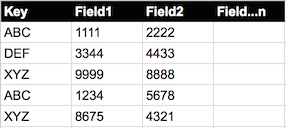
What I want to do is combine the results that have the same 'Key', but I want to retain all of the 'Fields', ideally as a multi-value field.
So ending up with:
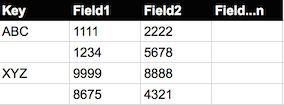
If I use a selfjoin I've only got the option to keep one or other of the associated fields (using the overwrite option with either true or false).
The results table that I'm working from is >20,000 lines so I may also need to be conscious of limits, etc.
Any thoughts?
- Mark as New
- Bookmark Message
- Subscribe to Message
- Mute Message
- Subscribe to RSS Feed
- Permalink
- Report Inappropriate Content


You can try something like this...
..| inputlookup mylookup | stats list(field1) list(field2) by key
That should give you the values of all fields, pivoting on the key value.
- Mark as New
- Bookmark Message
- Subscribe to Message
- Mute Message
- Subscribe to RSS Feed
- Permalink
- Report Inappropriate Content
I also found another solution via someone else's Splunk Answers question.
I was originally trying to simply use 'transaction' on the Key value. I'd discounted this, as it always came back with zero results.
It appears that 'transaction' needs the _time field, which wasn't in my inputlookup table.
By adding a
| eval _time=now()
I could then do:
...| inputlookup mylookup | eval _time=now() | transaction Key
I found this here, so can't take any credit for it:
http://answers.splunk.com/answers/207087/inputlookup-followed-by-transaction-no-results-fou.html
Both solutions work for me, which is great.
- Mark as New
- Bookmark Message
- Subscribe to Message
- Mute Message
- Subscribe to RSS Feed
- Permalink
- Report Inappropriate Content
You can try something like this...
..| inputlookup mylookup | stats list(field1) list(field2) by key
That should give you the values of all fields, pivoting on the key value.
- Mark as New
- Bookmark Message
- Subscribe to Message
- Mute Message
- Subscribe to RSS Feed
- Permalink
- Report Inappropriate Content
Hi.
Many thanks for this. I haven't used the list() function before, so that not only solves my problem, but gives me something new to play with!
Graham.




Join the Splunk Community Slack to learn, troubleshoot, and make connections with fellow Splunk practitioners in real time!
Join Splunk User Groups to connect and learn in-person by region or remotely by topic or industry.
A Four-Part Event Series: Full Stack Observability For the AI Era
SOC4Kafka - New Kafka Connector Powered by OpenTelemetry
Event Series: Level up your SOC: Advancing with Splunk Enterprise Security
