
Join the Conversation
- Find Answers
- :
- Using Splunk
- :
- Splunk Search
- :
- SPL: How to perform a SQL Like Minus Operation?
- Subscribe to RSS Feed
- Mark Topic as New
- Mark Topic as Read
- Float this Topic for Current User
- Bookmark Topic
- Subscribe to Topic
- Mute Topic
- Printer Friendly Page
- Mark as New
- Bookmark Message
- Subscribe to Message
- Mute Message
- Subscribe to RSS Feed
- Permalink
- Report Inappropriate Content

I am trying to remove certain logs from a base query of a certain type based on the results of another query of a different type of log. Both are connected by the user field.
Specifically, I have identified instances where a user has 4 or more failed login attempts, and am trying to remove instances where they successfully changed their password after. This leaves a list of users, and their associated logs, who have a large number of failed logins but did not update their password.
Here is the base query:
index=1234 logger_name=auth message="user failed to login" earliest=-24h latest=now
| stats count by user
| search count>=4
| join user [search index=1234 logger_name=auth message="user failed to login*" earliest=-24h latest=now]
Here is the query I am essentially trying to include. However, SPL only handles left, right, and inner joins
| MINUS user [search index=1234 logger_name=passwordchange message="Update Password:Success" earliest=-24h latest=now]
How might I accomplish this?
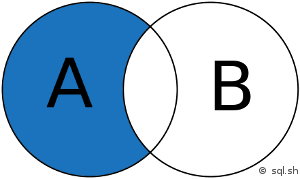
Thank you for your help.
- Mark as New
- Bookmark Message
- Subscribe to Message
- Mute Message
- Subscribe to RSS Feed
- Permalink
- Report Inappropriate Content

Hi @ahendler1,
it's actually not that difficult.
Go for something like this:
index=1234 logger_name=auth message="user failed to login" earliest=-24h latest=now
| stats count by user
| search count>=4
| join user [search index=1234 logger_name=auth message="user failed to login*" earliest=-24h latest=now]
| search NOT [search index=1234 logger_name=passwordchange message="Update Password:Success" earliest=-24h latest=now | fields user | format]
Tell me if it works.
- Mark as New
- Bookmark Message
- Subscribe to Message
- Mute Message
- Subscribe to RSS Feed
- Permalink
- Report Inappropriate Content
Hi @ahendler1,
it's actually not that difficult.
Go for something like this:
index=1234 logger_name=auth message="user failed to login" earliest=-24h latest=now
| stats count by user
| search count>=4
| join user [search index=1234 logger_name=auth message="user failed to login*" earliest=-24h latest=now]
| search NOT [search index=1234 logger_name=passwordchange message="Update Password:Success" earliest=-24h latest=now | fields user | format]
Tell me if it works.
- Mark as New
- Bookmark Message
- Subscribe to Message
- Mute Message
- Subscribe to RSS Feed
- Permalink
- Report Inappropriate Content
@pyro_wood
Works great, thank you!
- Mark as New
- Bookmark Message
- Subscribe to Message
- Mute Message
- Subscribe to RSS Feed
- Permalink
- Report Inappropriate Content
@ahenler1,
great!
Please accept the answer then. 🙂

Join the Splunk Community Slack to learn, troubleshoot, and make connections with fellow Splunk practitioners in real time!
Join Splunk User Groups to connect and learn in-person by region or remotely by topic or industry.
Accelerate Splunk App Development with AI
Meet the .conf26 AI Agent Buildathon Winners
Trusted Autonomy in the SOC: A Maturity Journey
