
Join the Conversation
- Find Answers
- :
- Using Splunk
- :
- Splunk Search
- :
- Problems opening a search on an APP...
- Subscribe to RSS Feed
- Mark Topic as New
- Mark Topic as Read
- Float this Topic for Current User
- Bookmark Topic
- Subscribe to Topic
- Mute Topic
- Printer Friendly Page
- Mark as New
- Bookmark Message
- Subscribe to Message
- Mute Message
- Subscribe to RSS Feed
- Permalink
- Report Inappropriate Content

When I try to open a search for an app that is not the "Search" gives the following result:
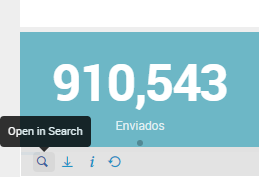
.
.
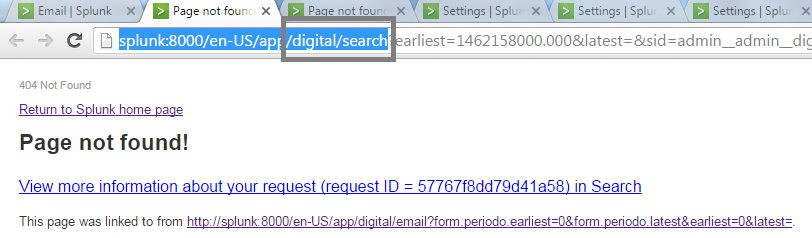
I imagine my other apps do not have the "Search".
How to fix this? I would have to add the search in apps or redirect the search to "Search" app?
App: digital;
- Mark as New
- Bookmark Message
- Subscribe to Message
- Mute Message
- Subscribe to RSS Feed
- Permalink
- Report Inappropriate Content

Search is a view in Splunk that is part of the search app. By default, this search view is available globally, but you might have changed the permission on the view and your user doesn't have access to it. Have you check this?
Otherwise, I would check the permission of the search app as well just in case.
- Mark as New
- Bookmark Message
- Subscribe to Message
- Mute Message
- Subscribe to RSS Feed
- Permalink
- Report Inappropriate Content

Whatever is after app/ in the URL is the app and search is the default app for all Search Heads. If you try to hand-modify the URL to another app that you know is installed on your Search Head and you get this error, you will have to change some settings. Click on the gear icon in the upper-left corner of the main landing page next to the word Apps. Locate your app in the list and check the Visible and Status settings which should be Yes and Enabled. If not, click the Edit properties link to the right and change them. Then it will work.
- Mark as New
- Bookmark Message
- Subscribe to Message
- Mute Message
- Subscribe to RSS Feed
- Permalink
- Report Inappropriate Content
The files were already in this condition.
- Mark as New
- Bookmark Message
- Subscribe to Message
- Mute Message
- Subscribe to RSS Feed
- Permalink
- Report Inappropriate Content
Search is a view in Splunk that is part of the search app. By default, this search view is available globally, but you might have changed the permission on the view and your user doesn't have access to it. Have you check this?
Otherwise, I would check the permission of the search app as well just in case.




Join the Splunk Community Slack to learn, troubleshoot, and make connections with fellow Splunk practitioners in real time!
Join Splunk User Groups to connect and learn in-person by region or remotely by topic or industry.
Data Management Digest – August 2026
Your Feedback. Our Roadmap. Visit the PX Feedback Booth at .conf26
Agentic SOC Triage: Investigating Splunk ES Notables with MCP Server and a Local LLM
