
Join the Conversation
- Find Answers
- :
- Using Splunk
- :
- Splunk Search
- :
- Re: Parse Nested JSON Array into Splunk Table
- Subscribe to RSS Feed
- Mark Topic as New
- Mark Topic as Read
- Float this Topic for Current User
- Bookmark Topic
- Subscribe to Topic
- Mute Topic
- Printer Friendly Page
- Mark as New
- Bookmark Message
- Subscribe to Message
- Mute Message
- Subscribe to RSS Feed
- Permalink
- Report Inappropriate Content
Parse Nested JSON Array into Splunk Table

I have the below JSON event with nested array in splunk -:
{
"items":
    [
        {
            "parts":
                [
                    {
                        "code":"1","var":"","pNum":"101","counter":1019
                    },
                    {
                        "code":"0","var":"","pNum":"102","counter":1029
                    }
                ],
            "se":"A1",
            "so":"111"
        },
        {
            "parts":
                [
                    {
                        "code":"1","var":"","pNum":"301","counter":3019
                    },
                    {
                        "code":"0","var":"","pNum":"302","counter":3029
                    }
                ],
            "se":"A3",
            "so":"333"
        },
        {
            "parts":
                [
                    {
                        "code":"0","var":"","pNum":"401","counter":4019
                    }
                ],
            "se":"A4",
            "so":"444"
        },
        {
            "parts":
                [
                    {
                        "code":"1","var":"","pNum":"501","counter":5019
                    }
                ],
            "se":"A5",
            "so":"555"
        }
    ],
"id":"x.9110790",
"cr":"x-273169"
}
I need to extract this JSON into the below Splunk table -:
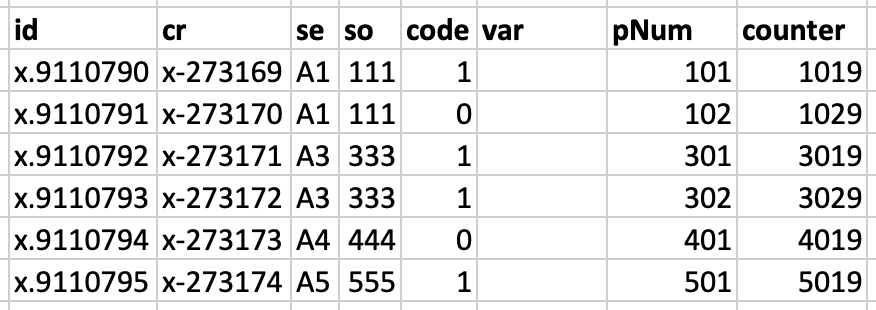
I tried to use spath as below but it is only giving wrong results given below -:
|makeresults | eval _raw="{ \"items\": [ { \"parts\": [ { \"code\":\"1\",\"var\":\"\",\"pNum\":\"101\",\"counter\":1019 }, { \"code\":\"0\",\"var\":\"\",\"pNum\":\"102\",\"counter\":1029 } ], \"se\":\"A1\", \"so\":\"111\" }, { \"parts\": [ { \"code\":\"1\",\"var\":\"\",\"pNum\":\"301\",\"counter\":3019 }, { \"code\":\"0\",\"var\":\"\",\"pNum\":\"302\",\"counter\":3029 } ], \"se\":\"A3\", \"so\":\"333\" }, { \"parts\": [ { \"code\":\"0\",\"var\":\"\",\"pNum\":\"401\",\"counter\":4019 } ], \"se\":\"A4\", \"so\":\"444\" }, { \"parts\": [ { \"code\":\"1\",\"var\":\"\",\"pNum\":\"501\",\"counter\":5019 } ], \"se\":\"A5\", \"so\":\"555\" } ], \"id\":\"x.9110790\", \"cr\":\"x-273169\" }" |spath |rename items as * | table id, cr,items{}.*

I am trying to parse the JSON type splunk logs for the first time. So please help with any hints to solve this.
Thank you


- Mark as New
- Bookmark Message
- Subscribe to Message
- Mute Message
- Subscribe to RSS Feed
- Permalink
- Report Inappropriate Content

This is nasty but...
| makeresults
| eval _raw="{
 \"items\":
     [
         {
             \"parts\":
                 [
                     {
                         \"code\":\"1\",\"var\":\"\",\"pNum\":\"101\",\"counter\":1019
                     },
                     {
                         \"code\":\"0\",\"var\":\"\",\"pNum\":\"102\",\"counter\":1029
                     }
                 ],
             \"se\":\"A1\",
             \"so\":\"111\"
             },
         {
             \"parts\":
                 [
                     {
                         \"code\":\"1\",\"var\":\"\",\"pNum\":\"301\",\"counter\":3019
                     },
                     {
                         \"code\":\"0\",\"var\":\"\",\"pNum\":\"302\",\"counter\":3029
                     }
                 ],
             \"se\":\"A3\",
             \"so\":\"333\"
             },
         {
             \"parts\":
                 [
                     {
                         \"code\":\"0\",\"var\":\"\",\"pNum\":\"401\",\"counter\":4019
                     }
                 ],
             \"se\":\"A4\",
             \"so\":\"444\"
             },
         {
             \"parts\":
                 [
                     {
                         \"code\":\"1\",\"var\":\"\",\"pNum\":\"501\",\"counter\":5019
                     }
                 ],
             \"se\":\"A5\",
             \"so\":\"555\"
             }
     ],
 \"id\":\"x.9110790\",
 \"cr\":\"x-273169\"
     }"

| rename COMMENT AS "Everything above generates sample events; everything below is your solution"

| rex "(?ms)\"id\":\"(?<id>[^\"]+).*?\"cr\":\"(?<cr>[^\"]+)"
| rex max_match=0 "(?ms)[\r\n\s]+\"parts\":[\r\n\s]+(?<parts>.*?\")[\r\n\s]+}"
| fields - _raw
| mvexpand parts
| rex field=parts "(?ms)\"se\":\"(?<se>[^\"]+).*?\"so\":\"(?<so>[^\"]+)"
| rex field=parts max_match=0 "(?ms)[\r\n\s]+{[\r\n\s]+(?<part>[^\r\n]+)"
| fields - parts
| mvexpand part
| rex field=part max_match=0 "\"(?<key>[^\"]+)\":\"?(?<val>[^\",]+)"
| eval _raw = mvzip(key, val, "=")
| fields - part key val
| kv
| table id cr se so code var pNum counter
- Mark as New
- Bookmark Message
- Subscribe to Message
- Mute Message
- Subscribe to RSS Feed
- Permalink
- Report Inappropriate Content

"(?ms)[\r\n\s]+{[\r\n\s]+(?<part>[^\r\n]+)"
I couldn't write this regex.
- Mark as New
- Bookmark Message
- Subscribe to Message
- Mute Message
- Subscribe to RSS Feed
- Permalink
- Report Inappropriate Content
I am not too sure that I should have...
- Mark as New
- Bookmark Message
- Subscribe to Message
- Mute Message
- Subscribe to RSS Feed
- Permalink
- Report Inappropriate Content
| makeresults
| eval _raw="{ \"items\": [ { \"parts\": [ { \"code\":\"1\",\"var\":\"\",\"pNum\":\"101\",\"counter\":1019 }, { \"code\":\"0\",\"var\":\"\",\"pNum\":\"102\",\"counter\":1029 } ], \"se\":\"A1\", \"so\":\"111\" }, { \"parts\": [ { \"code\":\"1\",\"var\":\"\",\"pNum\":\"301\",\"counter\":3019 }, { \"code\":\"0\",\"var\":\"\",\"pNum\":\"302\",\"counter\":3029 } ], \"se\":\"A3\", \"so\":\"333\" }, { \"parts\": [ { \"code\":\"0\",\"var\":\"\",\"pNum\":\"401\",\"counter\":4019 } ], \"se\":\"A4\", \"so\":\"444\" }, { \"parts\": [ { \"code\":\"1\",\"var\":\"\",\"pNum\":\"501\",\"counter\":5019 } ], \"se\":\"A5\", \"so\":\"555\" } ], \"id\":\"x.9110790\", \"cr\":\"x-273169\" }"
| rex mode=sed "s/}, {/}# {/g"
| eval raw=split(_raw,"#")
| mvexpand raw
| fields - _*
| streamstats count(eval(match(raw,"\["))) as session
| rex field=raw max_match=0 "(?<fieldnamevalue>\"\S+?\:[^ ,]+)"
| fields fieldnamevalue
| streamstats current=f count as session
| mvexpand fieldnamevalue
| rex field=fieldnamevalue "(?<fieldname>.*):(?<fieldvalue>.*)"
| foreach field* [eval <<FIELD>> = trim('<<FIELD>>' ,"\"")]
| xyseries session fieldname fieldvalue
| reverse
| filldown
| reverse
| eval cr="x-".(tonumber(mvindex(split(cr,"-"),1)) + session) ,id="x.".(tonumber(mvindex(split(id,"."),1)) + session)
| table id,cr,se,so,code,var,pNum,counter
- Mark as New
- Bookmark Message
- Subscribe to Message
- Mute Message
- Subscribe to RSS Feed
- Permalink
- Report Inappropriate Content
Yours should have ended like this:
| rex field=fieldnamevalue "\"?(?<fieldname>[^:\"]+)\"?:\"?(?<fieldvalue>[^:\"]+)\"?"
| eval {fieldname} = fieldvalue
| fields - fieldnamevalue fieldname fieldvalue
| stats values(*) AS * BY session
| reverse
| filldown
| table id,cr,se,so,code,var,pNum,counter
| reverse
- Mark as New
- Bookmark Message
- Subscribe to Message
- Mute Message
- Subscribe to RSS Feed
- Permalink
- Report Inappropriate Content
We need a fillup command.
- Mark as New
- Bookmark Message
- Subscribe to Message
- Mute Message
- Subscribe to RSS Feed
- Permalink
- Report Inappropriate Content
OR filldown desc is fine also, too .
- Mark as New
- Bookmark Message
- Subscribe to Message
- Mute Message
- Subscribe to RSS Feed
- Permalink
- Report Inappropriate Content
I get about half of this just reading it. I need to run it and rip it apart.
- Mark as New
- Bookmark Message
- Subscribe to Message
- Mute Message
- Subscribe to RSS Feed
- Permalink
- Report Inappropriate Content
Hello @kripzadamas,
check the following, it meets your requirements. I got the idea from the documentation (botton of this page https://docs.splunk.com/Documentation/Splunk/latest/SearchReference/Spath).
|makeresults | eval _raw="{ \"items\": [ { \"parts\": [ { \"code\":\"1\",\"var\":\"\",\"pNum\":\"101\",\"counter\":1019 }, { \"code\":\"0\",\"var\":\"\",\"pNum\":\"102\",\"counter\":1029 } ], \"se\":\"A1\", \"so\":\"111\" }, { \"parts\": [ { \"code\":\"1\",\"var\":\"\",\"pNum\":\"301\",\"counter\":3019 }, { \"code\":\"0\",\"var\":\"\",\"pNum\":\"302\",\"counter\":3029 } ], \"se\":\"A3\", \"so\":\"333\" }, { \"parts\": [ { \"code\":\"0\",\"var\":\"\",\"pNum\":\"401\",\"counter\":4019 } ], \"se\":\"A4\", \"so\":\"444\" }, { \"parts\": [ { \"code\":\"1\",\"var\":\"\",\"pNum\":\"501\",\"counter\":5019 } ], \"se\":\"A5\", \"so\":\"555\" } ], \"id\":\"x.9110790\", \"cr\":\"x-273169\" }"
| spath
| table _raw,cr,id
| spath path=items{}
| rename items{} as items
| mvexpand items
| spath input=items
| rename parts{}.code as code parts{}.counter as counter parts{}.pNum as pNum parts{}.var as var
| eval x=mvzip(code,mvzip(counter,pNum))
| table cr,id,x,var,se,so
| mvexpand x
| eval x = split(x,",") | eval code=mvindex(x,0)| eval counter=mvindex(x,1)| eval pNum=mvindex(x,2)
| table id,cr,se,so,code,var,pNum,counter

Join the Splunk Community Slack to learn, troubleshoot, and make connections with fellow Splunk practitioners in real time!
Join Splunk User Groups to connect and learn in-person by region or remotely by topic or industry.
Persistent Queue at TcpOut — One of Splunk's Most Practical Features
Catalog Is Now Generally Available on Splunk Cloud Platform
Your Path to AgenticOps: AI Experiences for Every Splunk Practitioner
