
Join the Conversation
- Find Answers
- :
- Using Splunk
- :
- Splunk Search
- :
- PROPS Conf with Header
- Subscribe to RSS Feed
- Mark Topic as New
- Mark Topic as Read
- Float this Topic for Current User
- Bookmark Topic
- Subscribe to Topic
- Mute Topic
- Printer Friendly Page
- Mark as New
- Bookmark Message
- Subscribe to Message
- Mute Message
- Subscribe to RSS Feed
- Permalink
- Report Inappropriate Content

Hello, I have some issues to create PROPS Conf file for following sample data events. It's a text file with header in it. I created one, but not working. Thank you so much, any help will be highly appreciated
Sample Events
UserId, UserType, System, EventType, EventId, STF, SessionId, SourceAddress, RCode, ErrorMsg, Timestamp, Dataload, Period, WFftCode, ReturnType, DataType
2021-08-19 08:05:52,763-CDT - SFTCE,IDCSEE,SATA,FA,FETCHFI,000000000,E3CE4819360E57124D220634E0D,sata,00,Successful,20210819130552,SCM3R8,,,1,0
2021-08-19 08:06:53,564-CDT - SFTCE,IDCSEE,SATA,FA,FETCHFI,000000000,E3CE4819360E57124D220634E0D,sata,00,Successful,20210819130653,SCM3R8,,,1,0
What I wrote my PROPS Conf file
[ __auto__learned__ ]
SHOULD_LINEMERGE=false
LINE_BREAKER=([\r\n]+)
INDEXED_EXTRACTIONS=psv
TIME_FORMAT=%Y-%m-%d %H:%M:%S .%3N
TIMESTAMP_FIELDS=TIMESTAMP
- Mark as New
- Bookmark Message
- Subscribe to Message
- Mute Message
- Subscribe to RSS Feed
- Permalink
- Report Inappropriate Content


@SplunkDash your content might be .txt however it is having header with comma's perfect structured except a simple issue with data that has prevented parsing see below the very first UserId field having no double quotes around..(inherently having comma ,763). I have changed the contents as below for testing...to map to correct fields which seems working fine.
Having double quotes around works fine. If you have control over source change that otherwise you can not do much at forwarding layer... you have to process them at indexing layer or during search-time.
UserId, UserType, System, EventType, EventId, STF, SessionId, SourceAddress, RCode, ErrorMsg, Timestamp, Dataload, Period, WFftCode, ReturnType, DataType
"2021-08-19 08:05:52,763-CDT - FETCE",SRGEE,SAATCA,FETCHFA,FI,000000000,E3CE4819360E57124D220634E0D,saatca,00,Successful,20210819130552,UCJ3R8,,,1,0
"2021-08-19 08:06:53,564-CDT - FETCE",SRGEE,SAATCA,FA,FETCHFI,000000000,E3CE4819360E57124D220634E0D,saatca,00,Successful,20210819130653,UCJ3R8,,,1,0
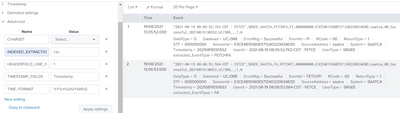
[ __auto__learned__ ]
INDEXED_EXTRACTIONS=csv
HEADERFIELD_LINE_NUMBER=1
TIMESTAMP_FIELDS=Timestamp
TIME_FORMAT=%Y%m%d%H%M%S
- Mark as New
- Bookmark Message
- Subscribe to Message
- Mute Message
- Subscribe to RSS Feed
- Permalink
- Report Inappropriate Content
Hello,
Thank you so much, appreciated.
But, using your code ...getting some errors "Failed to parse timestamp" and getting values UserId=2021-08-19 08:05:52,763,...... System=SATA.....so on and source FILE is not csv it's Text file. Thank you again.
- Mark as New
- Bookmark Message
- Subscribe to Message
- Mute Message
- Subscribe to RSS Feed
- Permalink
- Report Inappropriate Content
@SplunkDash Deploy props to Universal forwarder
[source_type_name]
INDEXED_EXTRACTIONS=csv
TIME_FORMAT=%Y-%m-%d %H:%M:%S,%3Q
TIMESTAMP_FIELDS=Timestamp
HEADER_FIELD_LINE_NUMBER = 1
Hope it helps!
- Mark as New
- Bookmark Message
- Subscribe to Message
- Mute Message
- Subscribe to RSS Feed
- Permalink
- Report Inappropriate Content
Hello,
Thank you so much, appreciated.
But, using your code ...getting some errors "Failed to parse timestamp", fields/headers are not mapping to correct values and just to let you know source FILE is not csv it's Text file. Thank you again.
I am giving the events again ......UserID and Timestamp values are marked as RED and Green respectively,
UserId, UserType, System, EventType, EventId, STF, SessionId, SourceAddress, RCode, ErrorMsg, Timestamp, Dataload, Period, WFftCode, ReturnType, DataType
2021-08-19 08:05:52,763-CDT - FETCE,SRGEE,SAATCA,FETCHFA,FI,000000000,E3CE4819360E57124D220634E0D,saatca,00,Successful,20210819130552,UCJ3R8,,,1,0
2021-08-19 08:06:53,564-CDT - FETCE,SRGEE,SAATCA,FA,FETCHFI,000000000,E3CE4819360E57124D220634E0D,saatca,00,Successful,20210819130653,UCJ3R8,,,1,0
- Mark as New
- Bookmark Message
- Subscribe to Message
- Mute Message
- Subscribe to RSS Feed
- Permalink
- Report Inappropriate Content
Hello,
.....I am sending same thing again as some issues .....sending text with Red and Green color codes.
But, using your code ...getting some errors "Failed to parse timestamp", fields/headers are not mapping to correct values and just to let you know source FILE is not csv it's Text file. Thank you again.
I am giving the events again ......UserID and Timestamp values are marked as Bold Below,
UserId, UserType, System, EventType, EventId, STF, SessionId, SourceAddress, RCode, ErrorMsg, Timestamp, Dataload, Period, WFftCode, ReturnType, DataType
2021-08-19 08:05:52,763-CDT - FETCE,SRGEE,SAATCA,FETCHFA,FI,000000000,E3CE4819360E57124D220634E0D,saatca,00,Successful,20210819130552,UCJ3R8,,,1,0
2021-08-19 08:06:53,564-CDT - FETCE,SRGEE,SAATCA,FA,FETCHFI,000000000,E3CE4819360E57124D220634E0D,saatca,00,Successful,20210819130653,UCJ3R8,,,1,0
- Mark as New
- Bookmark Message
- Subscribe to Message
- Mute Message
- Subscribe to RSS Feed
- Permalink
- Report Inappropriate Content
@SplunkDash your content might be .txt however it is having header with comma's perfect structured except a simple issue with data that has prevented parsing see below the very first UserId field having no double quotes around..(inherently having comma ,763). I have changed the contents as below for testing...to map to correct fields which seems working fine.
Having double quotes around works fine. If you have control over source change that otherwise you can not do much at forwarding layer... you have to process them at indexing layer or during search-time.
UserId, UserType, System, EventType, EventId, STF, SessionId, SourceAddress, RCode, ErrorMsg, Timestamp, Dataload, Period, WFftCode, ReturnType, DataType
"2021-08-19 08:05:52,763-CDT - FETCE",SRGEE,SAATCA,FETCHFA,FI,000000000,E3CE4819360E57124D220634E0D,saatca,00,Successful,20210819130552,UCJ3R8,,,1,0
"2021-08-19 08:06:53,564-CDT - FETCE",SRGEE,SAATCA,FA,FETCHFI,000000000,E3CE4819360E57124D220634E0D,saatca,00,Successful,20210819130653,UCJ3R8,,,1,0
[ __auto__learned__ ]
INDEXED_EXTRACTIONS=csv
HEADERFIELD_LINE_NUMBER=1
TIMESTAMP_FIELDS=Timestamp
TIME_FORMAT=%Y%m%d%H%M%S
- Mark as New
- Bookmark Message
- Subscribe to Message
- Mute Message
- Subscribe to RSS Feed
- Permalink
- Report Inappropriate Content
Make sense, thank you appreciated!

Join the Splunk Community Slack to learn, troubleshoot, and make connections with fellow Splunk practitioners in real time!
Join Splunk User Groups to connect and learn in-person by region or remotely by topic or industry.
Meet the .conf26 AI Agent Buildathon Winners
Trusted Autonomy in the SOC: A Maturity Journey
Supercharging Windows Security Detection Performance: Introducing Hybrid Field ...
