
Join the Conversation
- Find Answers
- :
- Using Splunk
- :
- Splunk Search
- :
- Re: Only showing latest value in a multi-value cel...
- Subscribe to RSS Feed
- Mark Topic as New
- Mark Topic as Read
- Float this Topic for Current User
- Bookmark Topic
- Subscribe to Topic
- Mute Topic
- Printer Friendly Page
- Mark as New
- Bookmark Message
- Subscribe to Message
- Mute Message
- Subscribe to RSS Feed
- Permalink
- Report Inappropriate Content

Hi all,
I have the following command which produces a table with one fixed column (Artefact) and the remaining columns are dynamically produced (due to the second eval statement).
Search:
index="main" sourcetype="main"
|eval ApplicationName = Application + "-" + AppID
|table Environment,ApplicationName,Artefact,Version
|eval {Environment}:{ApplicationName}=Version
|fields - Environment,ApplicationName,Version
|stats values by Artefact
| rename values(*) as *
This produces the desired table format however some of the dynamic columns produced by "|eval {Environment}:{ApplicationName}=Version" line have multiple values within cells (I believe the multiple values are the previous 'Version's that have been recorded in the past). Is there a way to force the table to only show the latest Version value for each cell?
Please let me know if further clarification of the question is required with examples.
Otherwise, thank you so much for any assistance.
- Mark as New
- Bookmark Message
- Subscribe to Message
- Mute Message
- Subscribe to RSS Feed
- Permalink
- Report Inappropriate Content


Try last rather than list since that's what's going on anyway - this assumes that the events are already in the right order - if not, you may need to sort by _time assuming they have timestamps
index="main" sourcetype="main"
|eval ApplicationName = Application + "-" + AppID
|stats last(Version) as Version by Environment,ApplicationName,Artefact
|eval {Environment}:{ApplicationName}=Version
|fields - Environment,ApplicationName,Version
|stats values by Artefact
| rename values(*) as *- Mark as New
- Bookmark Message
- Subscribe to Message
- Mute Message
- Subscribe to RSS Feed
- Permalink
- Report Inappropriate Content
|eval {Environment}:{ApplicationName}=mvindex(Version,mvcount(Version)-1)- Mark as New
- Bookmark Message
- Subscribe to Message
- Mute Message
- Subscribe to RSS Feed
- Permalink
- Report Inappropriate Content

Hi @ITWhisperer
Thank you for your response! However, this did not work. Screenshot is from the dynamically generated columns.
- Mark as New
- Bookmark Message
- Subscribe to Message
- Mute Message
- Subscribe to RSS Feed
- Permalink
- Report Inappropriate Content
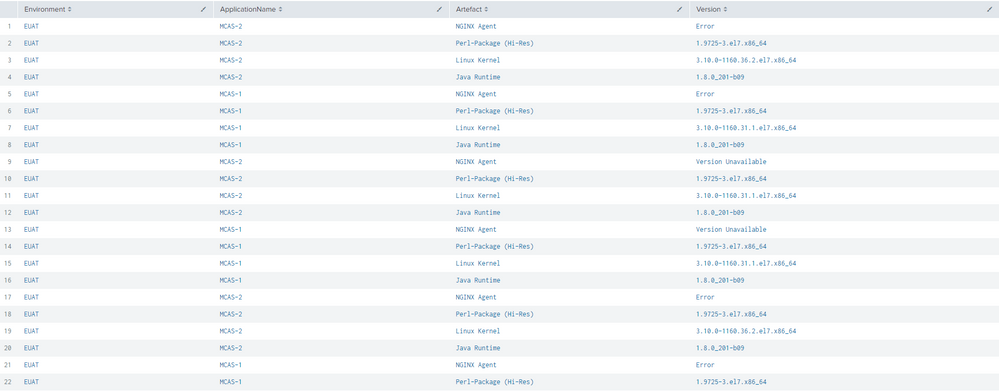
It looks like you have other multi value fields (not just Version). Can you share some events or results from just the first 3 lines (upto and including the table command)?
- Mark as New
- Bookmark Message
- Subscribe to Message
- Mute Message
- Subscribe to RSS Feed
- Permalink
- Report Inappropriate Content
This is without filtering the artefact @ITWhisperer
- Mark as New
- Bookmark Message
- Subscribe to Message
- Mute Message
- Subscribe to RSS Feed
- Permalink
- Report Inappropriate Content
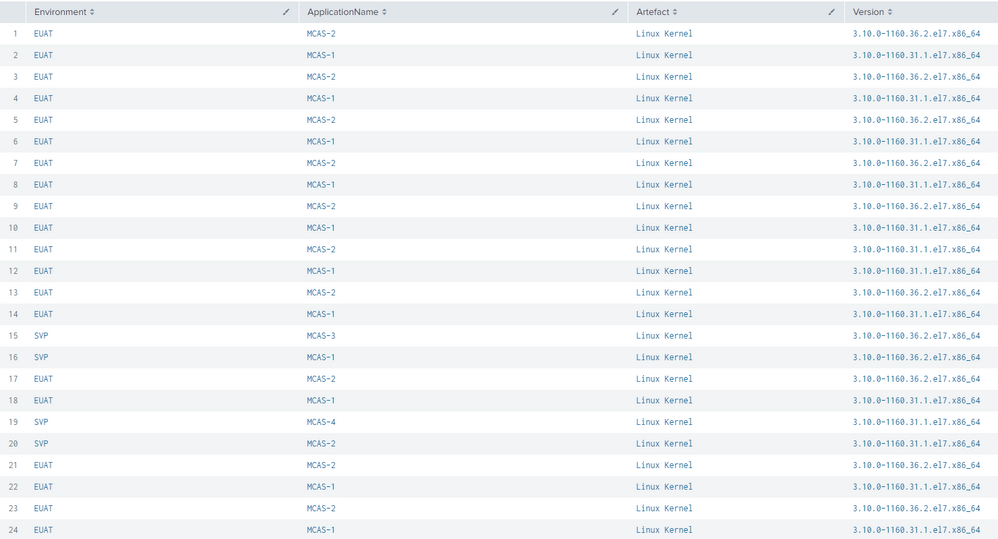
I've added a picture with one type of artefact filtered. Let me know if you need text values instead of a picture.
@ITWhisperer
- Mark as New
- Bookmark Message
- Subscribe to Message
- Mute Message
- Subscribe to RSS Feed
- Permalink
- Report Inappropriate Content
Try this
index="main" sourcetype="main"
|eval ApplicationName = Application + "-" + AppID
|stats list(Version) as Version by Environment,ApplicationName,Artefact
|eval {Environment}:{ApplicationName}=mvindex(Version,mvcount(Version)-1)
|fields - Environment,ApplicationName,Version
|stats values by Artefact
| rename values(*) as *- Mark as New
- Bookmark Message
- Subscribe to Message
- Mute Message
- Subscribe to RSS Feed
- Permalink
- Report Inappropriate Content
Majority of rows are fixed however it has given me a warning - values are now single but one row is showing weird output.
"'stats' command: limit for values of field 'Version' reached. Some values may have been truncated or ignored."
Also one of the rows used to look like this:
Now it looks like this:


- Mark as New
- Bookmark Message
- Subscribe to Message
- Mute Message
- Subscribe to RSS Feed
- Permalink
- Report Inappropriate Content
Try last rather than list since that's what's going on anyway - this assumes that the events are already in the right order - if not, you may need to sort by _time assuming they have timestamps
index="main" sourcetype="main"
|eval ApplicationName = Application + "-" + AppID
|stats last(Version) as Version by Environment,ApplicationName,Artefact
|eval {Environment}:{ApplicationName}=Version
|fields - Environment,ApplicationName,Version
|stats values by Artefact
| rename values(*) as *
Join the Splunk Community Slack to learn, troubleshoot, and make connections with fellow Splunk practitioners in real time!
Join Splunk User Groups to connect and learn in-person by region or remotely by topic or industry.
May 2026 Splunk Expert Sessions: Security & Observability
Network to App: Observability Unlocked [May & June Series]
SPL2 Deep Dives, AppDynamics Integrations, SAML Made Simple and Much More on Splunk ...
