
Join the Conversation
- Find Answers
- :
- Using Splunk
- :
- Splunk Search
- :
- Re: stats or chart by multiple columns while using...
- Subscribe to RSS Feed
- Mark Topic as New
- Mark Topic as Read
- Float this Topic for Current User
- Bookmark Topic
- Subscribe to Topic
- Mute Topic
- Printer Friendly Page
- Mark as New
- Bookmark Message
- Subscribe to Message
- Mute Message
- Subscribe to RSS Feed
- Permalink
- Report Inappropriate Content

Here is the sample data set:
| ENTITY_NAME | REPLICATION_OF | VALUE |
| server1 | BackupA | 59 |
| server2 | BackupB | 28 |
| server3 | backup_noenc_h1 | 54 |
| server3 | backup_utility_h1 | 96 |
| server4 | backup_noenc_h2 | 40 |
| server4 | backup_utility_h2 | 700 |
I want to be able to use the number display visualization to display entity_name, replication_of, and latest value for each record. I've tried these:
| stats latest(VALUE) by REPLICATION_OF ENTITY_NAME
| chart latest(VALUE) by REPLICATION_OF ENTITY_NAME
| chart latest(VALUE) over REPLICATION_OF by ENTITY_NAME
Ultimately I want something that looks like this, but not sure if you can display three data series in a number display. If this isn't possible, what would be the best way to visualize a data set like this?

- Mark as New
- Bookmark Message
- Subscribe to Message
- Mute Message
- Subscribe to RSS Feed
- Permalink
- Report Inappropriate Content

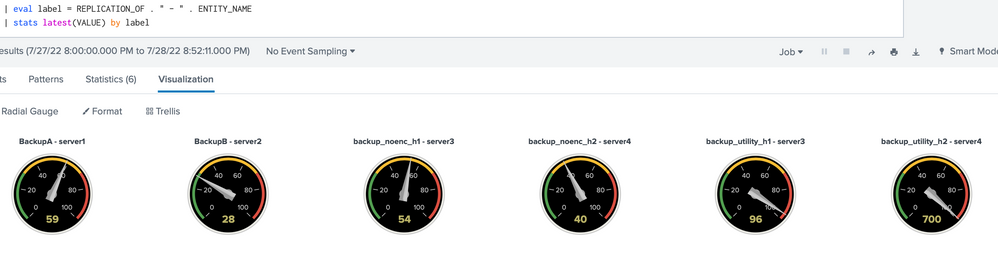
| eval label = REPLICATION_OF . " - " . ENTITY_NAME
| stats latest(VALUE) by label
- Mark as New
- Bookmark Message
- Subscribe to Message
- Mute Message
- Subscribe to RSS Feed
- Permalink
- Report Inappropriate Content
| eval label = REPLICATION_OF . " - " . ENTITY_NAME
| stats latest(VALUE) by label
- Mark as New
- Bookmark Message
- Subscribe to Message
- Mute Message
- Subscribe to RSS Feed
- Permalink
- Report Inappropriate Content
This worked great for my number display, but I can't seem to get it to work on the radial gauges like your screenshot. Did you have to do something else to get it to populate multiple gauges?
- Mark as New
- Bookmark Message
- Subscribe to Message
- Mute Message
- Subscribe to RSS Feed
- Permalink
- Report Inappropriate Content
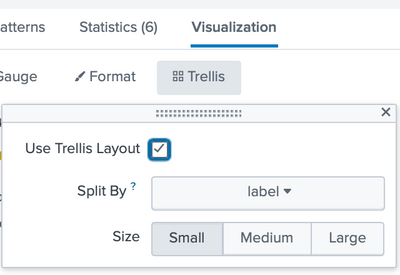
I'm not aware of any special setting. I'm using a 9.0.0 installation. After the stats, Splunk visualization automatically selected "Radial Gauge". All I did is select trellis.
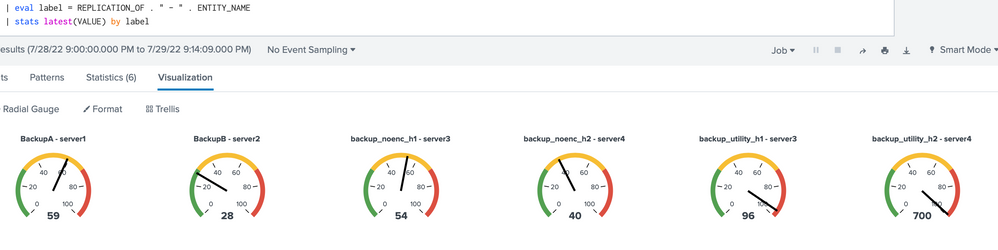
By default, radial gauge uses the "shiny" skin; another skin (style) is "minimal", like this
- Mark as New
- Bookmark Message
- Subscribe to Message
- Mute Message
- Subscribe to RSS Feed
- Permalink
- Report Inappropriate Content
I thought of trying something like that last night (combining the values into one field) but couldn't get it to work. Thanks a lot, this accomplishes what I was looking for!


Join the Splunk Community Slack to learn, troubleshoot, and make connections with fellow Splunk practitioners in real time!
Join Splunk User Groups to connect and learn in-person by region or remotely by topic or industry.
Meet the .conf26 AI Agent Buildathon Winners
Trusted Autonomy in the SOC: A Maturity Journey
Supercharging Windows Security Detection Performance: Introducing Hybrid Field ...
