
Join the Conversation
- Find Answers
- :
- Using Splunk
- :
- Splunk Search
- :
- How to separate fields and create a pie chart of s...
- Subscribe to RSS Feed
- Mark Topic as New
- Mark Topic as Read
- Float this Topic for Current User
- Bookmark Topic
- Subscribe to Topic
- Mute Topic
- Printer Friendly Page
- Mark as New
- Bookmark Message
- Subscribe to Message
- Mute Message
- Subscribe to RSS Feed
- Permalink
- Report Inappropriate Content
How to separate fields and create a pie chart of status count?

Hi Splunkers,
Please guide us on the requirement below:
Input:
server, env, req no, input field,status
host-1,PROD,1666680,mobile1,Deployment_Successful
host-1,PROD,1666680,mobile2,Deployment_failed
host-1,PROD,1666680,mobile3,exception
host-1,PROD,1666001,mobile1,Deployment_Successful
host-1,PROD,1666601,mobile2,Deployment_failed
host-1,PROD,16666801,mobile3,exception
Expected output: Pie chart with status count
My trial:
sourcetype=sourcetype1 source=*.log
| rex field=_raw "(?\w+\-\d+)\,(?\w+\/\w+)\,(?\d+)\,(?\w+)\,,(?\w+.*)"
| stats count by Status
The above search is not showing the count if the log has different statuses. Kindly help to guide on this.
- Mark as New
- Bookmark Message
- Subscribe to Message
- Mute Message
- Subscribe to RSS Feed
- Permalink
- Report Inappropriate Content


Try this run-anywhere example, which displays a pie chart with 3 segments.
| makeresults | eval _raw="host-1,PROD,1666680,mobile1,Deployment_Successful|
 host-1,PROD,1666680,mobile2,Deployment_failed|
 host-1,PROD,1666680,mobile3,exception|
 host-1,PROD,1666001,mobile1,Deployment_Successful|
 host-1,PROD,1666601,mobile2,Deployment_failed|
 host-1,PROD,16666801,mobile3,exception" | eval _raw=split(_raw, "|") | mvexpand _raw
`comment("All of the above just sets up test data")`
 | rex field=_raw "(\w+\-\d+)\,(\w+)\,(\d+)\,(\w+),(?<Status>\w+.*)"
 | stats count by Status
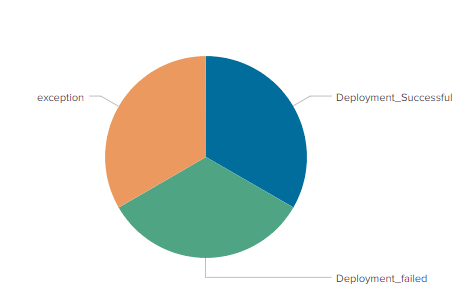
If this reply helps you, Karma would be appreciated.

- Mark as New
- Bookmark Message
- Subscribe to Message
- Mute Message
- Subscribe to RSS Feed
- Permalink
- Report Inappropriate Content
@richgalloway
I want to take input data from a log file instead of giving input in my query. Kindly help on that.
- Mark as New
- Bookmark Message
- Subscribe to Message
- Mute Message
- Subscribe to RSS Feed
- Permalink
- Report Inappropriate Content
Replace everything above the comment with the SPL you use to input data from your log file. For example,
sourcetype=sourcetype1 source=*.log
| rex field=_raw "(\w+\-\d+)\,(\w+)\,(\d+)\,(\w+),(?<Status>\w+.*)"
| stats count by Status
If this reply helps you, Karma would be appreciated.
- Mark as New
- Bookmark Message
- Subscribe to Message
- Mute Message
- Subscribe to RSS Feed
- Permalink
- Report Inappropriate Content
Please edit your question to correct the rex command. Also, please share your results and the desired output.
If this reply helps you, Karma would be appreciated.
- Mark as New
- Bookmark Message
- Subscribe to Message
- Mute Message
- Subscribe to RSS Feed
- Permalink
- Report Inappropriate Content
sourcetype=sourcetype1 source=.log | rex field=_raw "(?\w+-\d+)\,(?\w+\/\w+)\,(?\d+)\,(?\w+)\,(?\w+.)" | stats count by Status
Output am getting as NONE in pie chart view.
please note: If i have only one kind of status example as "deployment_successful" in my log, I can seethe count, but if there are different statuses, I cannot create a pie chart
- Mark as New
- Bookmark Message
- Subscribe to Message
- Mute Message
- Subscribe to RSS Feed
- Permalink
- Report Inappropriate Content
Your regular expression (rex command) doesn't match the data.
If this reply helps you, Karma would be appreciated.

Data Management Digest – December 2025
Index This | What is broken 80% of the time by February?
Unlock Faster Time-to-Value on Edge and Ingest Processor with New SPL2 Pipeline ...
