
Join the Conversation
- Find Answers
- :
- Using Splunk
- :
- Splunk Search
- :
- Re: How to see only earliest and latest values in ...
- Subscribe to RSS Feed
- Mark Topic as New
- Mark Topic as Read
- Float this Topic for Current User
- Bookmark Topic
- Subscribe to Topic
- Mute Topic
- Printer Friendly Page
- Mark as New
- Bookmark Message
- Subscribe to Message
- Mute Message
- Subscribe to RSS Feed
- Permalink
- Report Inappropriate Content

I'm having an issue because I need to show in a report only the first ticket received by an agent and the latest one, so all the other tickets in the middle I have to leave them behind. Here is the evidence:
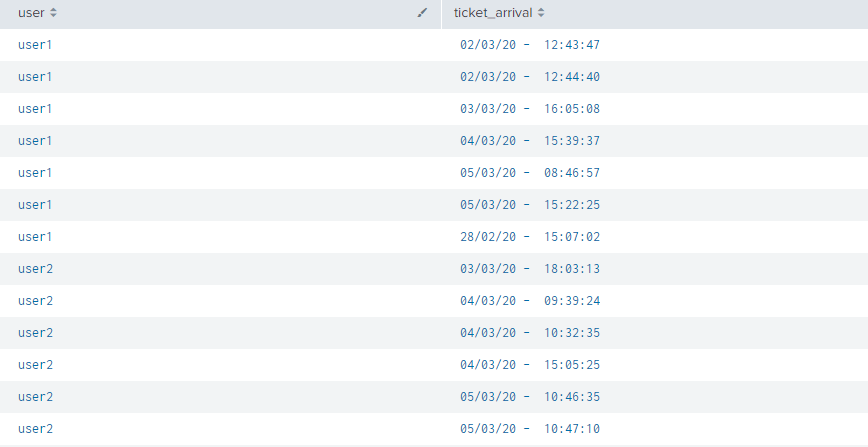
Of all the tickets assigned to user1 or user2, how can I capture only the oldest and newest one?
Thanks in advance
- Mark as New
- Bookmark Message
- Subscribe to Message
- Mute Message
- Subscribe to RSS Feed
- Permalink
- Report Inappropriate Content


Hi @franciscof,
did you tried using earliest and latest in stats?
index=your_index ticket_arrival=*
| eval ticket_arrival=strptime(ticket_arrival,"%d/%m/%y - %H:%M:%S"")
| stats earliest(ticket_arrival) AS earliest latest(ticket_arrival) AS latest BY user
| eval earliest=strftime(earliest,"%d/%m/%y - %H:%M:%S""), latest=strftime(latest,"%d/%m/%y - %H:%M:%S"")
Please check the format of the ticket_arrival field, because I'm not sure about the spaces before hours.
Ciao.
Giuseppe
- Mark as New
- Bookmark Message
- Subscribe to Message
- Mute Message
- Subscribe to RSS Feed
- Permalink
- Report Inappropriate Content

Do this:
| eval ticket_arrival = strptime(replace(ticket_arrival, "\s", ""), "%d/%m/%y-%H:%M:%S") | stats min(ticket_arrival) as min_time, max(ticket_arrival) as max_time by user | eval min_time=strftime(min_time, "%d/%m/%y-%H:%M:%S"), max_time=strftime(max_time, "%d/%m/%y-%H:%M:%S")
- Mark as New
- Bookmark Message
- Subscribe to Message
- Mute Message
- Subscribe to RSS Feed
- Permalink
- Report Inappropriate Content


- Mark as New
- Bookmark Message
- Subscribe to Message
- Mute Message
- Subscribe to RSS Feed
- Permalink
- Report Inappropriate Content

The basic answer is to use earliest() and latest() but you can also use first() and last() just be aware that the former pair leverages the _time field (which may/not be present and may/not be correct) whereas the latter leverages the order of the data which you can control by sorting it. Both honor the BY section of stats.
- Mark as New
- Bookmark Message
- Subscribe to Message
- Mute Message
- Subscribe to RSS Feed
- Permalink
- Report Inappropriate Content

| makeresults
| eval _raw="user,ticket_arrival
user1,02/03/20 - 12:43:47
user1,02/03/20 - 12:44:40
user1,03/03/20 - 16:05:08
user1,04/03/20 - 15:39:37
user1,05/03/20 - 15:22:25
user2,04/03/20 - 18:03:13
user2,04/03/20 - 09:39:24
user2,04/03/20 - 10:32:35
user2,04/03/20 - 15:05:25
user2,05/03/20 - 10:46:35
user2,05/03/20 - 10:47:10"
| multikv forceheader=1
| table user,ticket_arrival
| rename COMMENT as "this is sample your stats output, from here, the logic"
| eval _time=strptime(ticket_arrival,"%d/%m/%y - %T")
| eventstats min(_time) as e_time max(_time) as l_time by user
| where _time=e_time OR _time=l_time
| table user,ticket_arrival
Hi, If you provide your query, there is more easy query.
- Mark as New
- Bookmark Message
- Subscribe to Message
- Mute Message
- Subscribe to RSS Feed
- Permalink
- Report Inappropriate Content
Hi @franciscof,
did you tried using earliest and latest in stats?
index=your_index ticket_arrival=*
| eval ticket_arrival=strptime(ticket_arrival,"%d/%m/%y - %H:%M:%S"")
| stats earliest(ticket_arrival) AS earliest latest(ticket_arrival) AS latest BY user
| eval earliest=strftime(earliest,"%d/%m/%y - %H:%M:%S""), latest=strftime(latest,"%d/%m/%y - %H:%M:%S"")
Please check the format of the ticket_arrival field, because I'm not sure about the spaces before hours.
Ciao.
Giuseppe
- Mark as New
- Bookmark Message
- Subscribe to Message
- Mute Message
- Subscribe to RSS Feed
- Permalink
- Report Inappropriate Content
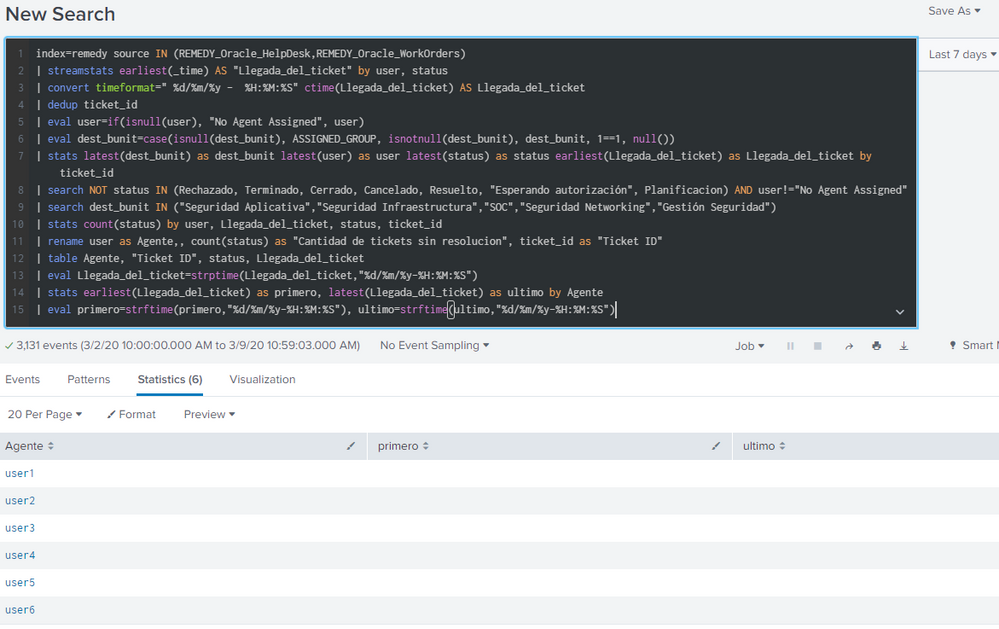
Hi @gcusello , I did tried it and I think it didn't work and I can't figure out why. Below (in an answer) I'll show you what I got
- Mark as New
- Bookmark Message
- Subscribe to Message
- Mute Message
- Subscribe to RSS Feed
- Permalink
- Report Inappropriate Content
Solved it! All it was needed was to replace stats earliest and latest with stats first and last!
Thank you for your help
- Mark as New
- Bookmark Message
- Subscribe to Message
- Mute Message
- Subscribe to RSS Feed
- Permalink
- Report Inappropriate Content
you're welcome!
Ciao and next time.
Giuseppe

A Season of Skills: New Splunk Courses to Light Up Your Learning Journey
Announcing the Migration of the Splunk Add-on for Microsoft Azure Inputs to ...
Splunk Observability for AI
