
Join the Conversation
- Find Answers
- :
- Using Splunk
- :
- Splunk Search
- :
- Re: How to remove redudant data from a query
- Subscribe to RSS Feed
- Mark Topic as New
- Mark Topic as Read
- Float this Topic for Current User
- Bookmark Topic
- Subscribe to Topic
- Mute Topic
- Printer Friendly Page
- Mark as New
- Bookmark Message
- Subscribe to Message
- Mute Message
- Subscribe to RSS Feed
- Permalink
- Report Inappropriate Content

Hi there!
I have a custom query that produces an output similar to this ...
| makeresults
| eval data= "Name=ServerA IP=1.1.1.1 OS=\"Windows 2016\" Software=Word;Name=ServerA IP=1.1.1.1 OS=\"Windows 2016\" Software=Paint;Name=ServerA IP=1.1.1.1 OS=\"Windows 2016\" Software=VMWare Tools;Name=ServerB IP=1.1.1.2 OS=\"Windows 2016\" Software=Word;Name=ServerB IP=1.1.1.2 OS=\"Windows 2016\" Software=Paint;Name=ServerB IP=1.1.1.2 OS=\"Windows 2016\" Software=VMWare Tools;"
| makemv data delim=";"
| mvexpand data
| rename data as _raw
| KV
| table Name IP OS Software
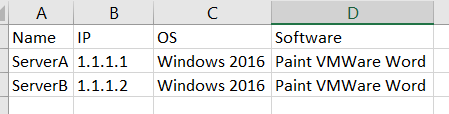
My goal is to remove some of the redundant data on the output and produce something like this, where each software stills has its own row.

* Image edited w/ Snagit

The reason why I'm looking into this is because I want the CSV export to look w/ the exact same format.
I have tried adding this to the query
| stats values(Software) as Software by Name, IP, OS
Which puts me closer to what I want, although when I export the data to CSV all the software show up under one cell which is fine when you have 2 or 3 but it is definitely a no go when you have +100 software / asset.
Any ideas?
TIA!
- Mark as New
- Bookmark Message
- Subscribe to Message
- Mute Message
- Subscribe to RSS Feed
- Permalink
- Report Inappropriate Content

Hi @azulgrana ,
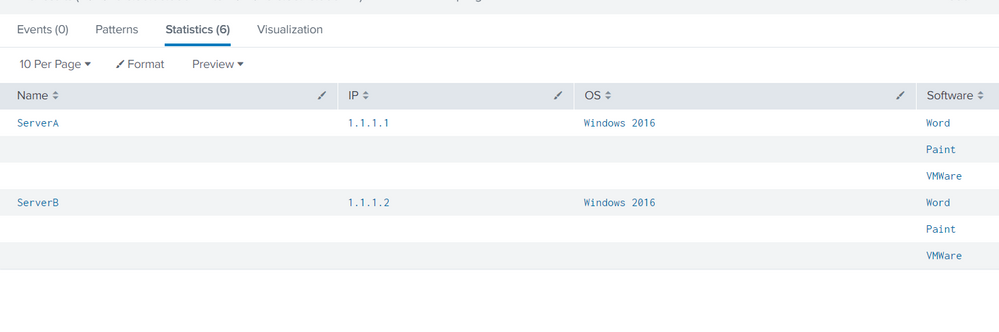
Can you try the following?
The search is basically creating a new field which is a string joining the fields - Name, IP and OS.
Streamstats command has been used to calculate the number of times that string is found in the data and if the count is more than one, then eval has been used to make the fields blank.
| makeresults
| eval data= "Name=ServerA IP=1.1.1.1 OS=\"Windows 2016\" Software=Word;Name=ServerA IP=1.1.1.1 OS=\"Windows 2016\" Software=Paint;Name=ServerA IP=1.1.1.1 OS=\"Windows 2016\" Software=VMWare Tools;Name=ServerB IP=1.1.1.2 OS=\"Windows 2016\" Software=Word;Name=ServerB IP=1.1.1.2 OS=\"Windows 2016\" Software=Paint;Name=ServerB IP=1.1.1.2 OS=\"Windows 2016\" Software=VMWare Tools;"
| makemv data delim=";"
| mvexpand data
| rename data as _raw
| KV
| table Name IP OS Software
| eval dummy_value = Name."+".IP."+".OS
| streamstats count by dummy_value
| eval Name = if(count>1,"",Name)
| eval IP = if(count>1,"",IP)
| eval OS = if(count>1,"",OS)
| table Name IP OS Software
I obtained the following result:
- Mark as New
- Bookmark Message
- Subscribe to Message
- Mute Message
- Subscribe to RSS Feed
- Permalink
- Report Inappropriate Content
Hi @azulgrana ,
Can you try the following?
The search is basically creating a new field which is a string joining the fields - Name, IP and OS.
Streamstats command has been used to calculate the number of times that string is found in the data and if the count is more than one, then eval has been used to make the fields blank.
| makeresults
| eval data= "Name=ServerA IP=1.1.1.1 OS=\"Windows 2016\" Software=Word;Name=ServerA IP=1.1.1.1 OS=\"Windows 2016\" Software=Paint;Name=ServerA IP=1.1.1.1 OS=\"Windows 2016\" Software=VMWare Tools;Name=ServerB IP=1.1.1.2 OS=\"Windows 2016\" Software=Word;Name=ServerB IP=1.1.1.2 OS=\"Windows 2016\" Software=Paint;Name=ServerB IP=1.1.1.2 OS=\"Windows 2016\" Software=VMWare Tools;"
| makemv data delim=";"
| mvexpand data
| rename data as _raw
| KV
| table Name IP OS Software
| eval dummy_value = Name."+".IP."+".OS
| streamstats count by dummy_value
| eval Name = if(count>1,"",Name)
| eval IP = if(count>1,"",IP)
| eval OS = if(count>1,"",OS)
| table Name IP OS Software
I obtained the following result:
- Mark as New
- Bookmark Message
- Subscribe to Message
- Mute Message
- Subscribe to RSS Feed
- Permalink
- Report Inappropriate Content


Join the Splunk Community Slack to learn, troubleshoot, and make connections with fellow Splunk practitioners in real time!
Join Splunk User Groups to connect and learn in-person by region or remotely by topic or industry.
Data Management Digest – September 2026
Federated Search for CloudWatch Unified Data Store Is Generally Available
Announcing Modern Navigation: A New Era of Splunk User Experience
