
Join the Conversation
- Find Answers
- :
- Using Splunk
- :
- Splunk Search
- :
- How to rearrange below numeric columns based on or...
- Subscribe to RSS Feed
- Mark Topic as New
- Mark Topic as Read
- Float this Topic for Current User
- Bookmark Topic
- Subscribe to Topic
- Mute Topic
- Printer Friendly Page
- Mark as New
- Bookmark Message
- Subscribe to Message
- Mute Message
- Subscribe to RSS Feed
- Permalink
- Report Inappropriate Content

Hi,
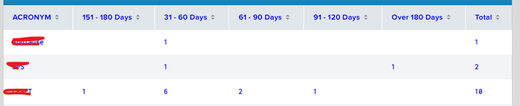
I have to rearrange below columns in below order
i.e. 31-60 Days, 61-90 Days, 91-120 Days,151-180 Days,Over 180 Days, Total
Query:
| inputlookup ACRONYM_Updated.csv
|stats count by ACRONYM Aging
|xyseries ACRONYM Aging count
|addtotals
- Mark as New
- Bookmark Message
- Subscribe to Message
- Mute Message
- Subscribe to RSS Feed
- Permalink
- Report Inappropriate Content


There are a number of techniques to solve this.
First one is to make your dashboard create a token that represents. the fields that are to be included in the table and simply use that token in the table statement - i.e.
| table $field_order_token$that token is calculated in the same place that determines which fields are included.
Second one is the use of a prefix to force the column ordering in the xyseries, followed by a double transpose, which does not change field order when flipping, so this example shows how
| makeresults count=100
| eval Aging=mvindex(split("31-60 Days,61-90 Days,91-120 Days,151-180 Days,Over 180 Days", ","), random() % 5)
| eval ACRONYM=mvindex(split("RTFM,WYSIWIG,OK", ","), random() % 3)
``` Simulated data setup above ```
| stats count by ACRONYM Aging
``` Prefix the value with a sort order ```
| eval Aging=case(Aging="31-60 Days", 1, Aging="61-90 Days", 2, Aging="91-120 Days", 3, Aging="151-180 Days", 4, Aging="Over 180 Days", 5).":".Aging
| xyseries ACRONYM Aging count
``` Now flip the table and remove the sort element and flip back - no field re-order occurs ```
| transpose 0 header_field=ACRONYM
| eval column=replace(column, "^\d:", "")
| transpose 0 header_field=column
Note that you can replace your stats + xyseries with a single operation
| chart count over ACRONYM by Aging
- Mark as New
- Bookmark Message
- Subscribe to Message
- Mute Message
- Subscribe to RSS Feed
- Permalink
- Report Inappropriate Content
Just table the columns as you need them
| table ACRONYM "31-60 Days" "61-90 Days" "91-120 Days" "151-180 Days" "Over 180 Days" Total- Mark as New
- Bookmark Message
- Subscribe to Message
- Mute Message
- Subscribe to RSS Feed
- Permalink
- Report Inappropriate Content
@bowesmana Based on user selection from the dashboard the data keeps changing as below. So i cannot table it since depending on user selection data will be displayed in dashboard. Irrespective of any selection the days should sorted in order. Can we do that in query
Example


- Mark as New
- Bookmark Message
- Subscribe to Message
- Mute Message
- Subscribe to RSS Feed
- Permalink
- Report Inappropriate Content
There are a number of techniques to solve this.
First one is to make your dashboard create a token that represents. the fields that are to be included in the table and simply use that token in the table statement - i.e.
| table $field_order_token$that token is calculated in the same place that determines which fields are included.
Second one is the use of a prefix to force the column ordering in the xyseries, followed by a double transpose, which does not change field order when flipping, so this example shows how
| makeresults count=100
| eval Aging=mvindex(split("31-60 Days,61-90 Days,91-120 Days,151-180 Days,Over 180 Days", ","), random() % 5)
| eval ACRONYM=mvindex(split("RTFM,WYSIWIG,OK", ","), random() % 3)
``` Simulated data setup above ```
| stats count by ACRONYM Aging
``` Prefix the value with a sort order ```
| eval Aging=case(Aging="31-60 Days", 1, Aging="61-90 Days", 2, Aging="91-120 Days", 3, Aging="151-180 Days", 4, Aging="Over 180 Days", 5).":".Aging
| xyseries ACRONYM Aging count
``` Now flip the table and remove the sort element and flip back - no field re-order occurs ```
| transpose 0 header_field=ACRONYM
| eval column=replace(column, "^\d:", "")
| transpose 0 header_field=column
Note that you can replace your stats + xyseries with a single operation
| chart count over ACRONYM by Aging
- Mark as New
- Bookmark Message
- Subscribe to Message
- Mute Message
- Subscribe to RSS Feed
- Permalink
- Report Inappropriate Content
@bowesmana Thank You. Works perfect

Join the Splunk Community Slack to learn, troubleshoot, and make connections with fellow Splunk practitioners in real time!
Join Splunk User Groups to connect and learn in-person by region or remotely by topic or industry.
Agent Mode Engaged! Enchaining Agentic Operations with Splunk AI Assistant 2.0
Announcing Modern Navigation: A New Era of Splunk User Experience
Modernize your Splunk Apps – Introducing Python 3.13 in Splunk
