
Join the Conversation
- Find Answers
- :
- Using Splunk
- :
- Splunk Search
- :
- Re: How to parse a raw msg using rex then get the ...
- Subscribe to RSS Feed
- Mark Topic as New
- Mark Topic as Read
- Float this Topic for Current User
- Bookmark Topic
- Subscribe to Topic
- Mute Topic
- Printer Friendly Page
- Mark as New
- Bookmark Message
- Subscribe to Message
- Mute Message
- Subscribe to RSS Feed
- Permalink
- Report Inappropriate Content
How to parse a raw msg using rex then get the stats count by that field?

I've read a few posts here already but hoping to clarify some items that I have. I need regex (rex) a raw or list msg then perform a "stats count by field" on that field found.
- When i login to splunk the view is defaulted to "List" results vs Raw results. Is this the default in spunk-cloud? Not that it matters to me but probably it matters when I create my Search in my Dashboard?
- When I try to perform rex, I can't get the exact field that I need to do a stats count by that field and value that I need
- The field that I need is "processingStatus”:”BIDDING_STARTED” then do stats count on this key, value. I think the List vs Raw view is throwing off the way rex is used? Any other recommendations?
- Do I need to set something to stick to a certain view?
Thanks!
LIST VIEW: (with escape characters)
\"processingStatus\":\"BIDDING_STARTED\"
RAW VIEW:
msg: 2018-10-11 15:32:07.973 INFO 14 --- [aaa-8080-exec-6] a.b.c.shoppingCartController : Response = [{"resourceId”:”f133b31e0-1234-1234-1234-rt1204bf8122”,”customerId":4194562,"consumerKey":"f133b31e0-1234-1234-1234-rt1204bf8122","externalId":"SHOEX:201810090738498037101234: 201810090738498037101234","shoes":{"relativeId":"f133b31e0-1234-1234-1234-rt1204bf8122","externalId":"SHOEX:521900”,”name":"VaporFly","gender":"MALE","year":1,"birthDate":{"year”:2018,”month”:9,”day":1},"classification":{"model":"Runnning","brand":"NIKE","environment":"Road"},"classifications":{"model":"Runnning","brand":"NIKE","environment":"Road"}},"person":{"relativeId":"5e3b69e5-8586-4bbf-99fd-a42f38609c0b","externalId":"SHOEX:568156","name":{"first":"Kipchoge","last":"Eliud"},"postalAddresses":[{"parentResourceId":"5e3b69e5-8586-4bbf-99fd-a42f38609c0b","streetAddress":["123 INTERNATIONA PKWY"],"city":"New York","state":{"name":"New York","code”:”NY”},”postalCode”:”12345”,”country":{"name":"UNITED STATES","iso2code":"US","iso3code":"USA","system":"http://abc-open.org/iso/3166/"}}],"electronicAddresses":[{"parentResourceId":"f133b31e0-1234-1234-12... Weight","system":{"identifier":"http://shoe”,”name”:”VAPORFLY FLYKNIT”,”version":"V2”}}],”text":"Weight"},"value":{"quantity”:7.9,”uncertainty":0.0,"units":{"symbol":"lb","unitSystem”:”METRIC”}}}]},”createdDateTime":{"date":{"year":2018,"month”:10,”day”:1},”time":{"hour":14,"minute":48,"second":5,"nano”:124000000}},"updatedDateTime":{"date":{"year":2018,"month":10,"day":9},"time":{"hour":14,"minute":48,"second":11,"nano":377000000}},"status":"Processed","processingStatus”:”BIDDING_STARTED”,”links":[{"rel":"self","href":"https://coding.io/v1/ShoppingCarts/a47b31e0-7443-48a9-8d98-ac3204bf824a","template":{"variables":{"v...]
- Mark as New
- Bookmark Message
- Subscribe to Message
- Mute Message
- Subscribe to RSS Feed
- Permalink
- Report Inappropriate Content

Try this regex:
|rex "processingStatus”:”(?<processingStatus>[^\”]+)"
- Mark as New
- Bookmark Message
- Subscribe to Message
- Mute Message
- Subscribe to RSS Feed
- Permalink
- Report Inappropriate Content
Rex seems to be ok but I'm not seeing any results parsed or when I add the stats count after?
|rex "processingStatus”:”(?[^\”]+)" | stats count by processingStatus
- Mark as New
- Bookmark Message
- Subscribe to Message
- Mute Message
- Subscribe to RSS Feed
- Permalink
- Report Inappropriate Content
@elheffe, try exactly same command what I shown with <processingStatus> so that it will store extracted value in field name processingStatus then you can try stats command
|rex "processingStatus”:”(?<processingStatus>[^\”]+)"| stats count by processingStatus
- Mark as New
- Bookmark Message
- Subscribe to Message
- Mute Message
- Subscribe to RSS Feed
- Permalink
- Report Inappropriate Content
@493669
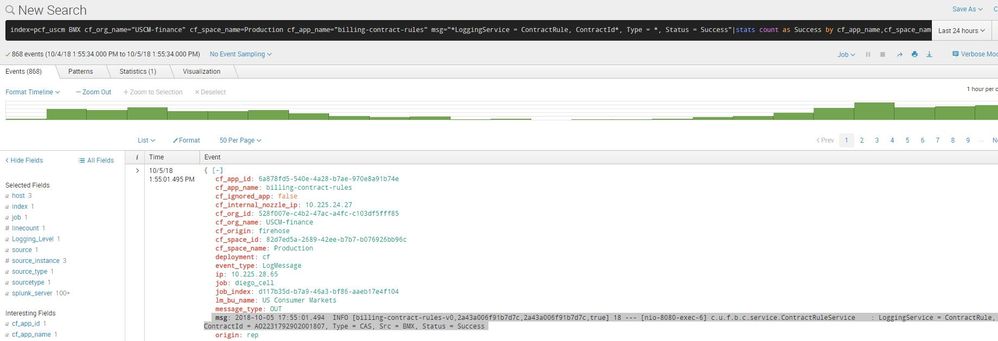
I think one of the issue is our Prod defaulting the view to "List" view instead of raw view. This is one of the reason that I might not getting the actual hit or stats based on the query we both have.
Any idea on how I can indicate that I should be in "raw" result mode?
Below is a sample list view as default mode coming up to our prod splunk - picture that value with processingStatus field.
https://answers.splunk.com/storage/temp/256156-json.jpg
- Mark as New
- Bookmark Message
- Subscribe to Message
- Mute Message
- Subscribe to RSS Feed
- Permalink
- Report Inappropriate Content
on above i am not able to find processingStatus field..
and secondly if you want statistics and not raw event then click on statistics tab or you can search your query in smart mode instead of verbose mode.



Join the Splunk Community Slack to learn, troubleshoot, and make connections with fellow Splunk practitioners in real time!
Join Splunk User Groups to connect and learn in-person by region or remotely by topic or industry.
Event Series: Level up your SOC: Advancing with Splunk Enterprise Security
Announcing Modern Navigation: A New Era of Splunk User Experience
SOC4Kafka - New Kafka Connector Powered by OpenTelemetry
