
Join the Conversation
- Find Answers
- :
- Using Splunk
- :
- Splunk Search
- :
- How to extract fields from windows security log?
- Subscribe to RSS Feed
- Mark Topic as New
- Mark Topic as Read
- Float this Topic for Current User
- Bookmark Topic
- Subscribe to Topic
- Mute Topic
- Printer Friendly Page
- Mark as New
- Bookmark Message
- Subscribe to Message
- Mute Message
- Subscribe to RSS Feed
- Permalink
- Report Inappropriate Content
How to extract fields from windows security log?

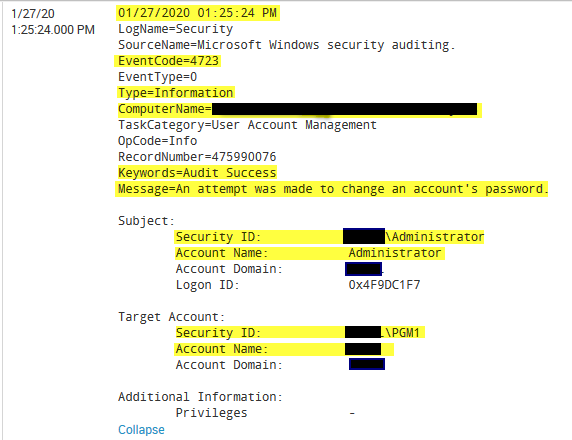
I am looking to extract fields from some windows security events. Much of the data I need ends up being in the "message" section of the log due to the way Windows logs are formatted.
See the example below...ideally, each of the fields highlighted in yellow would be it's own field.
Any ideas? Thank you!

- Mark as New
- Bookmark Message
- Subscribe to Message
- Mute Message
- Subscribe to RSS Feed
- Permalink
- Report Inappropriate Content


Hi @andrewits,
Spunk by itself extract all fields where there's = (e.g. EventCode=4723).
Timestamp is automatically extracted.
The other fields can be extracted using regexes.
As first thing, install on your Search Head Splunk TA_Windows ( https://splunkbase.splunk.com/app/742/ ) so you already have all the needed extractions; if you're not satisfied and you want more fields, use regexes, e.g. to exctract Account Name after Subject, use something like this (sorry if my logs are in italian!):
(?ms)Soggetto:.*Nome account:\s+(?<Account_Name>\w+)
that you can see at https://regex101.com/r/QD06Ok/1
Ciao.
Giuseppe

Join the Splunk Community Slack to learn, troubleshoot, and make connections with fellow Splunk practitioners in real time!
Join Splunk User Groups to connect and learn in-person by region or remotely by topic or industry.
[Puzzles] Solve, Learn, Repeat: Matching cron expressions
Design, Compete, Win: Submit Your Best Splunk Dashboards for a .conf26 Pass
May 2026 Splunk Expert Sessions: Security & Observability
