
Join the Conversation
- Find Answers
- :
- Using Splunk
- :
- Splunk Search
- :
- Re: How to extract JSON data format using extract ...
- Subscribe to RSS Feed
- Mark Topic as New
- Mark Topic as Read
- Float this Topic for Current User
- Bookmark Topic
- Subscribe to Topic
- Mute Topic
- Printer Friendly Page
- Mark as New
- Bookmark Message
- Subscribe to Message
- Mute Message
- Subscribe to RSS Feed
- Permalink
- Report Inappropriate Content

Hi,
I have JSON data format that send to Splunk as below:
{
"timestamp": "2020-03-12T18:18:48+00:00",
"siteid": "CPM-1600-2-EC-158",
"location": "LABRACK1",
"powerunit": "1",
"outletmetering": "1",
"ats": "0",
"branchcount": "4",
"plugcount": "16",
"powerfactor": "100",
"powereff": "100",
"powerdatacount": "1",
"powerdata": [{
"timestamp": "2020-03-12T18:18:48+00:00",
"plug1": [{
"plugname": "PaloAlto5220",
"voltage": "125.00",
"current": "6.00",
"branch": "1"
}],
"plug2": [{
"plugname": "Cisco5220Meraki",
"voltage": "125.00",
"current": "6.00",
"branch": "1"
}],
"plug3": [{
"plugname": "Outlet_A3",
"voltage": "125.00",
"current": "1.40",
"branch": "2"

    }]
}]
}
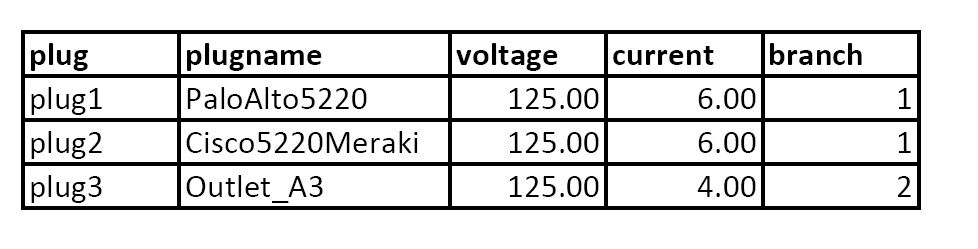
How do I extract JSON data format using the extract field in Splunk? I want to group the data like these. Can someone please point me to the right way of how to do it.

- Mark as New
- Bookmark Message
- Subscribe to Message
- Mute Message
- Subscribe to RSS Feed
- Permalink
- Report Inappropriate Content

hi @matoulas,
Try this:
| makeresults
| eval _raw="{
 \"timestamp\": \"2020-03-12T18:18:48+00:00\",
 \"siteid\": \"CPM-1600-2-EC-158\",
 \"location\": \"LABRACK1\",
 \"powerunit\": \"1\",
 \"outletmetering\": \"1\",
 \"ats\": \"0\",
 \"branchcount\": \"4\",
 \"plugcount\": \"16\",
 \"powerfactor\": \"100\",
 \"powereff\": \"100\",
 \"powerdatacount\": \"1\",
 \"powerdata\": [{
 \"timestamp\": \"2020-03-12T18:18:48+00:00\",
 \"plug1\": [{
 \"plugname\": \"PaloAlto5220\",
 \"voltage\": \"125.00\",
 \"current\": \"6.00\",
 \"branch\": \"1\"
    }],
 \"plug2\": [{
 \"plugname\": \"Cisco5220Meraki\",
 \"voltage\": \"125.00\",
 \"current\": \"6.00\",
 \"branch\": \"1\"
    }],
 \"plug3\": [{
 \"plugname\": \"Outlet_A3\",
 \"voltage\": \"125.00\",
 \"current\": \"1.40\",
 \"branch\": \"2\"
    }]
 }]
 }"
| spath
| spath path=powerdata{} output=powerdata
| eval powerdata=split(powerdata, "}],")
| mvexpand powerdata
| rex field=powerdata "\"(?<plug>plug\d+)\"[^\w]+\"plugname\":\s\"(?<plugname>[\w]+)[^\w]+voltage\":\s\"(?<voltage>[\d\.]+)[^\w]+current.*(?<current>[\d\.]+)[^\w]+branch\":\s\"(?<branch>[\d]+)\""
| table plug, plugname, voltage, current, branch, timestamp, siteid, location, powerunit, outletmetering, ats, branchcount, plugcount, powerfactor, powereff, powerdatacount, powerdata{}.timestamp
| rename powerdata{}.timestamp as powerdata_timestamp
- Mark as New
- Bookmark Message
- Subscribe to Message
- Mute Message
- Subscribe to RSS Feed
- Permalink
- Report Inappropriate Content
hi @matoulas,
Try this:
| makeresults
| eval _raw="{
 \"timestamp\": \"2020-03-12T18:18:48+00:00\",
 \"siteid\": \"CPM-1600-2-EC-158\",
 \"location\": \"LABRACK1\",
 \"powerunit\": \"1\",
 \"outletmetering\": \"1\",
 \"ats\": \"0\",
 \"branchcount\": \"4\",
 \"plugcount\": \"16\",
 \"powerfactor\": \"100\",
 \"powereff\": \"100\",
 \"powerdatacount\": \"1\",
 \"powerdata\": [{
 \"timestamp\": \"2020-03-12T18:18:48+00:00\",
 \"plug1\": [{
 \"plugname\": \"PaloAlto5220\",
 \"voltage\": \"125.00\",
 \"current\": \"6.00\",
 \"branch\": \"1\"
    }],
 \"plug2\": [{
 \"plugname\": \"Cisco5220Meraki\",
 \"voltage\": \"125.00\",
 \"current\": \"6.00\",
 \"branch\": \"1\"
    }],
 \"plug3\": [{
 \"plugname\": \"Outlet_A3\",
 \"voltage\": \"125.00\",
 \"current\": \"1.40\",
 \"branch\": \"2\"
    }]
 }]
 }"
| spath
| spath path=powerdata{} output=powerdata
| eval powerdata=split(powerdata, "}],")
| mvexpand powerdata
| rex field=powerdata "\"(?<plug>plug\d+)\"[^\w]+\"plugname\":\s\"(?<plugname>[\w]+)[^\w]+voltage\":\s\"(?<voltage>[\d\.]+)[^\w]+current.*(?<current>[\d\.]+)[^\w]+branch\":\s\"(?<branch>[\d]+)\""
| table plug, plugname, voltage, current, branch, timestamp, siteid, location, powerunit, outletmetering, ats, branchcount, plugcount, powerfactor, powereff, powerdatacount, powerdata{}.timestamp
| rename powerdata{}.timestamp as powerdata_timestamp
- Mark as New
- Bookmark Message
- Subscribe to Message
- Mute Message
- Subscribe to RSS Feed
- Permalink
- Report Inappropriate Content
Awesome It worked! Thank you so much
- Mark as New
- Bookmark Message
- Subscribe to Message
- Mute Message
- Subscribe to RSS Feed
- Permalink
- Report Inappropriate Content
One last question? All the column table that were append to it like location, siteid and etc. The result show two data entry for every row. How to make it to not duplicate the data. Thanks in advance!
- Mark as New
- Bookmark Message
- Subscribe to Message
- Mute Message
- Subscribe to RSS Feed
- Permalink
- Report Inappropriate Content
How to display or add location, siteid append to the column.
- Mark as New
- Bookmark Message
- Subscribe to Message
- Mute Message
- Subscribe to RSS Feed
- Permalink
- Report Inappropriate Content
Another way.
How to add a column to the results table based on an existing field above like loction, siteid and etc...?
- Mark as New
- Bookmark Message
- Subscribe to Message
- Mute Message
- Subscribe to RSS Feed
- Permalink
- Report Inappropriate Content
Then it's better to use regex to extract fields and values. I updated answer. Try that.
- Mark as New
- Bookmark Message
- Subscribe to Message
- Mute Message
- Subscribe to RSS Feed
- Permalink
- Report Inappropriate Content
It worked! Thanks again for all your help!
- Mark as New
- Bookmark Message
- Subscribe to Message
- Mute Message
- Subscribe to RSS Feed
- Permalink
- Report Inappropriate Content
You're welcome 🙂
- Mark as New
- Bookmark Message
- Subscribe to Message
- Mute Message
- Subscribe to RSS Feed
- Permalink
- Report Inappropriate Content
You're welcome!

Join the Splunk Community Slack to learn, troubleshoot, and make connections with fellow Splunk practitioners in real time!
Join Splunk User Groups to connect and learn in-person by region or remotely by topic or industry.
Your Path to AgenticOps: AI Experiences for Every Splunk Practitioner
The Data Connection - October 2026
Beyond the Acceleration Zone: Maximizing Your Success with Splunk Customer Experience ...
