
Join the Conversation
- Find Answers
- :
- Using Splunk
- :
- Splunk Search
- :
- Re: How to expand macros in a Splunk search?
- Subscribe to RSS Feed
- Mark Topic as New
- Mark Topic as Read
- Float this Topic for Current User
- Bookmark Topic
- Subscribe to Topic
- Mute Topic
- Printer Friendly Page
- Mark as New
- Bookmark Message
- Subscribe to Message
- Mute Message
- Subscribe to RSS Feed
- Permalink
- Report Inappropriate Content

I have a search as follows:
index="x" search_name="`Y`" (status=Z) | `A` |`B`
where A and B are macros
Now how can I see the complete search by expanding all the Y, A, and B?
Also, if the macros (A and B) contain some internal macros and also some internal tags, how can I expand them all and see the complete search?
- Mark as New
- Bookmark Message
- Subscribe to Message
- Mute Message
- Subscribe to RSS Feed
- Permalink
- Report Inappropriate Content

For versions Splunk 6.0 - 6.5, you need to open the job inspector for that search either in the Search app or via the job inspector / activity inspector. The job inspector will reveal how it interprets and expands the macros in order to execute the search.
Starting with Splunk 6.6, follow @hrottenberg_splunk instructions for the new macro expansion feature.
- Mark as New
- Bookmark Message
- Subscribe to Message
- Mute Message
- Subscribe to RSS Feed
- Permalink
- Report Inappropriate Content


New in 6.6, there is now a keystroke to expand macros in the search window! Click inside your search and press cmd-shift-E (on Mac) and ctrl-shift-E on Windows, and you'll see a window like this:
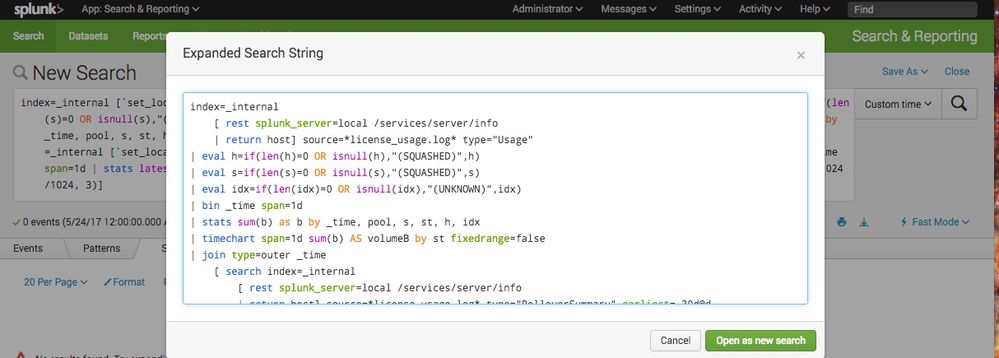
(Edit: corrected Windows hotkey, thanks for the comment below!)
- Mark as New
- Bookmark Message
- Subscribe to Message
- Mute Message
- Subscribe to RSS Feed
- Permalink
- Report Inappropriate Content

Just an update. It is control + shift + E on windows.
Happy Splunking!
- Mark as New
- Bookmark Message
- Subscribe to Message
- Mute Message
- Subscribe to RSS Feed
- Permalink
- Report Inappropriate Content


Navigate to Settings > Advanced Search > Search macros
There you can look for the definition of your macros.
https://docs.splunk.com/Documentation/Splunk/6.5.0/Knowledge/Definesearchmacros
- Mark as New
- Bookmark Message
- Subscribe to Message
- Mute Message
- Subscribe to RSS Feed
- Permalink
- Report Inappropriate Content
I downvoted this post because i'm really tired of karma-farming responses that are simply "rtfm" links. it degrades the value of all 'answers' activity if the only help anyone ever gets is a link back to documentation that seeker has already read. we've read the docs, and we're here for further clarification or perspective.
- Mark as New
- Bookmark Message
- Subscribe to Message
- Mute Message
- Subscribe to RSS Feed
- Permalink
- Report Inappropriate Content
I downvoted this post because vise versa is true as well. many times users may not know the documentation page link.
on my answer, i have clearly replied the correct process and then for more clarity i have given the docs link. i don't see anything wrong with my answer.
- Mark as New
- Bookmark Message
- Subscribe to Message
- Mute Message
- Subscribe to RSS Feed
- Permalink
- Report Inappropriate Content
For versions Splunk 6.0 - 6.5, you need to open the job inspector for that search either in the Search app or via the job inspector / activity inspector. The job inspector will reveal how it interprets and expands the macros in order to execute the search.
Starting with Splunk 6.6, follow @hrottenberg_splunk instructions for the new macro expansion feature.
- Mark as New
- Bookmark Message
- Subscribe to Message
- Mute Message
- Subscribe to RSS Feed
- Permalink
- Report Inappropriate Content
I downvoted this post because while it was very true, it's not true anymore though. see @hrottenberg comment below.

Join the Splunk Community Slack to learn, troubleshoot, and make connections with fellow Splunk practitioners in real time!
Join Splunk User Groups to connect and learn in-person by region or remotely by topic or industry.
[Puzzles] Solve, Learn, Repeat: Character substitutions with Regular Expressions
Splunk Community Badges!
[Puzzles] Solve, Learn, Repeat: Matching cron expressions
