
Join the Conversation
- Find Answers
- :
- Using Splunk
- :
- Splunk Search
- :
- Re: How to exclude sub folders
- Subscribe to RSS Feed
- Mark Topic as New
- Mark Topic as Read
- Float this Topic for Current User
- Bookmark Topic
- Subscribe to Topic
- Mute Topic
- Printer Friendly Page
- Mark as New
- Bookmark Message
- Subscribe to Message
- Mute Message
- Subscribe to RSS Feed
- Permalink
- Report Inappropriate Content

Hi All
I would like to monitor "4670: Permissions on an object were changed".
I have the following query:
index=wineventlog sourcetype="WinEventLog:Security" "EventCode=4670" "Object_Name"!= "."
| search [inputlookup xxxxxx.csv]
| Table _time EventCode Account_Name "Object_Type" "Object_Name"
| rename EventCode AS "Event", "Account_Name" AS "User", "Object_Type" AS "Object", "Object_Name" AS "Folder"
In the results I get the root folder and all it subfolders.
How can I exclude the subfolders from the results so I just get the root folder?
Regards
- Mark as New
- Bookmark Message
- Subscribe to Message
- Mute Message
- Subscribe to RSS Feed
- Permalink
- Report Inappropriate Content

Hello soctv,
the field "Object_Name" contains the path with all folders, here i used eval split and mvindex to extract it. there are other ways like | rex command for example.
here is my search based on your search and a screenshot:
index=wineventlog sourcetype="WinEventLog:Security" "EventCode=4670" "Object_Name"!= "."
| head
| eval dirs=split(Object_Name ,"\\")
| eval root_dir= mvindex(dirs, 1)
| table _time EventCode Account_Name "Object_Type" "root_dir"
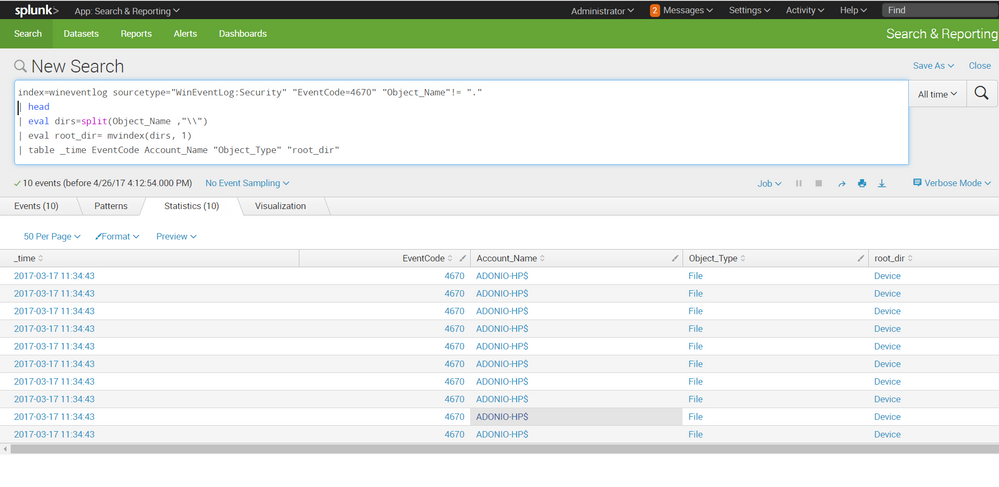
hope it helps
- Mark as New
- Bookmark Message
- Subscribe to Message
- Mute Message
- Subscribe to RSS Feed
- Permalink
- Report Inappropriate Content
Hello soctv,
the field "Object_Name" contains the path with all folders, here i used eval split and mvindex to extract it. there are other ways like | rex command for example.
here is my search based on your search and a screenshot:
index=wineventlog sourcetype="WinEventLog:Security" "EventCode=4670" "Object_Name"!= "."
| head
| eval dirs=split(Object_Name ,"\\")
| eval root_dir= mvindex(dirs, 1)
| table _time EventCode Account_Name "Object_Type" "root_dir"
hope it helps



Join the Splunk Community Slack to learn, troubleshoot, and make connections with fellow Splunk practitioners in real time!
Join Splunk User Groups to connect and learn in-person by region or remotely by topic or industry.
A Four-Part Event Series: Full Stack Observability For the AI Era
SOC4Kafka - New Kafka Connector Powered by OpenTelemetry
Event Series: Level up your SOC: Advancing with Splunk Enterprise Security
