
Join the Conversation
- Find Answers
- :
- Using Splunk
- :
- Splunk Search
- :
- How to edit my search to create a new extracted fi...
- Subscribe to RSS Feed
- Mark Topic as New
- Mark Topic as Read
- Float this Topic for Current User
- Bookmark Topic
- Subscribe to Topic
- Mute Topic
- Printer Friendly Page
- Mark as New
- Bookmark Message
- Subscribe to Message
- Mute Message
- Subscribe to RSS Feed
- Permalink
- Report Inappropriate Content

I have this search
index=nitro_prod_ecomm earliest=-30m@m | rex field=_raw "\d\d\:\d\d\:\d\d\s+(?\d+\.\d+)" | where ResponseTime>1| rex field=_raw "(?(GET|POST)\s+\/(\w+))" |stats count by header_page
It gets me the first part of a URL from the raw rex field, which is what I want.
I want to get this information into my extracted fields section on the left, I want to be able to click "header_page" and it will show me what is being displayed by this search such as "GET /store" etc. (Like below)
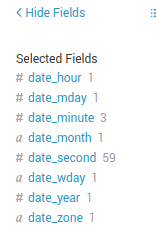
When attempting to create an extracted field via the automatic builder, it cannot do it and needs a custom written one. I tried just using the rex from the search, but it didn't seem to work.
Any ideas?

- Mark as New
- Bookmark Message
- Subscribe to Message
- Mute Message
- Subscribe to RSS Feed
- Permalink
- Report Inappropriate Content

Add this to your props.conf
[sourcetype_stanza]
EXTRACT-headepage = (?<header_page>(GET|POST)\s+\/(\w+))
- Mark as New
- Bookmark Message
- Subscribe to Message
- Mute Message
- Subscribe to RSS Feed
- Permalink
- Report Inappropriate Content
Add this to your props.conf
[sourcetype_stanza]
EXTRACT-headepage = (?<header_page>(GET|POST)\s+\/(\w+))
- Mark as New
- Bookmark Message
- Subscribe to Message
- Mute Message
- Subscribe to RSS Feed
- Permalink
- Report Inappropriate Content


Can you share some sample data?
If this reply helps you, Karma would be appreciated.
- Mark as New
- Bookmark Message
- Subscribe to Message
- Mute Message
- Subscribe to RSS Feed
- Permalink
- Report Inappropriate Content
header_page ________________count
GET /price_______________________ 3
GET /product_________________3956
POST /rest__________________373
GET /search________________355
GET /search_error _____________1
GET /store______________________382
Basically this ^

Upcoming Webinar: Unmasking Insider Threats with Slunk Enterprise Security’s UEBA
.conf25 technical session recap of Observability for Gen AI: Monitoring LLM ...
A Season of Skills: New Splunk Courses to Light Up Your Learning Journey
