
Turn on suggestions
Auto-suggest helps you quickly narrow down your search results by suggesting possible matches as you type.
Splunk Search
×
Join the Conversation
Without signing in, you're just watching from the sidelines. Sign in or Register to connect, share, and be part of the Splunk Community.
- Find Answers
- :
- Using Splunk
- :
- Splunk Search
- :
- Re: How to display Total Count inside a Chart
Options
- Subscribe to RSS Feed
- Mark Topic as New
- Mark Topic as Read
- Float this Topic for Current User
- Bookmark Topic
- Subscribe to Topic
- Mute Topic
- Printer Friendly Page
- Mark as New
- Bookmark Message
- Subscribe to Message
- Mute Message
- Subscribe to RSS Feed
- Permalink
- Report Inappropriate Content

virgilg
Explorer
10-10-2016
10:18 AM
Hi,
I have a search like this:
sourcetype=syslog AND host="xxx.xxx.xxx.xxx" AND mpkg | stats count by username, operation | sort count
This gives me a nice graph, which I've added to a Dashboard:
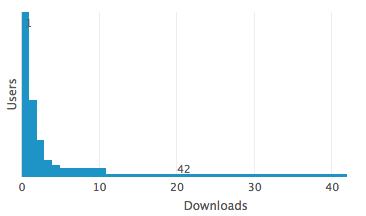
However, I would love to get a total count of the Downloads operation be displayed inside the graph, like a Legend of sorts, which will show total downloads were e.g. "157 events" (the count of matches as displayed by the Search view).
How can I do that?
Thanks,
Virgil

1 Solution
- Mark as New
- Bookmark Message
- Subscribe to Message
- Mute Message
- Subscribe to RSS Feed
- Permalink
- Report Inappropriate Content

somesoni2
Revered Legend
10-10-2016
11:40 AM
If you're using Splunk 6.3+ version, they try something like this (see the token setting in <done> tag and usage in panel title)
<form>
  ......
  <row>
    <panel>
      <table>
        <title>Total Results: $resultcount$</title>
        <search>
          <query>sourcetype=syslog AND host="xxx.xxx.xxx.xxx" AND mpkg | stats count by username, operation | sort count</query>
          <earliest>-15m</earliest>
          <latest>now</latest>
        <done>
          <eval token="resultcount">$job.resultCount$</eval>
        </done>
        </search>
      ........
      </table>
    </panel>
  </row>
.......
</form>
- Mark as New
- Bookmark Message
- Subscribe to Message
- Mute Message
- Subscribe to RSS Feed
- Permalink
- Report Inappropriate Content
somesoni2
Revered Legend
10-10-2016
11:40 AM
If you're using Splunk 6.3+ version, they try something like this (see the token setting in <done> tag and usage in panel title)
<form>
  ......
  <row>
    <panel>
      <table>
        <title>Total Results: $resultcount$</title>
        <search>
          <query>sourcetype=syslog AND host="xxx.xxx.xxx.xxx" AND mpkg | stats count by username, operation | sort count</query>
          <earliest>-15m</earliest>
          <latest>now</latest>
        <done>
          <eval token="resultcount">$job.resultCount$</eval>
        </done>
        </search>
      ........
      </table>
    </panel>
  </row>
.......
</form>
- Mark as New
- Bookmark Message
- Subscribe to Message
- Mute Message
- Subscribe to RSS Feed
- Permalink
- Report Inappropriate Content

vravisplunker
Explorer
09-19-2017
08:18 AM
This idea worked for me, thanks somesoni2

Got questions? Get answers!
Join the Splunk Community Slack to learn, troubleshoot, and make connections with fellow Splunk practitioners in real time!
Meet up IRL or virtually!
Join Splunk User Groups to connect and learn in-person by region or remotely by topic or industry.
Get Updates on the Splunk Community!
A Four-Part Event Series: State of Observability - Where AI Meets Performance
As AI agents take on more complex tasks, teams need greater visibility into how they behave, what they cost, ...
Persistent Queue at TcpOut — One of Splunk's Most Practical Features
Splunk introduced persistent queueing at the tcpout layer as one of the most practical resilience features in ...
Build resilience for the agentic era: Join us at Splunk Go San Jose
AI is changing how organizations build, operate, and secure digital services. As teams adopt AI agents and ...
