
Join the Conversation
- Find Answers
- :
- Using Splunk
- :
- Splunk Search
- :
- Re: How to customize raw data into fields using re...
- Subscribe to RSS Feed
- Mark Topic as New
- Mark Topic as Read
- Float this Topic for Current User
- Bookmark Topic
- Subscribe to Topic
- Mute Topic
- Printer Friendly Page
- Mark as New
- Bookmark Message
- Subscribe to Message
- Mute Message
- Subscribe to RSS Feed
- Permalink
- Report Inappropriate Content
How to customize raw data into fields using regex before exporting to CSV?

We are ingesting syslog logs. While doing a search and exporting to csv, we would like the raw data column to be split into readable fields. Do I need to use regex?
What can I post here so you can see the raw data?
- Mark as New
- Bookmark Message
- Subscribe to Message
- Mute Message
- Subscribe to RSS Feed
- Permalink
- Report Inappropriate Content


- A more permanent solution would be using transforms.conf and props.conf. Docs here.
- or use the field extractor ? Docs here
- or maybe you just love that web gui ? You can manage extractions there as well. Here
Example:
Add a new error code field
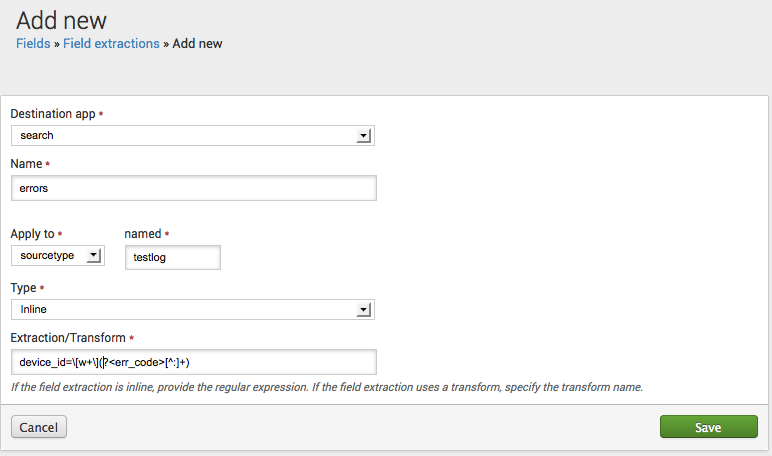
This example shows how to create a new "error code" field by configuring a field extraction in props.conf. The field can be identified by the occurrence of device_id= followed by a word within brackets and a text string terminating with a colon. The field should be extracted from events related to the testlog source type.
In props.conf, add:
[testlog]
EXTRACT-errors = device_id=\[w+\](?<err_code>[^:]+)
Or get jiggy with that GUI:
- Mark as New
- Bookmark Message
- Subscribe to Message
- Mute Message
- Subscribe to RSS Feed
- Permalink
- Report Inappropriate Content
You can try using the "erex" command that Splunk has. This command basically creates your rex call for you.
Here's how it works:
... YOUR SEARCH ... | erex FIELD_NAME examples="2345,3455,9283"
After your search, use the erex command by replacing FIELD_NAME with a name of your choice and then post real examples of the data that you want to be put in this field (you only need two or three examples). These examples of yours will replace the dummy data that I have above in between quotes. Your examples must be comma separated and surrounded by quotes.
After your search runs, the rex command that it creates for you can be found under the "Jobs" tab.
- Mark as New
- Bookmark Message
- Subscribe to Message
- Mute Message
- Subscribe to RSS Feed
- Permalink
- Report Inappropriate Content
you could post a few lines from your logs itself...
- Mark as New
- Bookmark Message
- Subscribe to Message
- Mute Message
- Subscribe to RSS Feed
- Permalink
- Report Inappropriate Content

If this is syslog, and your timestamps and events are being recognized correctly, you can use the Field Extractor Utility to extract fields as you desire. And then using the fields and outputcsv commands, you can format how you want your CSV to look.
Other options as mentioned are using props and transforms to create your own extractions and fields.


Join the Splunk Community Slack to learn, troubleshoot, and make connections with fellow Splunk practitioners in real time!
Join Splunk User Groups to connect and learn in-person by region or remotely by topic or industry.
Cisco Data Fabric from Architecture to Investigation, Better SOC Visibility, and More ...
The Trust Gap: Why a Data Foundation is Fundamental to an Agentic Enterprise
Data Management Digest – September 2026
