
Join the Conversation
- Find Answers
- :
- Using Splunk
- :
- Splunk Search
- :
- Re: Splunk query Search
- Subscribe to RSS Feed
- Mark Topic as New
- Mark Topic as Read
- Float this Topic for Current User
- Bookmark Topic
- Subscribe to Topic
- Mute Topic
- Printer Friendly Page
- Mark as New
- Bookmark Message
- Subscribe to Message
- Mute Message
- Subscribe to RSS Feed
- Permalink
- Report Inappropriate Content

Hello Splunkers!!
I have mentioned below query and from the below query I want a results as shown below in the excel. Please help me achieve that result.
index=ABC sourcetype=ABC
| eval date_year=strftime('_time',"%Y"), date_month=strftime('_time',"%B"), day_week=strftime('_time',"%A"), date_mday=strftime('_time',"%d"), date_hour=strftime('_time',"%H"), date_minute=strftime('_time',"%M") | stats count count(eval(ShuttleId)) as total by sourcetype
| table sourcetype total
| join max=0 type=outer sourcetype
[| search index=ABC sourcetype=ABC
| eval date_year=strftime('_time',"%Y"), date_month=strftime('_time',"%B"), day_week=strftime('_time',"%A"), date_mday=strftime('_time',"%d"), date_hour=strftime('_time',"%H"), date_minute=strftime('_time',"%M") | stats count by ShuttleId sourcetype _time]
| table ShuttleId count total
| eval condition =if(round((count/total),2) <=0, "GREEN", "RED")
| eval Status =round((count/total),2)
| eval Shuttle_percentage = round(((count/total)*100),2)
| table ShuttleId Shuttle_percentage
| _time | ShuttleId | Total_Orders | Errors |
| 2022-08-03T00:00:00.000+0000 | Shuttle_001 | 69341 | 117 |
| 2022-08-04T00:00:00.000+0000 | Shuttle_002 | 85640 | 51 |
| 2022-08-05T00:00:00.000+0000 | Shuttle_003 | 72260 | 43 |
| 2022-08-06T00:00:00.000+0000 | Shuttle_004 | 60291 | 22 |
| 2022-08-07T00:00:00.000+0000 | Shuttle_005 | 0 | 0 |
- Mark as New
- Bookmark Message
- Subscribe to Message
- Mute Message
- Subscribe to RSS Feed
- Permalink
- Report Inappropriate Content


| stats count by _time shuttleId
| eventstats sum(count) as total by shuttleId- Mark as New
- Bookmark Message
- Subscribe to Message
- Mute Message
- Subscribe to RSS Feed
- Permalink
- Report Inappropriate Content
You have present a seemingly random set of SPL which bear little resemblance to your expected output, with meaningless evaluations which are often not used.
What is it you are actually trying to do, and what have you actually tried so far?
- Mark as New
- Bookmark Message
- Subscribe to Message
- Mute Message
- Subscribe to RSS Feed
- Permalink
- Report Inappropriate Content
@ITWhisperer | eval command for condition we can ignore.
I need a result like :
column 1 : time
column 2 : shuttle name
column 3 : total number of shuttle
column 4 : number of count of each shuttle.
- Mark as New
- Bookmark Message
- Subscribe to Message
- Mute Message
- Subscribe to RSS Feed
- Permalink
- Report Inappropriate Content
What it the difference between column 3 and 4?
- Mark as New
- Bookmark Message
- Subscribe to Message
- Mute Message
- Subscribe to RSS Feed
- Permalink
- Report Inappropriate Content
@ITWhisperer Column 3 : total count of all the shuttle. & column 4 : (count of each shuttle/ total count of all the shuttle)
- Mark as New
- Bookmark Message
- Subscribe to Message
- Mute Message
- Subscribe to RSS Feed
- Permalink
- Report Inappropriate Content
| stats count by _time shuttleId
| eventstats sum(count) as total by shuttleId- Mark as New
- Bookmark Message
- Subscribe to Message
- Mute Message
- Subscribe to RSS Feed
- Permalink
- Report Inappropriate Content
@ITWhisperer I think I am getting below results. Please correct me for the below SPL
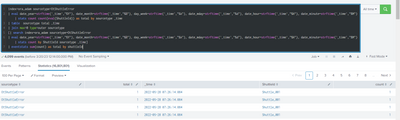
=========================================================
index=ora_adam sourcetype=OtShuttleError
| eval date_year=strftime('_time',"%Y"), date_month=strftime('_time',"%B"), day_week=strftime('_time',"%A"), date_mday=strftime('_time',"%d"), date_hour=strftime('_time',"%H"), date_minute=strftime('_time',"%M") | stats count count(eval(ShuttleId)) as total by sourcetype _time
| table sourcetype total _time
| join max=0 type=outer sourcetype
[| search index=ora_adam sourcetype=OtShuttleError
| eval date_year=strftime('_time',"%Y"), date_month=strftime('_time',"%B"), day_week=strftime('_time',"%A"), date_mday=strftime('_time',"%d"), date_hour=strftime('_time',"%H"), date_minute=strftime('_time',"%M") | stats count by ShuttleId sourcetype _time]
| eventstats sum(count) as total by shuttleId
- Mark as New
- Bookmark Message
- Subscribe to Message
- Mute Message
- Subscribe to RSS Feed
- Permalink
- Report Inappropriate Content
You might want to consider using the bin command to group your counts by hours or days, but it depends on what your requirement actually is.
- Mark as New
- Bookmark Message
- Subscribe to Message
- Mute Message
- Subscribe to RSS Feed
- Permalink
- Report Inappropriate Content
@ITWhisperer Let me check and try


Join the Splunk Community Slack to learn, troubleshoot, and make connections with fellow Splunk practitioners in real time!
Join Splunk User Groups to connect and learn in-person by region or remotely by topic or industry.
Event Series: Telemetry Pipeline Management
Kick the Tires Before You Commit: A Hands-On Tour of the Splunk Observability Cloud ...
Deep insights, no barriers: Splunk Observability Cloud Free Edition
