
Join the Conversation
- Find Answers
- :
- Using Splunk
- :
- Splunk Search
- :
- Re: How to create table from JSON?
- Subscribe to RSS Feed
- Mark Topic as New
- Mark Topic as Read
- Float this Topic for Current User
- Bookmark Topic
- Subscribe to Topic
- Mute Topic
- Printer Friendly Page
- Mark as New
- Bookmark Message
- Subscribe to Message
- Mute Message
- Subscribe to RSS Feed
- Permalink
- Report Inappropriate Content
How to create table from JSON?

Hello - Thank you in advance for the help. I am getting following raw data in Splunk events which I'd like to pull into a table format.
I would like to pull the following: Host, Success, and Error field as columns for my table.

I tried this query but no success:
| makeresults
| eval _raw="{\"host\"},{\"success\",{\"error\"}"
| spath path=host{} output=temp
| mvexpand temp
| spath input=temp
| fillnull value="None"
| table host,success,error
- Mark as New
- Bookmark Message
- Subscribe to Message
- Mute Message
- Subscribe to RSS Feed
- Permalink
- Report Inappropriate Content
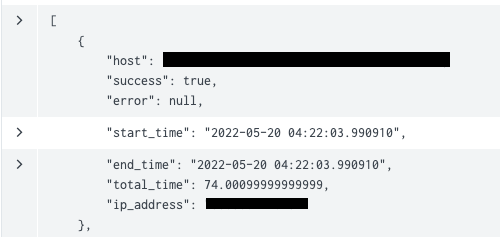
@ITWhisperer Here you are. So my code is pinging remote machines and the response is in JSON file. I would like to table the host and success from this response file.
- Mark as New
- Bookmark Message
- Subscribe to Message
- Mute Message
- Subscribe to RSS Feed
- Permalink
- Report Inappropriate Content


It looks like from your graphic that the JSON has been split across multiple events - is that right?
If so, will host, success and error always be in the same event?
- Mark as New
- Bookmark Message
- Subscribe to Message
- Mute Message
- Subscribe to RSS Feed
- Permalink
- Report Inappropriate Content
yeah I do not know why they are split up in multiple events but the host, success and error will be in same event.
- Mark as New
- Bookmark Message
- Subscribe to Message
- Mute Message
- Subscribe to RSS Feed
- Permalink
- Report Inappropriate Content
Try something like this
| rex "\"host\":\s(?<host>[^,]*),.*?\"success\":\s(?<success>[^,]*),.*?\"error\":\s(?<error>[^,]*),"- Mark as New
- Bookmark Message
- Subscribe to Message
- Mute Message
- Subscribe to RSS Feed
- Permalink
- Report Inappropriate Content
I tried and it didn't extract any fields.
- Mark as New
- Bookmark Message
- Subscribe to Message
- Mute Message
- Subscribe to RSS Feed
- Permalink
- Report Inappropriate Content
Try this
| rex "(?ms)\"host\":\s(?<host>[^,]*),.*?\"success\":\s(?<success>[^,]*),.*?\"error\":\s(?<error>[^,]*),"I haven't tested this because I don't have an example to use (which is why I asked for the event to be in a code block, and I am not about to type it all in) 😀
- Mark as New
- Bookmark Message
- Subscribe to Message
- Mute Message
- Subscribe to RSS Feed
- Permalink
- Report Inappropriate Content
It looks like (from the graphic) that host, success and error are elements of an object, which is part of a collection of similar objects. Is this right? Can you share a larger example of the whole event in a code block rather than a graphic (redacting any sensitive information of course)?
- Mark as New
- Bookmark Message
- Subscribe to Message
- Mute Message
- Subscribe to RSS Feed
- Permalink
- Report Inappropriate Content
@ITWhisperer hope this helps.
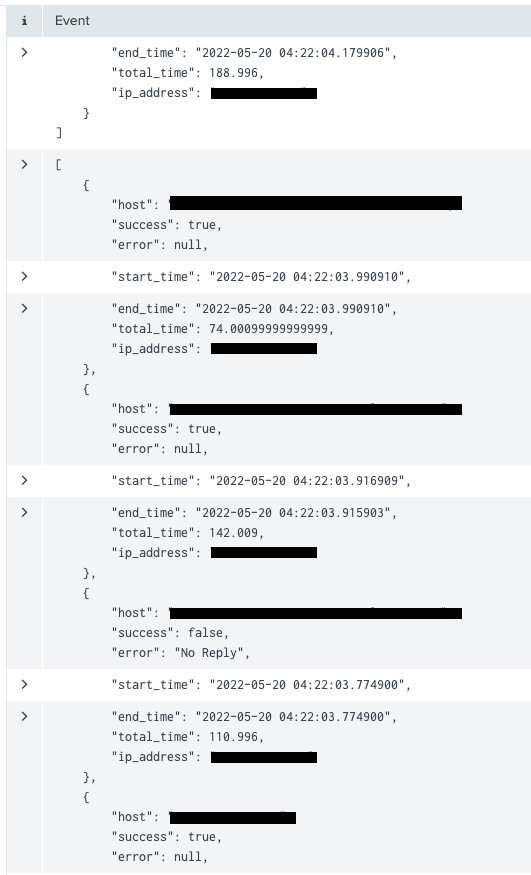
Here is my JSON file 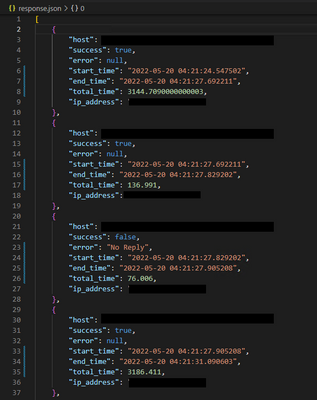
- Mark as New
- Bookmark Message
- Subscribe to Message
- Mute Message
- Subscribe to RSS Feed
- Permalink
- Report Inappropriate Content
It looks like your file is being broken into events by the presence of timestamps rather than the end of the array element


Join the Splunk Community Slack to learn, troubleshoot, and make connections with fellow Splunk practitioners in real time!
Join Splunk User Groups to connect and learn in-person by region or remotely by topic or industry.
Agentic SOC Triage: Investigating Splunk ES Notables with MCP Server and a Local LLM
All Work and No Play? Not at .conf26! Unwind at These Evening Events
Join the Hackathon at .conf26 and build a No-Code AI agent
