
Join the Conversation
- Find Answers
- :
- Using Splunk
- :
- Splunk Search
- :
- Re: How to create static baseline on chart without...
- Subscribe to RSS Feed
- Mark Topic as New
- Mark Topic as Read
- Float this Topic for Current User
- Bookmark Topic
- Subscribe to Topic
- Mute Topic
- Printer Friendly Page
- Mark as New
- Bookmark Message
- Subscribe to Message
- Mute Message
- Subscribe to RSS Feed
- Permalink
- Report Inappropriate Content

I created a baseline by adding eval field as shown below:
| eval BaseLine=1000|fields
_time, ResponeTime, BaseLine
I then have resulted as a column chart and also have formatted to "Show Data Values" on. I have Barchart for Response time field and then have Chart Overlay for Baseline field so that it shows a horizontal line.
The problem is that the Baseline show data too which I don't want. I just want a horizontal line without data.
Please advise if this is possible?
Thank You.
- Mark as New
- Bookmark Message
- Subscribe to Message
- Mute Message
- Subscribe to RSS Feed
- Permalink
- Report Inappropriate Content

@arusoft you can check out one of my older answers for hiding chart data label through CSS override: https://answers.splunk.com/answers/610389/how-to-display-values-only-for-chart-overlay-field.html
Following is a run anywhere example based on the sample data provided and your use case. Between Baseline and ResponseTime fields Baseline will be first series as per series sorting (i.e. .highcharts-series-1). So following CSS override can be applied where myChartWithHiddenDataLabelForFirstSeries is the ID of the chart where it is applied:
  <html depends="$alwaysHideCSSPanel$">
    <style>
     #myChartWithHiddenDataLabelForFirstSeries .highcharts-series-1 .highcharts-data-label text tspan
     {
       visibility:hidden !important;
     }
    </style>
  </html>
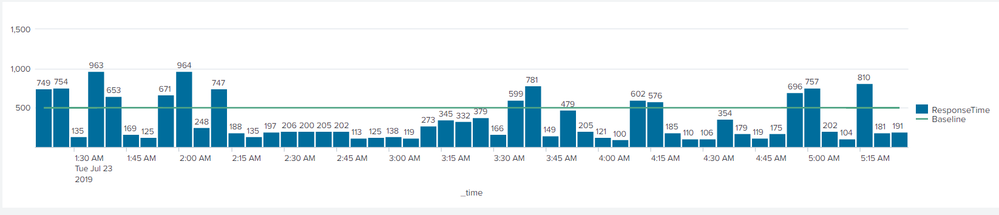
Please try out the complete Simple XML example and confirm:
<dashboard>
  <label>Chart With Hidden Data Label</label>
  <row>
    <panel>
      <html depends="$alwaysHideCSSPanel$">
        <style>
         #myChartWithHiddenDataLabelForFirstSeries .highcharts-series-1 .highcharts-data-label text tspan
         {
           visibility:hidden !important;
         }
        </style>
      </html>
      <chart id="myChartWithHiddenDataLabelForFirstSeries">
        <search>
          <query>|  makeresults count=50
|  eval duration=300
|  accum duration
|  eval _time=_time-duration
|  eval ResponseTime=random()
|  eval ResponseTime=substr(ResponseTime,1,3)
|  eval Baseline=500
|  table _time ResponseTime Baseline</query>
          <earliest>-24h@h</earliest>
          <latest>now</latest>
          <sampleRatio>1</sampleRatio>
        </search>
        <option name="charting.axisLabelsX.majorLabelStyle.overflowMode">ellipsisNone</option>
        <option name="charting.axisLabelsX.majorLabelStyle.rotation">0</option>
        <option name="charting.axisTitleX.visibility">visible</option>
        <option name="charting.axisTitleY.visibility">visible</option>
        <option name="charting.axisTitleY2.visibility">visible</option>
        <option name="charting.axisX.abbreviation">none</option>
        <option name="charting.axisX.scale">linear</option>
        <option name="charting.axisY.abbreviation">none</option>
        <option name="charting.axisY.scale">linear</option>
        <option name="charting.axisY2.abbreviation">none</option>
        <option name="charting.axisY2.enabled">0</option>
        <option name="charting.axisY2.scale">inherit</option>
        <option name="charting.chart">column</option>
        <option name="charting.chart.bubbleMaximumSize">50</option>
        <option name="charting.chart.bubbleMinimumSize">10</option>
        <option name="charting.chart.bubbleSizeBy">area</option>
        <option name="charting.chart.nullValueMode">gaps</option>
        <option name="charting.chart.overlayFields">Baseline</option>
        <option name="charting.chart.showDataLabels">all</option>
        <option name="charting.chart.sliceCollapsingThreshold">0.01</option>
        <option name="charting.chart.stackMode">default</option>
        <option name="charting.chart.style">minimal</option>
        <option name="charting.drilldown">none</option>
        <option name="charting.layout.splitSeries">0</option>
        <option name="charting.layout.splitSeries.allowIndependentYRanges">0</option>
        <option name="charting.legend.labelStyle.overflowMode">ellipsisMiddle</option>
        <option name="charting.legend.mode">standard</option>
        <option name="charting.legend.placement">right</option>
        <option name="charting.lineWidth">2</option>
        <option name="refresh.display">progressbar</option>
        <option name="trellis.enabled">0</option>
        <option name="trellis.scales.shared">1</option>
        <option name="trellis.size">medium</option>
      </chart>
    </panel>
  </row>
</dashboard>
| makeresults | eval message= "Happy Splunking!!!"

- Mark as New
- Bookmark Message
- Subscribe to Message
- Mute Message
- Subscribe to RSS Feed
- Permalink
- Report Inappropriate Content
@arusoft you can check out one of my older answers for hiding chart data label through CSS override: https://answers.splunk.com/answers/610389/how-to-display-values-only-for-chart-overlay-field.html
Following is a run anywhere example based on the sample data provided and your use case. Between Baseline and ResponseTime fields Baseline will be first series as per series sorting (i.e. .highcharts-series-1). So following CSS override can be applied where myChartWithHiddenDataLabelForFirstSeries is the ID of the chart where it is applied:
  <html depends="$alwaysHideCSSPanel$">
    <style>
     #myChartWithHiddenDataLabelForFirstSeries .highcharts-series-1 .highcharts-data-label text tspan
     {
       visibility:hidden !important;
     }
    </style>
  </html>
Please try out the complete Simple XML example and confirm:
<dashboard>
  <label>Chart With Hidden Data Label</label>
  <row>
    <panel>
      <html depends="$alwaysHideCSSPanel$">
        <style>
         #myChartWithHiddenDataLabelForFirstSeries .highcharts-series-1 .highcharts-data-label text tspan
         {
           visibility:hidden !important;
         }
        </style>
      </html>
      <chart id="myChartWithHiddenDataLabelForFirstSeries">
        <search>
          <query>|  makeresults count=50
|  eval duration=300
|  accum duration
|  eval _time=_time-duration
|  eval ResponseTime=random()
|  eval ResponseTime=substr(ResponseTime,1,3)
|  eval Baseline=500
|  table _time ResponseTime Baseline</query>
          <earliest>-24h@h</earliest>
          <latest>now</latest>
          <sampleRatio>1</sampleRatio>
        </search>
        <option name="charting.axisLabelsX.majorLabelStyle.overflowMode">ellipsisNone</option>
        <option name="charting.axisLabelsX.majorLabelStyle.rotation">0</option>
        <option name="charting.axisTitleX.visibility">visible</option>
        <option name="charting.axisTitleY.visibility">visible</option>
        <option name="charting.axisTitleY2.visibility">visible</option>
        <option name="charting.axisX.abbreviation">none</option>
        <option name="charting.axisX.scale">linear</option>
        <option name="charting.axisY.abbreviation">none</option>
        <option name="charting.axisY.scale">linear</option>
        <option name="charting.axisY2.abbreviation">none</option>
        <option name="charting.axisY2.enabled">0</option>
        <option name="charting.axisY2.scale">inherit</option>
        <option name="charting.chart">column</option>
        <option name="charting.chart.bubbleMaximumSize">50</option>
        <option name="charting.chart.bubbleMinimumSize">10</option>
        <option name="charting.chart.bubbleSizeBy">area</option>
        <option name="charting.chart.nullValueMode">gaps</option>
        <option name="charting.chart.overlayFields">Baseline</option>
        <option name="charting.chart.showDataLabels">all</option>
        <option name="charting.chart.sliceCollapsingThreshold">0.01</option>
        <option name="charting.chart.stackMode">default</option>
        <option name="charting.chart.style">minimal</option>
        <option name="charting.drilldown">none</option>
        <option name="charting.layout.splitSeries">0</option>
        <option name="charting.layout.splitSeries.allowIndependentYRanges">0</option>
        <option name="charting.legend.labelStyle.overflowMode">ellipsisMiddle</option>
        <option name="charting.legend.mode">standard</option>
        <option name="charting.legend.placement">right</option>
        <option name="charting.lineWidth">2</option>
        <option name="refresh.display">progressbar</option>
        <option name="trellis.enabled">0</option>
        <option name="trellis.scales.shared">1</option>
        <option name="trellis.size">medium</option>
      </chart>
    </panel>
  </row>
</dashboard>
| makeresults | eval message= "Happy Splunking!!!"
- Mark as New
- Bookmark Message
- Subscribe to Message
- Mute Message
- Subscribe to RSS Feed
- Permalink
- Report Inappropriate Content
wow.. it works. thank you 🙂

Join the Splunk Community Slack to learn, troubleshoot, and make connections with fellow Splunk practitioners in real time!
Join Splunk User Groups to connect and learn in-person by region or remotely by topic or industry.
[Puzzles] Solve, Learn, Repeat: Character substitutions with Regular Expressions
Splunk Community Badges!
[Puzzles] Solve, Learn, Repeat: Matching cron expressions
