
Join the Conversation
- Find Answers
- :
- Using Splunk
- :
- Splunk Search
- :
- Re: How to create a visualization for different ev...
- Subscribe to RSS Feed
- Mark Topic as New
- Mark Topic as Read
- Float this Topic for Current User
- Bookmark Topic
- Subscribe to Topic
- Mute Topic
- Printer Friendly Page
- Mark as New
- Bookmark Message
- Subscribe to Message
- Mute Message
- Subscribe to RSS Feed
- Permalink
- Report Inappropriate Content

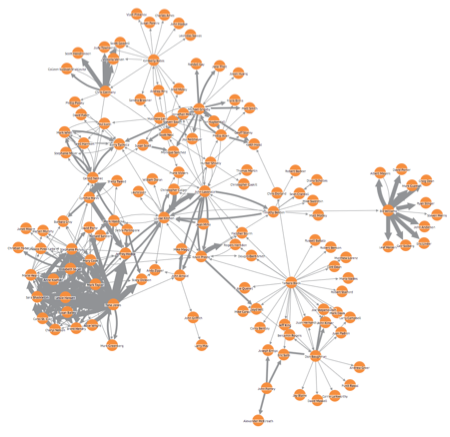
Have events that have 10+ variables in each. I want to be able to show correlations for one seed value and 1 to 10+ other variables grouped. Example graphic is below.
Example scenario would be buying a car. There are lots of options that a vehicle can have added. Like All-wheel drive (if needed or plan to drive in snow/off road areas), Aluminum alloy wheels (no wheel covers), Ambient/outside temperature display, Auto-dimming rear and power folding side view mirrors, Automatic headlights, Bi-Xenon/HID headlights (high and low beam), Blind spot and cross path detection, Cruise control – adaptive if available, Convertible top – fully-automatic operation, Cup holders – heated and cooled, Digital compass, and color.
Let's say I want the color to be the seed variable and want to see correlations on the 4 other variables of Automatic headlights, All-wheel drive (if needed or plan to drive in snow/off road areas), Convertible top – fully-automatic operation, and Cup holders – heated and cooled.

- Mark as New
- Bookmark Message
- Subscribe to Message
- Mute Message
- Subscribe to RSS Feed
- Permalink
- Report Inappropriate Content

You might have to include either Force Directed Graph or D3 Hive Plot. Refer to D3 Force-Directed Graph: Splunkweb view navigation example in Splunk 6.x Dashboard Examples.
Also refer to the link http://docs.splunk.com/Documentation/Splunk/6.5.1/AdvancedDev/CustomVizTutorial for creating your own Custom Visualization if you are interested in D3 Hive Plot.
| makeresults | eval message= "Happy Splunking!!!"
- Mark as New
- Bookmark Message
- Subscribe to Message
- Mute Message
- Subscribe to RSS Feed
- Permalink
- Report Inappropriate Content
You might have to include either Force Directed Graph or D3 Hive Plot. Refer to D3 Force-Directed Graph: Splunkweb view navigation example in Splunk 6.x Dashboard Examples.
Also refer to the link http://docs.splunk.com/Documentation/Splunk/6.5.1/AdvancedDev/CustomVizTutorial for creating your own Custom Visualization if you are interested in D3 Hive Plot.
| makeresults | eval message= "Happy Splunking!!!"

Join the Splunk Community Slack to learn, troubleshoot, and make connections with fellow Splunk practitioners in real time!
Join Splunk User Groups to connect and learn in-person by region or remotely by topic or industry.
Best Practices: Splunk auto adjust pipeline queue
Request for Professional Development: Attending .conf26
[Puzzles] Solve, Learn, Repeat: Classic British Rock Bands
