
Join the Conversation
- Find Answers
- :
- Using Splunk
- :
- Splunk Search
- :
- Re: How to create a pie chart after applying math ...
- Subscribe to RSS Feed
- Mark Topic as New
- Mark Topic as Read
- Float this Topic for Current User
- Bookmark Topic
- Subscribe to Topic
- Mute Topic
- Printer Friendly Page
- Mark as New
- Bookmark Message
- Subscribe to Message
- Mute Message
- Subscribe to RSS Feed
- Permalink
- Report Inappropriate Content

Hey people, my requirement is as such

I have extracted these columns from my data using the query
my query | rex "filterExecutionTime=(?<FET>[^,]+)" | rex "ddbWriteExecutionTime=(?<ddbET>[^)]+)" | rex "EXECUTION_TIME : (?<totalTime>[^ ms]+)" | eval buildAndTearDowTime=(tonumber(FET)) + (tonumber(ddbET)) |table totalTime FET ddbET buildAndTearDownTime
I want to have buildAndTearDown as totalTime - (FET+ ddbET)
once I have all the three values required (FET, ddbET, buildAndTearDown) I want to put these values in a pie chart.
Another question I have is why is
This statement
eval buildAndTearDowTime=(tonumber(FET)) + (tonumber(ddbET))
is giving me null value
Thanks 😊
- Mark as New
- Bookmark Message
- Subscribe to Message
- Mute Message
- Subscribe to RSS Feed
- Permalink
- Report Inappropriate Content


To make the pie chart, do
| table FET ddbET buildAndTearDownTime
| transpose 0- Mark as New
- Bookmark Message
- Subscribe to Message
- Mute Message
- Subscribe to RSS Feed
- Permalink
- Report Inappropriate Content
OMG, that worked as charm
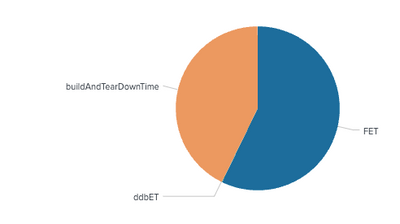
can I add any legends about the time on to the right side or somewhere because ddbET is so small, it is not visible
- Mark as New
- Bookmark Message
- Subscribe to Message
- Mute Message
- Subscribe to RSS Feed
- Permalink
- Report Inappropriate Content
Thanks that was so silly of me, could you please help me on the pie chart part too
- Mark as New
- Bookmark Message
- Subscribe to Message
- Mute Message
- Subscribe to RSS Feed
- Permalink
- Report Inappropriate Content
To make the pie chart, do
| table FET ddbET buildAndTearDownTime
| transpose 0- Mark as New
- Bookmark Message
- Subscribe to Message
- Mute Message
- Subscribe to RSS Feed
- Permalink
- Report Inappropriate Content
You have spelt buildAndTearDownTime incorrectly
| eval buildAndTearDowTime=(tonumber(FET)) + (tonumber(ddbET)) missing n in Down


Join the Splunk Community Slack to learn, troubleshoot, and make connections with fellow Splunk practitioners in real time!
Join Splunk User Groups to connect and learn in-person by region or remotely by topic or industry.
Event Series: Level up your SOC: Advancing with Splunk Enterprise Security
Announcing Modern Navigation: A New Era of Splunk User Experience
SOC4Kafka - New Kafka Connector Powered by OpenTelemetry
