
Join the Conversation
- Find Answers
- :
- Using Splunk
- :
- Splunk Search
- :
- How to compute a field using the previous value to...
- Subscribe to RSS Feed
- Mark Topic as New
- Mark Topic as Read
- Float this Topic for Current User
- Bookmark Topic
- Subscribe to Topic
- Mute Topic
- Printer Friendly Page
- Mark as New
- Bookmark Message
- Subscribe to Message
- Mute Message
- Subscribe to RSS Feed
- Permalink
- Report Inappropriate Content
How to compute a field using the previous value to simulate a data buffer?

Here is my problem: I have several log sources form and I want to follow how many logs I receive every second. That's easy:
| tstats COUNT where index=logs_*  by _time,index span=1s
| stats sum(COUNT) as eps by _time
Then I have to send these logs to an application that doesn't accept more than, let's say 1000 logs per second. So my plan is to use a buffer of some capacity, let's say 3000 logs and I want to know if that's enough and the data I can possibly lose. The following table is a simulation of what I'd like to have:
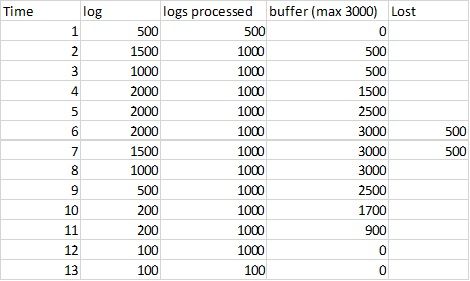
There is a burst at time 4 to 8s
I cannot manage to calculate "buffer". I tried several things with the autoregress command on the value "buffer", but I never get the correct answer. I suspect that this is not the correct way. I tried that for example:
| tstats COUNT where index=logs_*  by _time,index span=1s
| stats sum(COUNT) as eps by _time
| autoregress buffer p=1 |eval buffer = case(buffer_p1+eps-1000<=0,0,buffer_p1+eps-1000>3000,3000,true(),buffer_p1+eps-1000)
Does not work at all, there is a basic problem with the initialization of the field "buffer".
Any help welcomed!
Thanks
David



Join the Splunk Community Slack to learn, troubleshoot, and make connections with fellow Splunk practitioners in real time!
Join Splunk User Groups to connect and learn in-person by region or remotely by topic or industry.
A Four-Part Event Series: Full Stack Observability For the AI Era
SOC4Kafka - New Kafka Connector Powered by OpenTelemetry
Event Series: Level up your SOC: Advancing with Splunk Enterprise Security
