
Join the Conversation
- Find Answers
- :
- Using Splunk
- :
- Splunk Search
- :
- Re: How to combine multiple separate fields into o...
- Subscribe to RSS Feed
- Mark Topic as New
- Mark Topic as Read
- Float this Topic for Current User
- Bookmark Topic
- Subscribe to Topic
- Mute Topic
- Printer Friendly Page
- Mark as New
- Bookmark Message
- Subscribe to Message
- Mute Message
- Subscribe to RSS Feed
- Permalink
- Report Inappropriate Content

2017-09-12 12:31:11.817 INFO [RunMaster]
stats: jif: 1, fif: 9, fim: 192, f2c: 183
paper: pc: 9129, uwr: n/a, rwr: n/a
side-a: fa: 0, fmq: 0, fq: 0, fp: 96, #r: 49, frs: 0, f2f ms: 101, fb100 0.00
side-b: fa: 0, fmq: 0, fq: 9, fp: 87, #r: 49, frs: 0, f2f ms: 101, fb200 0.00
I want to pull out the values for fa, fmq, fq, and fp, but also associate them with either side-a or side-b. I want to be able to graph the these values side by side while also showing side-a vs side-b.
Currently I can pull out one sides info into separate fields using this regex: "[.\n]*side-a:\sfa:\s(?\d+),\sfmq:\s(?\d+),\sfq:\s(?\d+),\sfp:\s(?\d+)"
I tried also setting this regex equal to side-a but got no results. Any suggestions on how I am do this?
Thanks.
- Mark as New
- Bookmark Message
- Subscribe to Message
- Mute Message
- Subscribe to RSS Feed
- Permalink
- Report Inappropriate Content


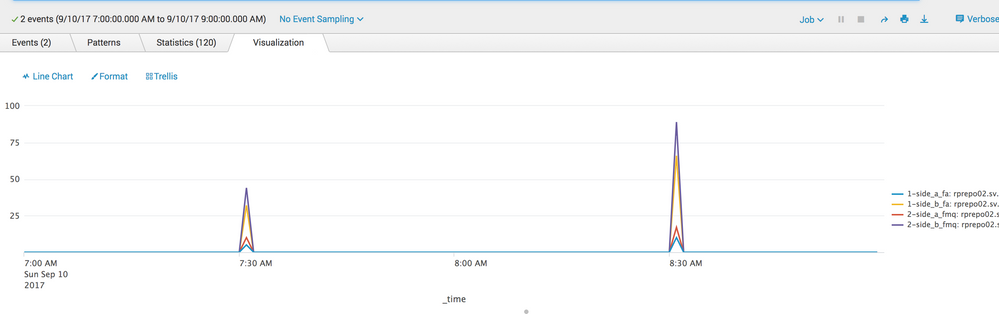
something like this might be what you're looking for:
index=main source="*mylog.log" host="xyz" | rex field=_raw "side-a: fa:\s+(?<side_a_fa>\d+)\,\s+fmq:\s+(?<side_a_fmq>\d+)\,\s+fq:\s+(?<side_a_fq>\d+)\,\s+fp:\s+(?<side_a_fp>\d+)\,\s+\#r:\s+(?<side_a_r>\d+)\,\s+frs:\s+(?<side_a_frs>\d+)\,\s+f2f\s+ms:\s+(?<side_a_f2f_ms>\d+)\,\s+fb100\s+(?<side_a_fb100>\S+)" | rex field=_raw "side-b:\s+fa:\s+(?<side_b_fa>\d+)\,\s+fmq:\s+(?<side_b_fmq>\d+)\,\s+fq:\s+(?<side_b_fq>\d+)\,\s+fp:\s+(?<side_b_fp>\d+)\,\s+\#r:\s+(?<side_b_r>\d+)\,\s+frs:\s+(?<side_b_frs>\d+)\,\s+f2f\s+ms:\s+(?<side_b_f2f_ms>\d+)\,\s+fb200\s+(?<side_b_fb200>\S+)" | timechart span=1m max(side_a_fa) as "1-side_a_fa" max(side_b_fa) as "1-side_b_fa" max(side_a_fmq) as "2-side_a_fmq" max(side_b_fmq) as "2-side_b_fmq" BY host
- Mark as New
- Bookmark Message
- Subscribe to Message
- Mute Message
- Subscribe to RSS Feed
- Permalink
- Report Inappropriate Content
- Mark as New
- Bookmark Message
- Subscribe to Message
- Mute Message
- Subscribe to RSS Feed
- Permalink
- Report Inappropriate Content
something like this might be what you're looking for:
index=main source="*mylog.log" host="xyz" | rex field=_raw "side-a: fa:\s+(?<side_a_fa>\d+)\,\s+fmq:\s+(?<side_a_fmq>\d+)\,\s+fq:\s+(?<side_a_fq>\d+)\,\s+fp:\s+(?<side_a_fp>\d+)\,\s+\#r:\s+(?<side_a_r>\d+)\,\s+frs:\s+(?<side_a_frs>\d+)\,\s+f2f\s+ms:\s+(?<side_a_f2f_ms>\d+)\,\s+fb100\s+(?<side_a_fb100>\S+)" | rex field=_raw "side-b:\s+fa:\s+(?<side_b_fa>\d+)\,\s+fmq:\s+(?<side_b_fmq>\d+)\,\s+fq:\s+(?<side_b_fq>\d+)\,\s+fp:\s+(?<side_b_fp>\d+)\,\s+\#r:\s+(?<side_b_r>\d+)\,\s+frs:\s+(?<side_b_frs>\d+)\,\s+f2f\s+ms:\s+(?<side_b_f2f_ms>\d+)\,\s+fb200\s+(?<side_b_fb200>\S+)" | timechart span=1m max(side_a_fa) as "1-side_a_fa" max(side_b_fa) as "1-side_b_fa" max(side_a_fmq) as "2-side_a_fmq" max(side_b_fmq) as "2-side_b_fmq" BY host
- Mark as New
- Bookmark Message
- Subscribe to Message
- Mute Message
- Subscribe to RSS Feed
- Permalink
- Report Inappropriate Content
This is very helpful! How do I modify it if want every individual event at the time it occurs not the max for a given time interval?
For example I am running this search:
index=pwp-prod press=MP230 stats | rex "[.\n]*side-a:\sfa:\s(?\d+),\sfmq:\s(?\d+),\sfq:\s(?\d+),\sfp:\s(?\d+)" | timechart max(side_a_fa) as "side_a_fa" max(side_a_fq) as "side_a_fq" max(side_a_fp) as "side_a_fp" by event
But some of the events where this is present occur in different time intervals and just want to capture each individual occurrence of this stats block. That is why I added the 'by event' but I am unsure this is what I want.
- Mark as New
- Bookmark Message
- Subscribe to Message
- Mute Message
- Subscribe to RSS Feed
- Permalink
- Report Inappropriate Content
I'm not completely sure I understand what you want the output to look like but you could use values instead of max,min,avg
reduce your span if you are seeing multiple values within one timespan
...| timechart span=1m values(side_a_fa) as "1-side_a_fa" values(side_b_fa) as "1-side_b_fa" values(side_a_fmq) as "2-side_a_fmq" values(side_b_fmq) as "2-side_b_fmq" BY host
- Mark as New
- Bookmark Message
- Subscribe to Message
- Mute Message
- Subscribe to RSS Feed
- Permalink
- Report Inappropriate Content


Can you describe what you want the final results to look like?
If you're using the regex at search time you can use two regex commands to extract side-a and side-b fields (with different field names).
If this reply helps you, Karma would be appreciated.



Join the Splunk Community Slack to learn, troubleshoot, and make connections with fellow Splunk practitioners in real time!
Join Splunk User Groups to connect and learn in-person by region or remotely by topic or industry.
Best Practices: Splunk auto adjust pipeline queue
Introducing the 2026 - 2027 SplunkTrust cohort!
Splunk Auto Ingestion Parallel Pipeline Scaling
