
Join the Conversation
- Find Answers
- :
- Using Splunk
- :
- Splunk Search
- :
- How to color trend in single value?
- Subscribe to RSS Feed
- Mark Topic as New
- Mark Topic as Read
- Float this Topic for Current User
- Bookmark Topic
- Subscribe to Topic
- Mute Topic
- Printer Friendly Page
- Mark as New
- Bookmark Message
- Subscribe to Message
- Mute Message
- Subscribe to RSS Feed
- Permalink
- Report Inappropriate Content

I can not figure out how to color the trend instead of the value. This is my search:
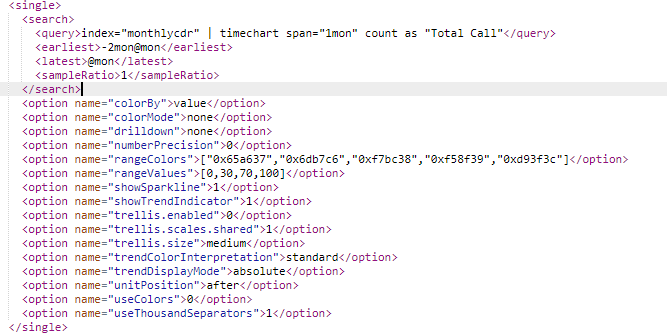
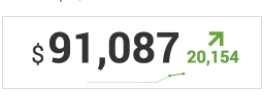
I found a documentation about it on splunk but it doesn't show how to use it or what command I should use. I look around and try option like colorvalue, rangemap, .... but have no result. This is the example i saw on splunk documentation site:
I want the big number to be black and the trendline along with the number below it to be a different color depend on the number. Did I do anything wrong here? Thanks
- Mark as New
- Bookmark Message
- Subscribe to Message
- Mute Message
- Subscribe to RSS Feed
- Permalink
- Report Inappropriate Content

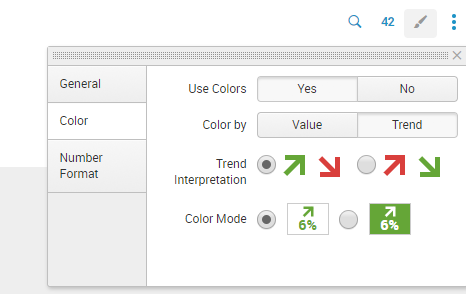
@tamduong16, you can change these settings from UI Edit by setting the visualization Format.
Following are the settings you need based on behavior described in your query through UI in Edit mode:
Following are the Simple XML chart configuration required for the same:


    <option name="colorBy">trend</option>
    <option name="colorMode">none</option>
    <option name="trendColorInterpretation">standard</option>
    <option name="trendDisplayMode">absolute</option>
    <option name="useColors">1</option>
Refer to Splunk Documentation on configuring Single Value visualization through Simple XML: https://docs.splunk.com/Documentation/Splunk/latest/Viz/PanelreferenceforSimplifiedXML#single_value
| makeresults | eval message= "Happy Splunking!!!"

- Mark as New
- Bookmark Message
- Subscribe to Message
- Mute Message
- Subscribe to RSS Feed
- Permalink
- Report Inappropriate Content
@tamduong16, you can change these settings from UI Edit by setting the visualization Format.
Following are the settings you need based on behavior described in your query through UI in Edit mode:
Following are the Simple XML chart configuration required for the same:
    <option name="colorBy">trend</option>
    <option name="colorMode">none</option>
    <option name="trendColorInterpretation">standard</option>
    <option name="trendDisplayMode">absolute</option>
    <option name="useColors">1</option>
Refer to Splunk Documentation on configuring Single Value visualization through Simple XML: https://docs.splunk.com/Documentation/Splunk/latest/Viz/PanelreferenceforSimplifiedXML#single_value
| makeresults | eval message= "Happy Splunking!!!"
- Mark as New
- Bookmark Message
- Subscribe to Message
- Mute Message
- Subscribe to RSS Feed
- Permalink
- Report Inappropriate Content

How do I change color single value trend by default it either red for negative, and green for positive. I want my single value color to be as I define in my range value even if trend is negative or positive. below is my source code.
    <earliest>-30d@d</earliest>
          <latest>now</latest>
          <sampleRatio>1</sampleRatio>
        </search>
        <option name="colorBy">trend</option>
        <option name="colorMode">none</option>
        <option name="drilldown">none</option>
        <option name="numberPrecision">0</option>
        <option name="rangeColors">["0xff1414","0xdc4e41","0x53a051","0xf1813f","0xdc4e41"]</option>
        <option name="rangeValues">[20,30,50,100]</option>
        <option name="showSparkline">1</option>
        <option name="showTrendIndicator">1</option>
        <option name="trellis.enabled">0</option>
        <option name="trellis.scales.shared">1</option>
        <option name="trellis.size">medium</option>
        <option name="trendColorInterpretation">standard</option>
        <option name="trendDisplayMode">absolute</option>
        <option name="trendInterval">-30d</option>
        <option name="unitPosition">after</option>
        <option name="useColors">1</option>
        <option name="useThousandSeparators">1</option>
      </single>
    </panel>
Thank you in advance.

Join the Splunk Community Slack to learn, troubleshoot, and make connections with fellow Splunk practitioners in real time!
Join Splunk User Groups to connect and learn in-person by region or remotely by topic or industry.
[Puzzles] Solve, Learn, Repeat: Character substitutions with Regular Expressions
Splunk Community Badges!
[Puzzles] Solve, Learn, Repeat: Matching cron expressions
