
Join the Conversation
- Find Answers
- :
- Using Splunk
- :
- Splunk Search
- :
- How to change color depending on value using javas...
- Subscribe to RSS Feed
- Mark Topic as New
- Mark Topic as Read
- Float this Topic for Current User
- Bookmark Topic
- Subscribe to Topic
- Mute Topic
- Printer Friendly Page
- Mark as New
- Bookmark Message
- Subscribe to Message
- Mute Message
- Subscribe to RSS Feed
- Permalink
- Report Inappropriate Content

Hello all,
I have below javascript code that I use to change the color of my table cell:
require([
      'underscore',
      'jquery',
      'splunkjs/mvc',
      'splunkjs/mvc/tableview',
      'splunkjs/mvc/simplexml/ready!'
  ], function(_, $, mvc, TableView) {

      var CustomRangeRenderer = TableView.BaseCellRenderer.extend({
          canRender: function(cell) {
              return _(['Performance']).contains(cell.field);
          },
          render: function($td, cell) {
              var label = cell.value.split("|")[0];
              var val = cell.value.split("|")[1];

                if(val=="high")
                {
                  $td.html("<div class='css_for_high'>"+label+"</div>")
                }
                else if(val=="low")
                {
                  $td.html("<div class='css_for_low'>"+label+"</div>")
                }
                else if(val=="no")
                {
                  $td.html("<div class='css_for_no'>"+label+"</div>")
                }
                else
                {
                  $td.html("<div class='align_right'>"+label+"</div>")
                }

          }
      });

      //List of table IDs to add icon
      var tableIDs = ["customTable"];
      for (i=0;i<tableIDs.length;i++) {
          var sh = mvc.Components.get(tableIDs[i]);
          if(typeof(sh)!="undefined") {
              sh.getVisualization(function(tableView) {
                  // Add custom cell renderer and force re-render
                  tableView.table.addCellRenderer(new CustomRangeRenderer());
                  tableView.table.render();
              });
          }
      }
  });
My table has a column "Performance" with samples values like, "99.75|high", "100.00|low", etc.
What the code does is get these values of column "Performance", split it, and then change the color depending on val.
Now, I have a table that looks something like this:
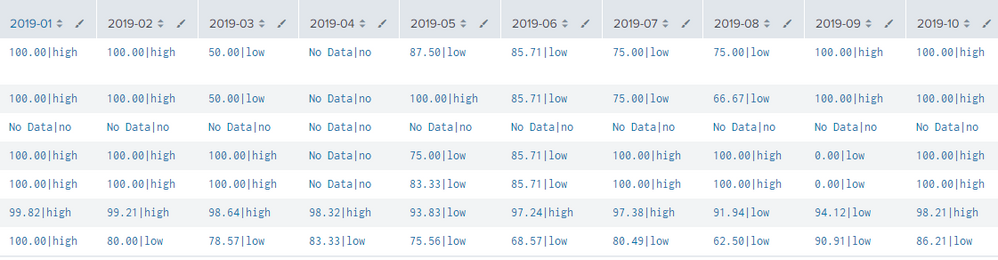
The number of columns increases or decreases depending on the time picker chosen by the user.
What should I put in line:
return _(['Performance']).contains(cell.field);
to make all the column with date headers be read by the javascript code?

- Mark as New
- Bookmark Message
- Subscribe to Message
- Mute Message
- Subscribe to RSS Feed
- Permalink
- Report Inappropriate Content

Just guessing, but try changing return _(['Performance']).contains(cell.field); to return true;
Jacob
If you feel this response answered your question, please do not forget to mark it as such. If it did not, but you do have the answer, feel free to answer your own post and accept that as the answer.
- Mark as New
- Bookmark Message
- Subscribe to Message
- Mute Message
- Subscribe to RSS Feed
- Permalink
- Report Inappropriate Content
Answered by @jacobevans, change line return _(['Performance']).contains(cell.field); to return true;.
- Mark as New
- Bookmark Message
- Subscribe to Message
- Mute Message
- Subscribe to RSS Feed
- Permalink
- Report Inappropriate Content


@dojiepreji You should accept @jacobevans 's answer. I have converted his comment to answer. 🙂
- Mark as New
- Bookmark Message
- Subscribe to Message
- Mute Message
- Subscribe to RSS Feed
- Permalink
- Report Inappropriate Content
Thanks 🙂 I had no idea if it would work!
Jacob
If you feel this response answered your question, please do not forget to mark it as such. If it did not, but you do have the answer, feel free to answer your own post and accept that as the answer.
- Mark as New
- Bookmark Message
- Subscribe to Message
- Mute Message
- Subscribe to RSS Feed
- Permalink
- Report Inappropriate Content
Just guessing, but try changing return _(['Performance']).contains(cell.field); to return true;
Jacob
If you feel this response answered your question, please do not forget to mark it as such. If it did not, but you do have the answer, feel free to answer your own post and accept that as the answer.

Join the Splunk Community Slack to learn, troubleshoot, and make connections with fellow Splunk practitioners in real time!
Join Splunk User Groups to connect and learn in-person by region or remotely by topic or industry.
Make Your Machine Data AI-Ready in Splunk
Splunk Asynchronous Forwarding Explained
How to Monitor AI Agents with Splunk Agent Observability
