
Join the Conversation
- Find Answers
- :
- Using Splunk
- :
- Splunk Search
- :
- Re: How to break multiple values into a new row ?
- Subscribe to RSS Feed
- Mark Topic as New
- Mark Topic as Read
- Float this Topic for Current User
- Bookmark Topic
- Subscribe to Topic
- Mute Topic
- Printer Friendly Page
- Mark as New
- Bookmark Message
- Subscribe to Message
- Mute Message
- Subscribe to RSS Feed
- Permalink
- Report Inappropriate Content

Thanks in advance,
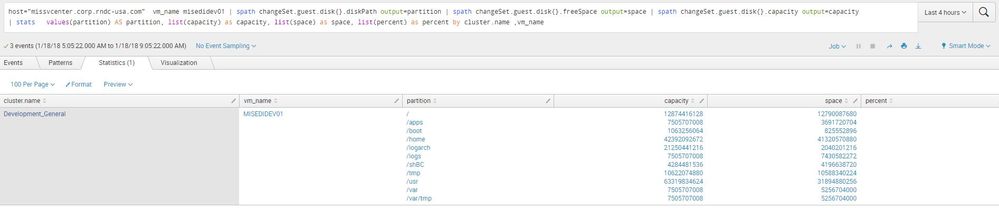
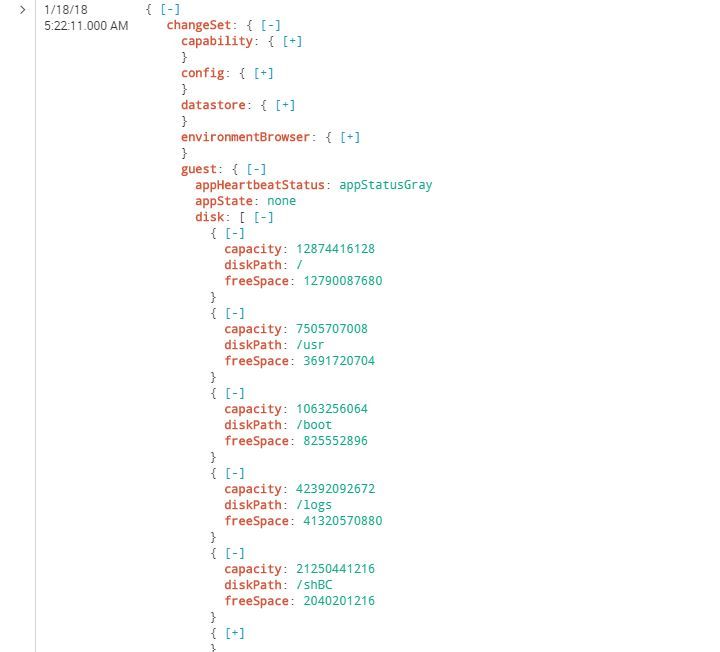
We are having a hard time trying to split free and used space by partition, hope you can help.
- Mark as New
- Bookmark Message
- Subscribe to Message
- Mute Message
- Subscribe to RSS Feed
- Permalink
- Report Inappropriate Content

Try something like this, first 2 lines are used to generate sample data only.
| makeresults
| eval _raw="{\"disk\": [{\"capacity\": \"12874416128\", \"diskPath\": \"/\", \"freeSpace\": \"12790087680\"}, {\"capacity\": \"7505707008\", \"diskPath\": \"/usr\", \"freeSpace\": \"3691720704\"}, {\"capacity\": \"1063256064\", \"diskPath\": \"/boot\", \"freeSpace\": \"825552896\"}, {\"capacity\": \"42392092672\", \"diskPath\": \"/logs\", \"freeSpace\": \"41320570880\"}, {\"capacity\": \"21250441216\", \"diskPath\": \"/shBC\", \"freeSpace\": \"2040201216\"}, {\"capacity\": \"7505707008\", \"diskPath\": \"/home\", \"freeSpace\": \"7430582272\"}, {\"capacity\": \"4284481536\", \"diskPath\": \"/tmp\", \"freeSpace\": \"4196638720\"}, {\"capacity\": \"10622074880\", \"diskPath\": \"/logarch\", \"freeSpace\": \"10588340224\"}, {\"capacity\": \"63319834624\", \"diskPath\": \"/apps\", \"freeSpace\": \"31894880256\"}, {\"capacity\": \"7505707008\", \"diskPath\": \"/var\", \"freeSpace\": \"5256704000\"}, {\"capacity\": \"7505707008\", \"diskPath\": \"/var/tmp\", \"freeSpace\": \"5256704000\"}]}"
| spath
| rename disk{}.capacity AS capacity, disk{}.diskPath AS path, disk{}.freeSpace AS space
| eval cap_path=mvzip(capacity,path)
| eval cap_path_space=mvzip(cap_path,space)
| mvexpand cap_path_space
| makemv delim="," cap_path_space
| eval capacity=mvindex(cap_path_space,0), path=mvindex(cap_path_space,1), space=mvindex(cap_path_space,2)
| fields - cap_path,cap_path_space
- Mark as New
- Bookmark Message
- Subscribe to Message
- Mute Message
- Subscribe to RSS Feed
- Permalink
- Report Inappropriate Content
This is a piece of the raw data without being organized.
disk": [{"capacity": "12874416128", "diskPath": "/", "freeSpace": "12790087680"}, {"capacity": "7505707008", "diskPath": "/usr", "freeSpace": "3691720704"}, {"capacity": "1063256064", "diskPath": "/boot", "freeSpace": "825552896"}, {"capacity": "42392092672", "diskPath": "/logs", "freeSpace": "41320570880"}, {"capacity": "21250441216", "diskPath": "/shBC", "freeSpace": "2040201216"}, {"capacity": "7505707008", "diskPath": "/home", "freeSpace": "7430582272"}, {"capacity": "4284481536", "diskPath": "/tmp", "freeSpace": "4196638720"}, {"capacity": "10622074880", "diskPath": "/logarch", "freeSpace": "10588340224"}, {"capacity": "63319834624", "diskPath": "/apps", "freeSpace": "31894880256"}, {"capacity": "7505707008", "diskPath": "/var", "freeSpace": "5256704000"}, {"capacity": "7505707008", "diskPath": "/var/tmp", "freeSpace": "5256704000"}],




Join the Splunk Community Slack to learn, troubleshoot, and make connections with fellow Splunk practitioners in real time!
Join Splunk User Groups to connect and learn in-person by region or remotely by topic or industry.
A Four-Part Event Series: Full Stack Observability For the AI Era
SOC4Kafka - New Kafka Connector Powered by OpenTelemetry
Event Series: Level up your SOC: Advancing with Splunk Enterprise Security
