
Splunk Search
×
Are you a member of the Splunk Community?
Sign in or Register with your Splunk account to get your questions answered, access valuable resources and connect with experts!
- Find Answers
- :
- Using Splunk
- :
- Splunk Search
- :
- How to best approach timeseries graph based on mul...
Options
- Subscribe to RSS Feed
- Mark Topic as New
- Mark Topic as Read
- Float this Topic for Current User
- Bookmark Topic
- Subscribe to Topic
- Mute Topic
- Printer Friendly Page
- Mark as New
- Bookmark Message
- Subscribe to Message
- Mute Message
- Subscribe to RSS Feed
- Permalink
- Report Inappropriate Content

AKG11
Path Finder
11-07-2022
03:01 AM
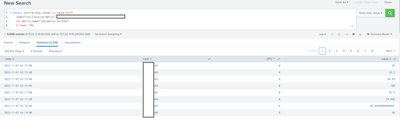
1 Solution
- Mark as New
- Bookmark Message
- Subscribe to Message
- Mute Message
- Subscribe to RSS Feed
- Permalink
- Report Inappropriate Content

ITWhisperer

SplunkTrust
11-07-2022
03:59 AM
Try this
| bin _time span=1m
| stats avg(value) as avg by _time host cpu
| eval {cpu}=avg
| fields - avg cpu- Mark as New
- Bookmark Message
- Subscribe to Message
- Mute Message
- Subscribe to RSS Feed
- Permalink
- Report Inappropriate Content
ITWhisperer
SplunkTrust
11-07-2022
03:15 AM
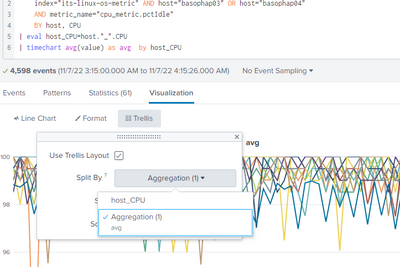
It depends on what you are trying to show!
You could use a trellis format, one tile for each host, or you could concatenate the host and cpu into a single field and display them all on one chart.
- Mark as New
- Bookmark Message
- Subscribe to Message
- Mute Message
- Subscribe to RSS Feed
- Permalink
- Report Inappropriate Content
AKG11
Path Finder
11-07-2022
03:30 AM
- Mark as New
- Bookmark Message
- Subscribe to Message
- Mute Message
- Subscribe to RSS Feed
- Permalink
- Report Inappropriate Content
ITWhisperer
SplunkTrust
11-07-2022
03:34 AM
For trellis, you need to keep host and cpu separate - try something like this
| bin _time span=1m
| stats avg(value) as avg by _time host CPU
If you want them all on the same chart, then you concatenate host and cpu
- Mark as New
- Bookmark Message
- Subscribe to Message
- Mute Message
- Subscribe to RSS Feed
- Permalink
- Report Inappropriate Content
AKG11
Path Finder
11-07-2022
03:45 AM
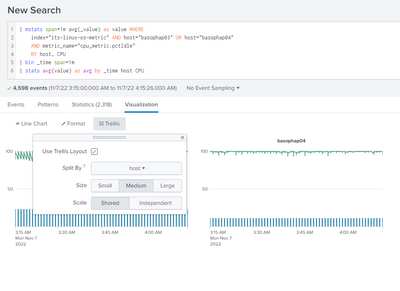
@ITWhisperer I think it will be better to have separate graph for each host.
I tried what you suggested but it doesn't seems like working. Infact its not changing any thing in results. Am I missing something ?
basically in one chart it should show all CPU graph for single host.
- Mark as New
- Bookmark Message
- Subscribe to Message
- Mute Message
- Subscribe to RSS Feed
- Permalink
- Report Inappropriate Content
ITWhisperer
SplunkTrust
11-07-2022
03:59 AM
Try this
| bin _time span=1m
| stats avg(value) as avg by _time host cpu
| eval {cpu}=avg
| fields - avg cpu

Get Updates on the Splunk Community!
Leveraging Detections from the Splunk Threat Research Team & Cisco Talos
Now On Demand
Stay ahead of today’s evolving threats with the combined power of the Splunk Threat Research ...
New in Splunk Observability Cloud: Automated Archiving for Unused Metrics
Automated Archival is a new capability within Metrics Management; which is a robust usage & cost optimization ...
Calling All Security Pros: Ready to Race Through Boston?
Hey Splunkers,
.conf25 is heading to Boston and we’re kicking things off with something bold, competitive, and ...
