
Join the Conversation
- Find Answers
- :
- Using Splunk
- :
- Splunk Search
- :
- Re: How does this search from Splunk documentation...
- Subscribe to RSS Feed
- Mark Topic as New
- Mark Topic as Read
- Float this Topic for Current User
- Bookmark Topic
- Subscribe to Topic
- Mute Topic
- Printer Friendly Page
- Mark as New
- Bookmark Message
- Subscribe to Message
- Mute Message
- Subscribe to RSS Feed
- Permalink
- Report Inappropriate Content
How does this search from Splunk documentation work to calculate the percentage of outliers?

I'd like to understand the mathematical meaning of the below search on documentation. Is this my understanding right that it calculates the outliers of 4.6% up or down based on the normal distribution?
sourcetype=access_* | eval URILen = len(useragent) | eventstats avg(URILen) as AvgURILen, stdev(URILen) as StdDevURILen| where URILen > AvgURILen+(2*StdDevURILen)
Use the stats command and functions: http://docs.splunk.com/Documentation/Splunk/6.2.0/Search/Usethestatscommandandfunctions
If I want to get the 0.3% outliers, can I do this by just changing the condition like this?
... | where URILen > AvgURILen+(3*StdDevURILen)
- Mark as New
- Bookmark Message
- Subscribe to Message
- Mute Message
- Subscribe to RSS Feed
- Permalink
- Report Inappropriate Content
Hi Shisa,
This search returns events that macth URILen's average and URILen's sample standard deviation where URILen > AvgURILen+(2*StdDevURILen) .
If i understand your problems, you want to return events where URILen > AvgURILen+(3*StdDevURILen) , this can be possible but, in your case, when i run sourcetype=access_* | eval URILen = len(useragent) | eventstats avg(URILen) as AvgURILen, stdev(URILen) as StdDevURILen| where URILen > AvgURILen+(3*StdDevURILen)| table AvgURILen StdDevURILen| table AvgURILen StdDevURILen ,
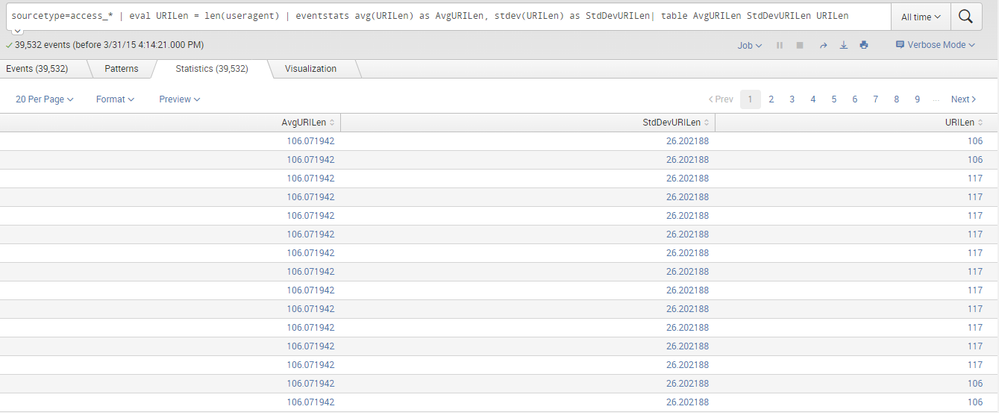
i get results not found . This explain that in the first part of query, that is sourcetype=access_* | eval URILen = len(useragent) | eventstats avg(URILen) as AvgURILen, stdev(URILen) as StdDevURILen| table AvgURILen StdDevURILen URILen
which displays like follow, there is no values of URILen where we can have URILen > AvgURILen+(3*StdDevURILen). Thus, can't get results.



Join the Splunk Community Slack to learn, troubleshoot, and make connections with fellow Splunk practitioners in real time!
Join Splunk User Groups to connect and learn in-person by region or remotely by topic or industry.
A Four-Part Event Series: Full Stack Observability For the AI Era
SOC4Kafka - New Kafka Connector Powered by OpenTelemetry
Event Series: Level up your SOC: Advancing with Splunk Enterprise Security
