
Join the Conversation
- Find Answers
- :
- Using Splunk
- :
- Splunk Search
- :
- Re: How do you remove remote data with configure f...
- Subscribe to RSS Feed
- Mark Topic as New
- Mark Topic as Read
- Float this Topic for Current User
- Bookmark Topic
- Subscribe to Topic
- Mute Topic
- Printer Friendly Page
- Mark as New
- Bookmark Message
- Subscribe to Message
- Mute Message
- Subscribe to RSS Feed
- Permalink
- Report Inappropriate Content

Hi, Splunkers:
Recently, I've migrated my indexer to search head, but I'm not very familiar with configure files. The question is, there are 4 remote inputs in Splunk web, and when I tried to remove them with role of admin, it showed me the following message:
I've used btool to debug the configure file, but it looks like there is no such inputs that I can find and then fix them.
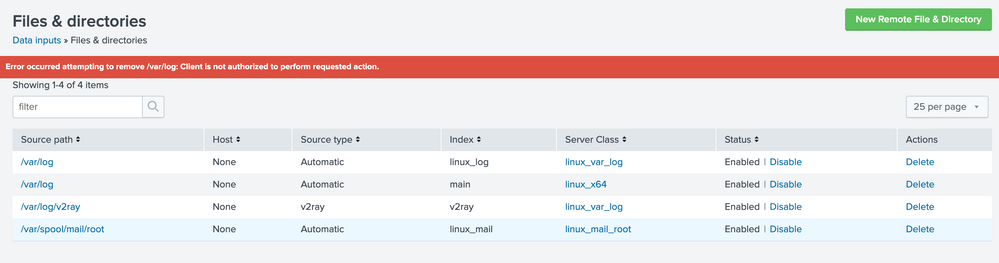
Any idea for this?

- Mark as New
- Bookmark Message
- Subscribe to Message
- Mute Message
- Subscribe to RSS Feed
- Permalink
- Report Inappropriate Content


Why do you have conf files in /var/log? All the conf files should be under $SPLUNK_HOME/etc/apps... OR $SPLUNK_HOME/etc/system/... Perhaps you're referring to log files sitting on remote hosts that get picked up by the forwarder? If so, these aren't conf files, and you can easily ssh into the box and remove those log files if you wish
- Mark as New
- Bookmark Message
- Subscribe to Message
- Mute Message
- Subscribe to RSS Feed
- Permalink
- Report Inappropriate Content
Why do you have conf files in /var/log? All the conf files should be under $SPLUNK_HOME/etc/apps... OR $SPLUNK_HOME/etc/system/... Perhaps you're referring to log files sitting on remote hosts that get picked up by the forwarder? If so, these aren't conf files, and you can easily ssh into the box and remove those log files if you wish
- Mark as New
- Bookmark Message
- Subscribe to Message
- Mute Message
- Subscribe to RSS Feed
- Permalink
- Report Inappropriate Content
I had tried to configure these remote inputs to another index in splunk web but it looks like no use.
- Mark as New
- Bookmark Message
- Subscribe to Message
- Mute Message
- Subscribe to RSS Feed
- Permalink
- Report Inappropriate Content
Hi, skoelpin:
I means that I had configured to collect log files via splunk web but it was in the incorrect index so I want to remove these remote inputs but I can't. So I want to remove these in configure files. ^_^

Join the Splunk Community Slack to learn, troubleshoot, and make connections with fellow Splunk practitioners in real time!
Join Splunk User Groups to connect and learn in-person by region or remotely by topic or industry.
Make your Splunk investment work harder with Optimization Advisor
How Splunk AI Assistant Is Transforming Investigations: Insights from .conf26
Make Your Machine Data AI-Ready in Splunk
