
Join the Conversation
- Find Answers
- :
- Using Splunk
- :
- Splunk Search
- :
- Re: How do I extract a field from my raw stdout lo...
- Subscribe to RSS Feed
- Mark Topic as New
- Mark Topic as Read
- Float this Topic for Current User
- Bookmark Topic
- Subscribe to Topic
- Mute Topic
- Printer Friendly Page
- Mark as New
- Bookmark Message
- Subscribe to Message
- Mute Message
- Subscribe to RSS Feed
- Permalink
- Report Inappropriate Content

Can you please help with extracting the fields from the below sample log. I am unable to escape the "'// &" '" in the log using regex.
I am trying to extract upstream_response_time and connection_requests.
{"log":"[1] api_access.log: [1618591069.220218866, { \"msec\": 1618591069.219, \"remote_addr\": \"10.248.32.1\", \"x_forwarded_for\": \"10.233.42.16, 10.248.32.1\", \"remote_port\": \"41474\", \"pipelined\": \".\", \"body_bytes_sent\": \"4554\", \"bytes_sent\": 5150, \"request_time\": 1.066, \"upstream_response_time\": \"1.066\", \"upstream_response_length\": \"18456\", \"upstream_status\": \"200\", \"kore_route\": \"-\", \"koreserver\": \"KoreServer/\", \"host\": \"app-artificial-intelligence-dev.t3-openshift1.*\", \"hostname\": \"kore-app-62-g6522\", \"server_name\": \"_\", \"request_completion\": \"OK\", \"status\": 200, \"connection_requests\": 2, \"request_uri\": \"/api/1.1/builder/streams/st-332b9e29-e487-567e-b382-56e0fa4beb9d/dialogs/dg-3558dfff-9932-5640-a364-5f7202d5dfc8/components?rnd=qdzsm9\", \"request_method\": \"GET\", \"request_content_type\": \"application/json;charset=UTF-8\", \"request_content_length\": \"-\", \"request_total_length\": 1735, \"args\": \"rnd=qdzsm9\",\"is_args\": \"?\", \"x-traceid\"😕"-\", \"http_user_agent\": \"Mozilla/5.0 (Windows NT 10.0; WOW64) AppleWebKit/537.36 (KHTML, like Gecko) Chrome/88.0.4324.150 Safari/537.36\" }\", \"podname\"=\u003e\"kore-app-62-g6522\"}]\n","stream":"stdout","time":"2021-04-16T16:37:49.39632196Z"}
- Mark as New
- Bookmark Message
- Subscribe to Message
- Mute Message
- Subscribe to RSS Feed
- Permalink
- Report Inappropriate Content

Hi @rseri17 ,
Maybe you can try the following regex for extracting the fields you need:
| rex field=FIELD_NAME "upstream_response_time\\"\:\s\\\"(?<upstream_response_time>[\d\.]+)\\\""
| rex field=FIELD_NAME "connection_requests\\\"\:\s(?<connection_requests>[\d]+)"
- Mark as New
- Bookmark Message
- Subscribe to Message
- Mute Message
- Subscribe to RSS Feed
- Permalink
- Report Inappropriate Content
Hi @rseri17 ,
Maybe you can try the following regex for extracting the fields you need:
| rex field=FIELD_NAME "upstream_response_time\\"\:\s\\\"(?<upstream_response_time>[\d\.]+)\\\""
| rex field=FIELD_NAME "connection_requests\\\"\:\s(?<connection_requests>[\d]+)"
- Mark as New
- Bookmark Message
- Subscribe to Message
- Mute Message
- Subscribe to RSS Feed
- Permalink
- Report Inappropriate Content
Thanks for your response . That did not work , I am unable to escape the ' " ' . It errors out parsing the regex.
- Mark as New
- Bookmark Message
- Subscribe to Message
- Mute Message
- Subscribe to RSS Feed
- Permalink
- Report Inappropriate Content


It looks like @alonsocaio is just missing a backslash after upstream_response_time - try
| rex field=FIELD_NAME "upstream_response_time\\\"\:\s\\\"(?<upstream_response_time>[\d\.]+)\\\""
| rex field=FIELD_NAME "connection_requests\\\"\:\s(?<connection_requests>[\d]+)"- Mark as New
- Bookmark Message
- Subscribe to Message
- Mute Message
- Subscribe to RSS Feed
- Permalink
- Report Inappropriate Content
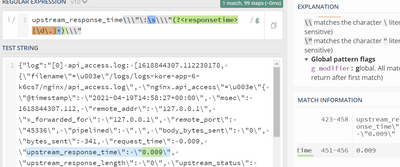
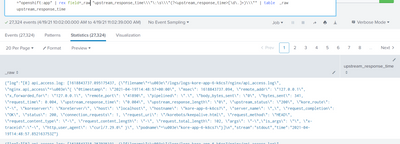
Thanks , I was able to extract the fields. However when i try to add that to my query to extract from the _raw its not working . could you please let me know , if I am missing something. I have attached the result.
- Mark as New
- Bookmark Message
- Subscribe to Message
- Mute Message
- Subscribe to RSS Feed
- Permalink
- Report Inappropriate Content
You may need to add more (pairs of) backslashes to the splunk rex expression (not the regex101.com) particularly when trying to escape backslashes as it seems to need extra.
- Mark as New
- Bookmark Message
- Subscribe to Message
- Mute Message
- Subscribe to RSS Feed
- Permalink
- Report Inappropriate Content
That worked !! Thanks a lot for your help guys. I didn't know about that, adding extra backsplashes worked.
|rex field=_raw "upstream_response_time\\\\\"\:\s\\\\\"(?<upstream_response_time>[\d\.]+)\\\\\""

Join the Splunk Community Slack to learn, troubleshoot, and make connections with fellow Splunk practitioners in real time!
Join Splunk User Groups to connect and learn in-person by region or remotely by topic or industry.
[Puzzles] Solve, Learn, Repeat: Character substitutions with Regular Expressions
Splunk Community Badges!
[Puzzles] Solve, Learn, Repeat: Matching cron expressions
