
Join the Conversation
- Find Answers
- :
- Using Splunk
- :
- Splunk Search
- :
- How do I create a histogram to show distribution o...
- Subscribe to RSS Feed
- Mark Topic as New
- Mark Topic as Read
- Float this Topic for Current User
- Bookmark Topic
- Subscribe to Topic
- Mute Topic
- Printer Friendly Page
- Mark as New
- Bookmark Message
- Subscribe to Message
- Mute Message
- Subscribe to RSS Feed
- Permalink
- Report Inappropriate Content

I have a search like this:
index=my_index search=my_search | stats count as no_of_hosts by uptime
It gives me uptime of hosts present in our environment and no_of_hosts having that uptime.
I would like a chart that gives me uptime in range of say 0-10 days, 11-20, 21-30 and so on ( plotted on x axis ) and no_of_hosts which falls within this uptime range ( plotted on y axis ).
something like this:

How do I achieve that in Splunk?
- Mark as New
- Bookmark Message
- Subscribe to Message
- Mute Message
- Subscribe to RSS Feed
- Permalink
- Report Inappropriate Content


uptime is probably a string with trailing spaces - try:
index=my_index search=my_search | eval uptime=trim(uptime) | bin span=10 uptime | stats count as no_of_hosts by uptime- Mark as New
- Bookmark Message
- Subscribe to Message
- Mute Message
- Subscribe to RSS Feed
- Permalink
- Report Inappropriate Content

Hi @asingh4177,
Please try below;
index=my_index search=my_search
| eval uptime=floor((if(uptime==0,0,uptime-1))/10)
| eval uptime=if(uptime==0,uptime*10,uptime*10+1)."-".((uptime+1)*10)
| stats count as no_of_hosts by uptime
If this reply helps you an upvote is appreciated.
- Mark as New
- Bookmark Message
- Subscribe to Message
- Mute Message
- Subscribe to RSS Feed
- Permalink
- Report Inappropriate Content
index=my_index search=my_search | bin span=10 uptime | stats count as no_of_hosts by uptime- Mark as New
- Bookmark Message
- Subscribe to Message
- Mute Message
- Subscribe to RSS Feed
- Permalink
- Report Inappropriate Content
Thanks for reply but this didn't provide the intended solution.
This search just gave me first value in uptime field in range of 0-10 with corresponding no_of_hosts field not providing correct number as well as other fields in uptime gave a single value as before.
To give you the clarity, here are the 2 searchs with o/p:
index=my_index search=my_search | bin span=10 uptime | stats count as no_of_hosts by uptime
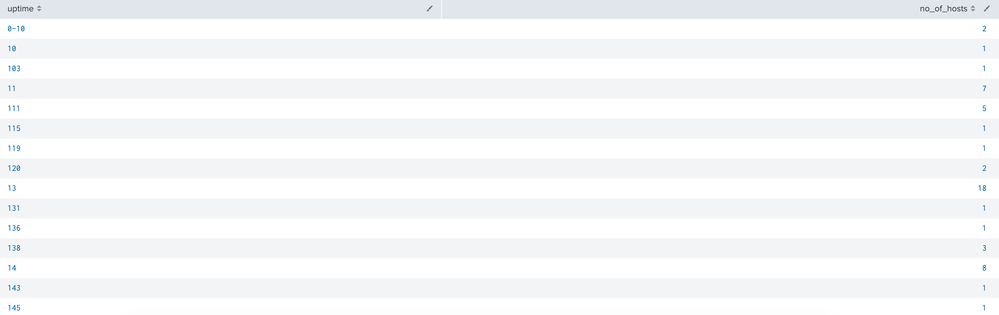
and here is my old search with o/p:
index=my_index search=my_search | stats count as no_of_hosts by uptime
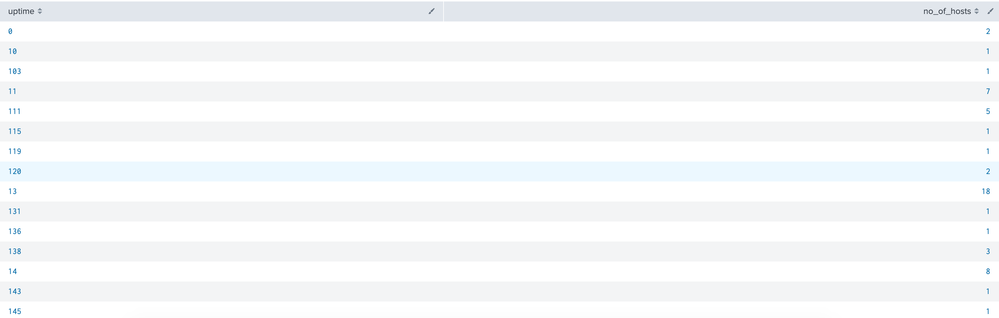
Any help is appreciated..
Thanks in advance.
- Mark as New
- Bookmark Message
- Subscribe to Message
- Mute Message
- Subscribe to RSS Feed
- Permalink
- Report Inappropriate Content
uptime is probably a string with trailing spaces - try:
index=my_index search=my_search | eval uptime=trim(uptime) | bin span=10 uptime | stats count as no_of_hosts by uptime
Data Management Digest – December 2025
Index This | What is broken 80% of the time by February?
Unlock Faster Time-to-Value on Edge and Ingest Processor with New SPL2 Pipeline ...
