
Join the Conversation
- Find Answers
- :
- Using Splunk
- :
- Splunk Search
- :
- How do I Display fields in a table after stats com...
- Subscribe to RSS Feed
- Mark Topic as New
- Mark Topic as Read
- Float this Topic for Current User
- Bookmark Topic
- Subscribe to Topic
- Mute Topic
- Printer Friendly Page
- Mark as New
- Bookmark Message
- Subscribe to Message
- Mute Message
- Subscribe to RSS Feed
- Permalink
- Report Inappropriate Content

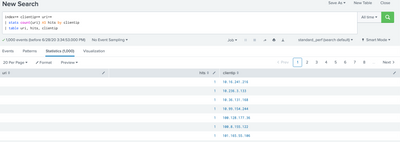
Working with some Apache logs. I am trying to get a table that displays the uri, the clientip, and the number of times that clientip has hit that uri (as hits). Everything is working as expected except for that table. Why doesn't the uri part work? I get a table with uri that has blank values, and the other fields show the expected values.
index=* clientip=* uri=*
| stats count(uri) AS hits by clientip
| table uri, hits, clientip
- Mark as New
- Bookmark Message
- Subscribe to Message
- Mute Message
- Subscribe to RSS Feed
- Permalink
- Report Inappropriate Content


Hi @adamfrisbee ,
you cannot display uri because after the stats command, you can display only the fields present in stats and in you stats command there isn't the uri value.
If you want it, you should modify your search in this way:
index=* clientip=* uri=*
| stats count(uri) AS hits values(uri) AS uri by clientip
| table uri hits clientip
Ciao.
Giuseppe
- Mark as New
- Bookmark Message
- Subscribe to Message
- Mute Message
- Subscribe to RSS Feed
- Permalink
- Report Inappropriate Content
Hi @adamfrisbee ,
you cannot display uri because after the stats command, you can display only the fields present in stats and in you stats command there isn't the uri value.
If you want it, you should modify your search in this way:
index=* clientip=* uri=*
| stats count(uri) AS hits values(uri) AS uri by clientip
| table uri hits clientip
Ciao.
Giuseppe
- Mark as New
- Bookmark Message
- Subscribe to Message
- Mute Message
- Subscribe to RSS Feed
- Permalink
- Report Inappropriate Content
Hi @adamfrisbee,
good for you, see next time!
Ciao and happy splunking
Giuseppe
P.S.: Karma Points are appreciated 😉


Join the Splunk Community Slack to learn, troubleshoot, and make connections with fellow Splunk practitioners in real time!
Join Splunk User Groups to connect and learn in-person by region or remotely by topic or industry.
Introducing ITSI 5.0: Unified Visibility and Actionable Insights
Inside Splunk Agent Observability: Understanding Agent Behavior, Tokens & Costs
From Data to Insight: Announcing the Winners of the Splunk Dashboard Contest
