
Join the Conversation
- Find Answers
- :
- Using Splunk
- :
- Splunk Search
- :
- Re: How come my trendline is not displaying on a s...
- Subscribe to RSS Feed
- Mark Topic as New
- Mark Topic as Read
- Float this Topic for Current User
- Bookmark Topic
- Subscribe to Topic
- Mute Topic
- Printer Friendly Page
- Mark as New
- Bookmark Message
- Subscribe to Message
- Mute Message
- Subscribe to RSS Feed
- Permalink
- Report Inappropriate Content

How can I get trendline data to show up on a single visualization using the following query? The results come back fine as timechart count, but the panel won't display:
index=ui_logs source="*.logs*" | search ("Start Transaction" "status=COMPLETE")  OR ("Start Transaction" AND "status=FAILED") |
stats count(eval(searchmatch("Start Transaction") AND searchmatch("status=COMPLETE"))) as successCount
      count(eval(searchmatch("Start Transaction") AND searchmatch("status=FAILED"))) as errorCount |
eval totalCount = successCount + errorCount |
timechart count as totalCount
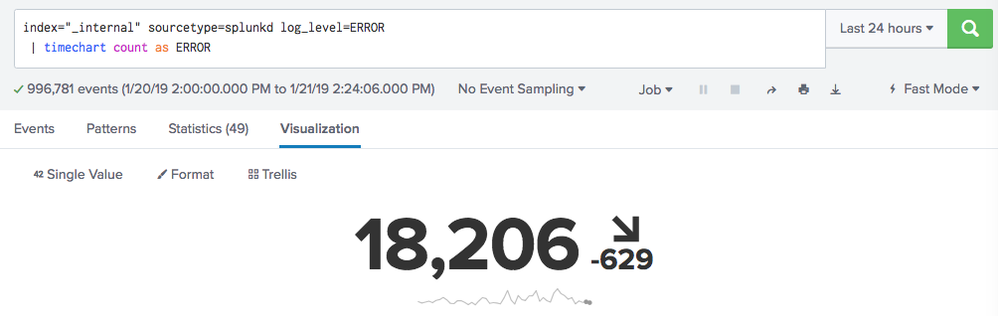
I would like to map the results to a single trendline display as such:

- Mark as New
- Bookmark Message
- Subscribe to Message
- Mute Message
- Subscribe to RSS Feed
- Permalink
- Report Inappropriate Content

@jaj your command with stats is removing _time field which is required by timechart
index=ui_logs source="*.logs*" search ("Start Transaction" "status=COMPLETE")  OR ("Start Transaction" AND "status=FAILED")
| timechart count(eval(searchmatch("Start Transaction") AND searchmatch("status=COMPLETE"))) as successCount
       count(eval(searchmatch("Start Transaction") AND searchmatch("status=FAILED"))) as errorCount
| eval totalCount = successCount + errorCount
| table _time totalCount
As stated in one of my precious answers, you can directly use the following after your base search:
| timechart count as totalCount
PS: move your | search ... to the base search as in answer above since the SPL in your question is asking for all the results from index and then filtering required data.
| makeresults | eval message= "Happy Splunking!!!"
- Mark as New
- Bookmark Message
- Subscribe to Message
- Mute Message
- Subscribe to RSS Feed
- Permalink
- Report Inappropriate Content
@jaj your command with stats is removing _time field which is required by timechart
index=ui_logs source="*.logs*" search ("Start Transaction" "status=COMPLETE")  OR ("Start Transaction" AND "status=FAILED")
| timechart count(eval(searchmatch("Start Transaction") AND searchmatch("status=COMPLETE"))) as successCount
       count(eval(searchmatch("Start Transaction") AND searchmatch("status=FAILED"))) as errorCount
| eval totalCount = successCount + errorCount
| table _time totalCount
As stated in one of my precious answers, you can directly use the following after your base search:
| timechart count as totalCount
PS: move your | search ... to the base search as in answer above since the SPL in your question is asking for all the results from index and then filtering required data.
| makeresults | eval message= "Happy Splunking!!!"
- Mark as New
- Bookmark Message
- Subscribe to Message
- Mute Message
- Subscribe to RSS Feed
- Permalink
- Report Inappropriate Content
@niketnilay thank you again!

Upcoming Webinar: Unmasking Insider Threats with Slunk Enterprise Security’s UEBA
.conf25 technical session recap of Observability for Gen AI: Monitoring LLM ...
A Season of Skills: New Splunk Courses to Light Up Your Learning Journey
