
Join the Conversation
- Find Answers
- :
- Using Splunk
- :
- Splunk Search
- :
- How can I display _time in my results using stats ...
- Subscribe to RSS Feed
- Mark Topic as New
- Mark Topic as Read
- Float this Topic for Current User
- Bookmark Topic
- Subscribe to Topic
- Mute Topic
- Printer Friendly Page
- Mark as New
- Bookmark Message
- Subscribe to Message
- Mute Message
- Subscribe to RSS Feed
- Permalink
- Report Inappropriate Content
How can I display _time in my results using stats command?

How can I display _time in my results using stats command
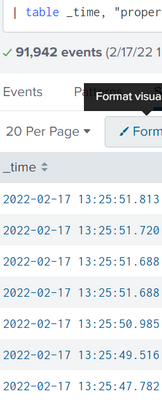
I get this field when I use "table _time"
Just like the image above, I want to get the time field using stats and/or eval command
The image below is how my time events look like.

- Mark as New
- Bookmark Message
- Subscribe to Message
- Mute Message
- Subscribe to RSS Feed
- Permalink
- Report Inappropriate Content


Hey @EvansB,
You can simply use the below query to get the time field displayed in the stats table
| stats values(time) as time by _time
Here, I have kept _time and time as two different fields as the image displays time as a separate field. If both time and _time are the same fields, then it should not be a problem using either. But if they are different fields, and you want to use _time, then you can replace _time with time in the values function.
If you find the answer helpful, an upvote/karma is appreciated
- Mark as New
- Bookmark Message
- Subscribe to Message
- Mute Message
- Subscribe to RSS Feed
- Permalink
- Report Inappropriate Content


Hi @EvansB,
let me understand: do you want to use _time for grouping events or as a field to display?
in the first case you could use the hint of @tshah-splunk , but is useful to add a bin command before the stats to group results, otherwise you'll have too many results:
| bin _time span=1d
| stats values(*) as * by _time
if instead you need to display _time as a field, you can put it in the stats options, using some function:
- values(to have all the distinct values of _time,
- earliest to have the first value,
- latest to have the latest value.
In both situations, you have also, at the end, to convert _time from epochtime to human readable format using strftime.
Ciao.
Giuseppe

Join the Splunk Community Slack to learn, troubleshoot, and make connections with fellow Splunk practitioners in real time!
Join Splunk User Groups to connect and learn in-person by region or remotely by topic or industry.
May 2026 Splunk Expert Sessions: Security & Observability
Network to App: Observability Unlocked [May & June Series]
SPL2 Deep Dives, AppDynamics Integrations, SAML Made Simple and Much More on Splunk ...
