
Join the Conversation
- Find Answers
- :
- Using Splunk
- :
- Splunk Search
- :
- Re: Getting rid of unused time in timechart
- Subscribe to RSS Feed
- Mark Topic as New
- Mark Topic as Read
- Float this Topic for Current User
- Bookmark Topic
- Subscribe to Topic
- Mute Topic
- Printer Friendly Page
- Mark as New
- Bookmark Message
- Subscribe to Message
- Mute Message
- Subscribe to RSS Feed
- Permalink
- Report Inappropriate Content


Given a search:
index="muni" | nbclosest | timechart span=30m dc(vehicle_id) as NumVehicles
(where nbclosest is a custom search command that filters results and isn't relevant to this question) it correctly charts the data, but the problem the data is only from a subset of hours in the day, e.g., 10am to 7pm. When plotting it, it looks like the attached image:
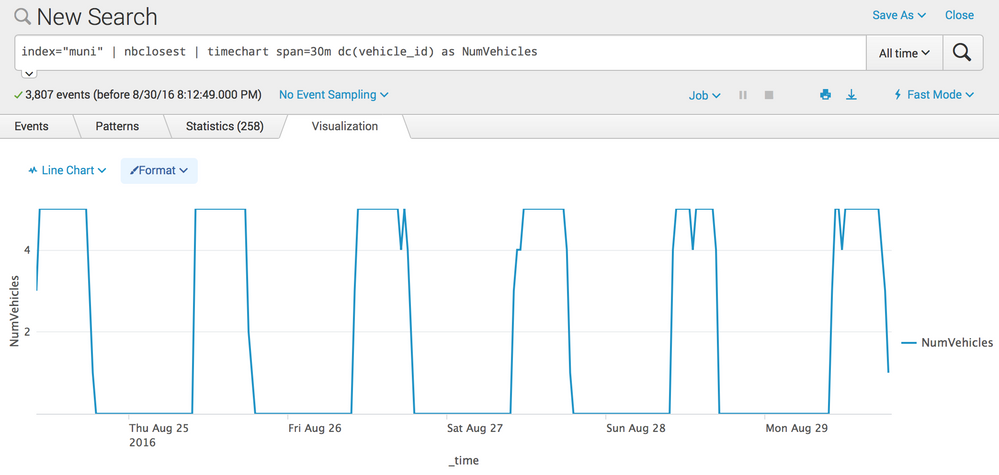
I'd like to change the chart so that the times outside 10am-7pm aren't displayed at all. It would be as if the chart were squished horizontally by removing midnight-10am and 7pm-midnight.
How can I do this?

- Mark as New
- Bookmark Message
- Subscribe to Message
- Mute Message
- Subscribe to RSS Feed
- Permalink
- Report Inappropriate Content

See if add cont=f to the timechart command gives you the desired output.
- Mark as New
- Bookmark Message
- Subscribe to Message
- Mute Message
- Subscribe to RSS Feed
- Permalink
- Report Inappropriate Content

Give this a try. You may loose the x-axis markers
index="muni" | nbclosest | bucket span=30m _time | stats dc(vehicle_id) as NumVehicles by _time
- Mark as New
- Bookmark Message
- Subscribe to Message
- Mute Message
- Subscribe to RSS Feed
- Permalink
- Report Inappropriate Content
This produces the same result as adding cont=f but, oddly, says "0 events" on the left.
- Mark as New
- Bookmark Message
- Subscribe to Message
- Mute Message
- Subscribe to RSS Feed
- Permalink
- Report Inappropriate Content
See if add cont=f to the timechart command gives you the desired output.

Accelerating Observability as Code with the Splunk AI Assistant
Integrating Splunk Search API and Quarto to Create Reproducible Investigation ...
Congratulations to the 2025-2026 SplunkTrust!
