
Join the Conversation
- Find Answers
- :
- Using Splunk
- :
- Splunk Search
- :
- Geostats Cluster Map Help
- Subscribe to RSS Feed
- Mark Topic as New
- Mark Topic as Read
- Float this Topic for Current User
- Bookmark Topic
- Subscribe to Topic
- Mute Topic
- Printer Friendly Page
- Mark as New
- Bookmark Message
- Subscribe to Message
- Mute Message
- Subscribe to RSS Feed
- Permalink
- Report Inappropriate Content

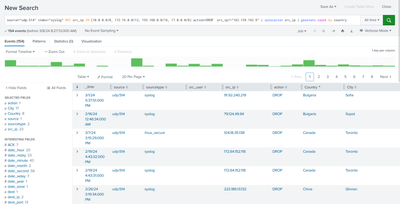
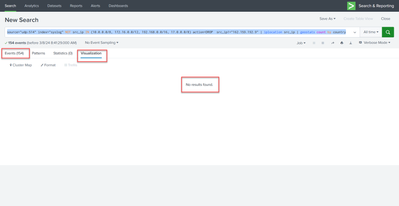
Any reason why this can't be visualized in a geo cluster map?
source="udp:514" index="syslog" NOT src_ip IN (10.0.0.0/8, 172.16.0.0/12, 192.168.0.0/16, 17.0.0.0/8) action=DROP src_ip!="162.159.192.9" | iplocation src_ip | geostats count by country
- Mark as New
- Bookmark Message
- Subscribe to Message
- Mute Message
- Subscribe to RSS Feed
- Permalink
- Report Inappropriate Content


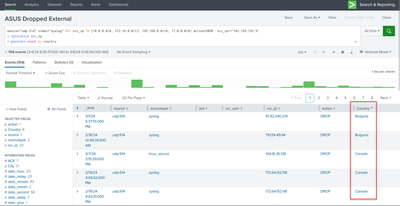
The field is "Country" not "country".
Try
...
| iplocation src_ip
| geostats count by Country
Happy Splunking!
-Rich
- Mark as New
- Bookmark Message
- Subscribe to Message
- Mute Message
- Subscribe to RSS Feed
- Permalink
- Report Inappropriate Content
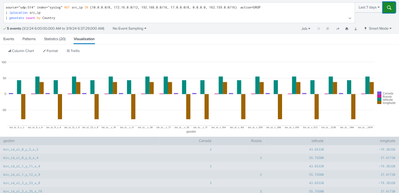
So, why is Lat/Long included as a data point? Even the tutorial I'm following has the same result, but surely there is a way to not show these since its sort of meaningless? (And don't call me Shirley!) 🙂
- Mark as New
- Bookmark Message
- Subscribe to Message
- Mute Message
- Subscribe to RSS Feed
- Permalink
- Report Inappropriate Content

@ChocolateRocket, the latitude and longitude fields are generated by the iplocation command and they are used to plot the data points on the map. You could remove them but then that would break the visualization.
Good luck, we're all counting on you.
- Mark as New
- Bookmark Message
- Subscribe to Message
- Mute Message
- Subscribe to RSS Feed
- Permalink
- Report Inappropriate Content
If that is correct, then the planet earth and all humanity is in the wrong hands.
🙂
- Mark as New
- Bookmark Message
- Subscribe to Message
- Mute Message
- Subscribe to RSS Feed
- Permalink
- Report Inappropriate Content
The field is "Country" not "country".
Try
...
| iplocation src_ip
| geostats count by Country
Happy Splunking!
-Rich
- Mark as New
- Bookmark Message
- Subscribe to Message
- Mute Message
- Subscribe to RSS Feed
- Permalink
- Report Inappropriate Content
Good lord. that was too easy.
Appreciate the help.
I keep forgetting I'm in a 'Nix world now.
Thank goodness PowerShell doesn't mind capitalization rule breakage. 😄
- Mark as New
- Bookmark Message
- Subscribe to Message
- Mute Message
- Subscribe to RSS Feed
- Permalink
- Report Inappropriate Content
The iplocation command generates the capitalized field "Country", not "country", so it should work if you capitalize Country:
| geostats count by Country
- Mark as New
- Bookmark Message
- Subscribe to Message
- Mute Message
- Subscribe to RSS Feed
- Permalink
- Report Inappropriate Content
Sweet, I was probably typing (got distracted) when you were posting. Glad we had the same answer. 🙂


Join the Splunk Community Slack to learn, troubleshoot, and make connections with fellow Splunk practitioners in real time!
Join Splunk User Groups to connect and learn in-person by region or remotely by topic or industry.
Data Management Digest – September 2026
Federated Search for CloudWatch Unified Data Store Is Generally Available
Announcing Modern Navigation: A New Era of Splunk User Experience
