
Join the Conversation
- Find Answers
- :
- Using Splunk
- :
- Splunk Search
- :
- Re: First event
- Subscribe to RSS Feed
- Mark Topic as New
- Mark Topic as Read
- Float this Topic for Current User
- Bookmark Topic
- Subscribe to Topic
- Mute Topic
- Printer Friendly Page
- Mark as New
- Bookmark Message
- Subscribe to Message
- Mute Message
- Subscribe to RSS Feed
- Permalink
- Report Inappropriate Content
First event
Hello, this is my query
| loadjob savedsearch="myquery"
| where (strftime(_time, "%Y-%m-%d") >= "2020-02-26") AND (strftime(_time, "%Y-%m-%d") <= "2020-03-03") and STEP=="Click"
| bucket _time span=1d
|table _time,MESSAGE
|where MESSAGE = "337668c2-162c-4f4f-bda9-92f7816f2752" OR MESSAGE = "46095117-4dcb-4ebc-9906-8c23f1a1a26b" OR MESSAGE = "60eb62a4-c54a-4fc0-9aaa-17726ff62929" OR MESSAGE = "8b5e055c-17ab-4135-8b90-1fbc65032792"
And this is the result
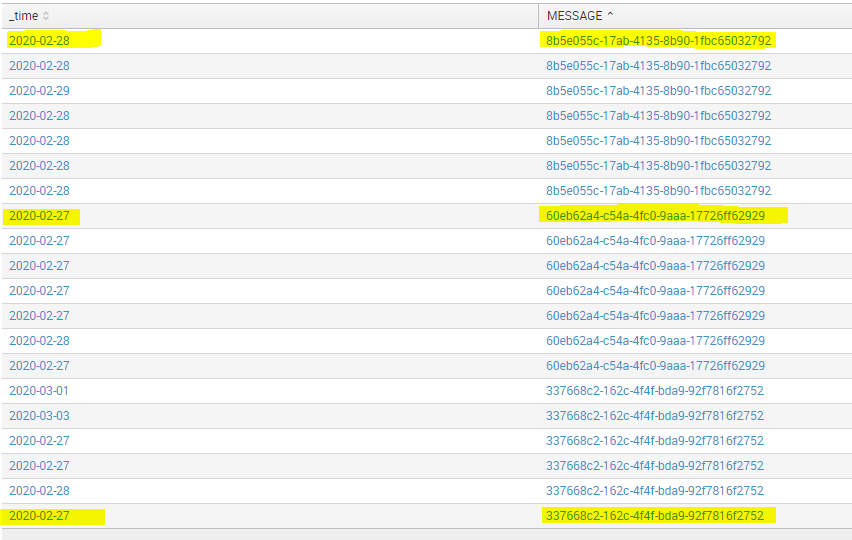
What i want is only the lines on yellow:
If I have a message on the 26th, 27th and 28th I must have that of 26
- Mark as New
- Bookmark Message
- Subscribe to Message
- Mute Message
- Subscribe to RSS Feed
- Permalink
- Report Inappropriate Content

Try this:
| loadjob savedsearch="myquery"
| rename COMMENT AS "Use timepicker to filter dates"
| addinfo
| rename COMMENT AS "First problem here: you used 'and' instead of 'AND'"
| where (_time >= info_min_time) AND (_time <= info_max_time)  AND STEP=="Click"
| bucket _time span=1d
| sort 0 - _time
| streamstats count AS _serial BY MESSAGE _time
| where _serial="1"
Or maybe even this:
| loadjob savedsearch="myquery"
| rename COMMENT AS "Use timepicker to filter dates"
| addinfo
| rename COMMENT AS "First problem here: you used 'and' instead of 'AND'"
| where (_time >= info_min_time) AND (_time <= info_max_time)  AND STEP=="Click"
| timechart span=1d first(_time) AS time BY MESSAGE
- Mark as New
- Bookmark Message
- Subscribe to Message
- Mute Message
- Subscribe to RSS Feed
- Permalink
- Report Inappropriate Content
this query works for me
 | loadjob savedsearch="myquery"
 | where (strftime(_time, "%Y-%m-%d") >= "2020-02-26") AND (strftime(_time, "%Y-%m-%d") <= "2020-03-03") and STEP=="Click"
 | bucket _time span=1d
 | stats earliest(_time) as _time by ID_MESSAGE
 | eval _time=strftime(_time, "%Y-%m-%d")
And this is the result :
_time ID_MESSAGE
27/02 YHDD
27/02 MFJIO
27/02 LKCFD
28/02 LMDFF
Now i wanna count ID_MESSAGE by _time to have this :
_time count(ID_MESSAGE)
27/02 3
28/02 1
- Mark as New
- Bookmark Message
- Subscribe to Message
- Mute Message
- Subscribe to RSS Feed
- Permalink
- Report Inappropriate Content
@to4kawa @manjunathmeti for the two solution, i can't use after a timechart?
dc(ID_MESSAGE) by _time

OR

timechart dc(ID_MESSAGE)
- Mark as New
- Bookmark Message
- Subscribe to Message
- Mute Message
- Subscribe to RSS Feed
- Permalink
- Report Inappropriate Content

timechart ?
....
| bucket _time span=1d
| table _time,MESSAGE
is same of timechart result.
but where does dc() come from?
your question First event doesn't need dc() and timechart .
- Mark as New
- Bookmark Message
- Subscribe to Message
- Mute Message
- Subscribe to RSS Feed
- Permalink
- Report Inappropriate Content
the purpose of the query, at the base is to calculate the messages per day, and count the message only on the first day.This why i did this query.
Now, i have 3 ID_MESSAGE for 27/02 and one for 28/02
This is what i want :
27/02 => 3
28/02 => 1
| loadjob savedsearch="myquery"
| where (strftime(_time, "%Y-%m-%d") >= "2020-02-26") AND (strftime(_time, "%Y-%m-%d") <= "2020-03-03") and STEP=="Click"
| bucket _time span=1d
| stats earliest(_time) as _time by ID_MESSAGE
| eval _time=strftime(_time, "%Y-%m-%d")
|timechart count(ID_MESSAGE)
- Mark as New
- Bookmark Message
- Subscribe to Message
- Mute Message
- Subscribe to RSS Feed
- Permalink
- Report Inappropriate Content

hi @tahasefiani,
Try this:
| loadjob savedsearch="myquery"
| where (strftime(_time, "%Y-%m-%d") >= "2020-02-26") AND (strftime(_time, "%Y-%m-%d") <= "2020-03-03") and STEP=="Click"
| bucket _time span=1d
| stats earliest(_time) as time by MESSAGE
| eval time=strftime(time, "%Y-%m-%d")
| where IN(MESSAGE, "337668c2-162c-4f4f-bda9-92f7816f2752", "46095117-4dcb-4ebc-9906-8c23f1a1a26b", "60eb62a4-c54a-4fc0-9aaa-17726ff62929", "8b5e055c-17ab-4135-8b90-1fbc65032792")
- Mark as New
- Bookmark Message
- Subscribe to Message
- Mute Message
- Subscribe to RSS Feed
- Permalink
- Report Inappropriate Content
Hi, @manjunathmeti
I like min() to epoch. your IN usage is cool.
- Mark as New
- Bookmark Message
- Subscribe to Message
- Mute Message
- Subscribe to RSS Feed
- Permalink
- Report Inappropriate Content
I have an old version,so i can't use IN
- Mark as New
- Bookmark Message
- Subscribe to Message
- Mute Message
- Subscribe to RSS Feed
- Permalink
- Report Inappropriate Content

How old? IN has worked since at least 6.3
- Mark as New
- Bookmark Message
- Subscribe to Message
- Mute Message
- Subscribe to RSS Feed
- Permalink
- Report Inappropriate Content
| loadjob savedsearch="myquery"
 | where (strftime(_time, "%Y-%m-%d") >= "2020-02-26") AND (strftime(_time, "%Y-%m-%d") <= "2020-03-03") and STEP=="Click"
 | bucket _time span=1d
 |stats min(_time) as _time by MESSAGE
 |where MESSAGE = "337668c2-162c-4f4f-bda9-92f7816f2752" OR MESSAGE = "46095117-4dcb-4ebc-9906-8c23f1a1a26b" OR MESSAGE = "60eb62a4-c54a-4fc0-9aaa-17726ff62929" OR MESSAGE = "8b5e055c-17ab-4135-8b90-1fbc65032792"



Join the Splunk Community Slack to learn, troubleshoot, and make connections with fellow Splunk practitioners in real time!
Join Splunk User Groups to connect and learn in-person by region or remotely by topic or industry.
Data Management Digest – September 2026
Federated Search for CloudWatch Unified Data Store Is Generally Available
Announcing Modern Navigation: A New Era of Splunk User Experience
