
Join the Conversation
- Find Answers
- :
- Using Splunk
- :
- Splunk Search
- :
- Finding the ratio between fields in different even...
- Subscribe to RSS Feed
- Mark Topic as New
- Mark Topic as Read
- Float this Topic for Current User
- Bookmark Topic
- Subscribe to Topic
- Mute Topic
- Printer Friendly Page
- Mark as New
- Bookmark Message
- Subscribe to Message
- Mute Message
- Subscribe to RSS Feed
- Permalink
- Report Inappropriate Content

I have the a search (picture below) which is calculating the open option interest on several ticker symbols. I was able to figure out how to calculate the sum of the "Call/Put Open Interest" field for each ticker, I can't figure out how to calculate the ratio between them. For example the Apple (AAPL) symbol should have a field with value 1.53. This was found by manually dividing the call open interest (1825974) by the put open interest (1193360). How can I create a new field that calculates this for me?
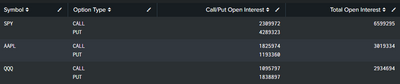
My search is:
index=raw
| eventstats max(_time) as maxtime
| where _time=maxtime
| stats sum(open_interest) as OI by ul_symbol, put_call
| stats list(put_call) as "Option Type" , list(OI) as "Call/Put Open Interest", sum(OI) as "Total Open Interest" by ul_symbol
| sort -"Total Open Interest"
| rename ul_symbol as "Symbol"
And an example of an event is:
{ [-]
   ask: 8.9
   bid: 6.5
   delta: -0.46
   dte: 42
   expiration_date: Nov 6
   gamma: 0.02
   high_price: 9.85
   last: 7.85
   low_price: 7.75
   net_change: -2.59
   open_interest: 6
   percent_change: -24.83
   put_call: PUT
   rho: -0.07
   strike: 112
   symbol: AAPL_110620P112
   theta: -0.091
   time_value: 7.85
   ul_symbol: AAPL
   vega: 0.153
   volume: 55
}
I'm definitely new to all this. Appreciate the help!
- Mark as New
- Bookmark Message
- Subscribe to Message
- Mute Message
- Subscribe to RSS Feed
- Permalink
- Report Inappropriate Content

Not clear how you are differentiating between call and put. However, from your existing search, you may try
Your search
|eval call=mvindex('Call/Put Open Interest',0),put=mvindex('Call/Put Open Interest',1)|eval ratio=call/put
If its possible to identify call and put from the event, you may do that in the stats as well
e.g.
Your search
| stats list(put_call) as "Option Type" , list(OI) as "Call/Put Open Interest", sum(OI) as "Total Open Interest",
first(eval(if(<condition for call>),OI,null()) ) as call, first(eval(if(<condition for put>),OI,null()) ) as put by ul_symbol
|eval ratio=call/put
What goes around comes around. If it helps, hit it with Karma 🙂
- Mark as New
- Bookmark Message
- Subscribe to Message
- Mute Message
- Subscribe to RSS Feed
- Permalink
- Report Inappropriate Content
Not clear how you are differentiating between call and put. However, from your existing search, you may try
Your search
|eval call=mvindex('Call/Put Open Interest',0),put=mvindex('Call/Put Open Interest',1)|eval ratio=call/put
If its possible to identify call and put from the event, you may do that in the stats as well
e.g.
Your search
| stats list(put_call) as "Option Type" , list(OI) as "Call/Put Open Interest", sum(OI) as "Total Open Interest",
first(eval(if(<condition for call>),OI,null()) ) as call, first(eval(if(<condition for put>),OI,null()) ) as put by ul_symbol
|eval ratio=call/put
What goes around comes around. If it helps, hit it with Karma 🙂
- Mark as New
- Bookmark Message
- Subscribe to Message
- Mute Message
- Subscribe to RSS Feed
- Permalink
- Report Inappropriate Content
That did the trick! I read up on mvindex yesterday but it didn't click with me that it was what I needed. I've got a better understanding of it now. Thank you!

Join the Splunk Community Slack to learn, troubleshoot, and make connections with fellow Splunk practitioners in real time!
Join Splunk User Groups to connect and learn in-person by region or remotely by topic or industry.
Why Splunk Customers Should Attend Cisco Live 2026 Las Vegas
What Is the Name of the USB Key Inserted by Bob Smith? (BOTS Hint, Not the Answer)
Automating Threat Operations and Threat Hunting with Recorded Future
