
Join the Conversation
- Find Answers
- :
- Using Splunk
- :
- Splunk Search
- :
- Re: FULL NULL Values based on certain values
- Subscribe to RSS Feed
- Mark Topic as New
- Mark Topic as Read
- Float this Topic for Current User
- Bookmark Topic
- Subscribe to Topic
- Mute Topic
- Printer Friendly Page
- Mark as New
- Bookmark Message
- Subscribe to Message
- Mute Message
- Subscribe to RSS Feed
- Permalink
- Report Inappropriate Content

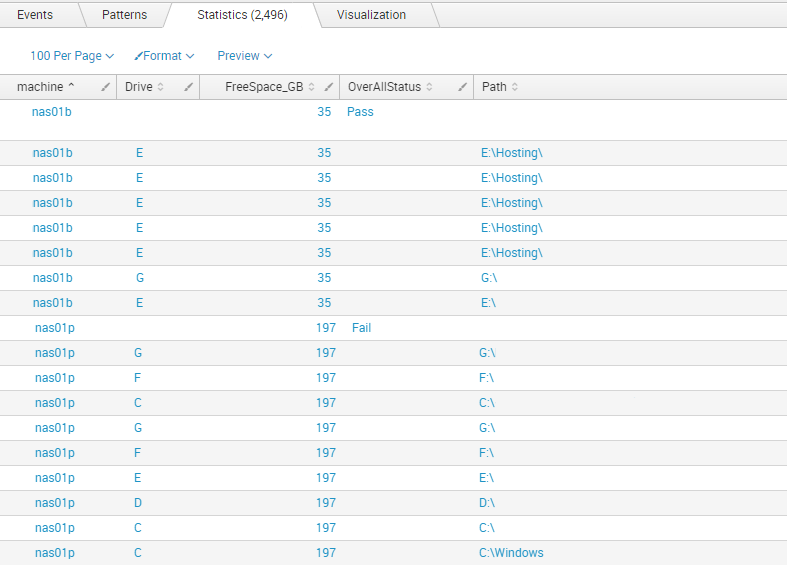
The OverAllStatus only displays on the first row but I require the OverAllStatus to be displayed on each row for each machine (either Pass or Fail).
I need some sort of eval to correctly assign the OverAllStatus on each row for each machine.
I use this eval to determine if the OverAllStatus is a Pass or Fail in the first place
| eval OverAllStatus=case(jobStatusSummary="Success", "Pass", jobStatusSummary="NoBackUp", "NoBackUp", jobStatusSummary!="Success", "Fail")
- Mark as New
- Bookmark Message
- Subscribe to Message
- Mute Message
- Subscribe to RSS Feed
- Permalink
- Report Inappropriate Content

Try:
| eval OverAllStatus=case(jobStatusSummary="Success", "Pass", jobStatusSummary="NoBackUp", "NoBackUp", jobStatusSummary!="Success", "Fail") | streamstats last(OverAllStatus) AS OverAllStatus BY machine
That assumes the first event per host already have an OverAllStatus value. If it is possible that value won't be present for the first event per machine you may try this:
| eval OverAllStatus=case(jobStatusSummary="Success", "Pass", jobStatusSummary="NoBackUp", "NoBackUp", jobStatusSummary!="Success", "Fail") | eventstats last(OverAllStatus) AS OverAllStatus BY machine
- Mark as New
- Bookmark Message
- Subscribe to Message
- Mute Message
- Subscribe to RSS Feed
- Permalink
- Report Inappropriate Content

Add a line after you set OverAllStatus...
| eventstats max(OverAllStatus) as OverAllStatus by machine
- Mark as New
- Bookmark Message
- Subscribe to Message
- Mute Message
- Subscribe to RSS Feed
- Permalink
- Report Inappropriate Content
Try:
| eval OverAllStatus=case(jobStatusSummary="Success", "Pass", jobStatusSummary="NoBackUp", "NoBackUp", jobStatusSummary!="Success", "Fail") | streamstats last(OverAllStatus) AS OverAllStatus BY machine
That assumes the first event per host already have an OverAllStatus value. If it is possible that value won't be present for the first event per machine you may try this:
| eval OverAllStatus=case(jobStatusSummary="Success", "Pass", jobStatusSummary="NoBackUp", "NoBackUp", jobStatusSummary!="Success", "Fail") | eventstats last(OverAllStatus) AS OverAllStatus BY machine
- Mark as New
- Bookmark Message
- Subscribe to Message
- Mute Message
- Subscribe to RSS Feed
- Permalink
- Report Inappropriate Content
Thank you very much for your help, this is great!



Join the Splunk Community Slack to learn, troubleshoot, and make connections with fellow Splunk practitioners in real time!
Join Splunk User Groups to connect and learn in-person by region or remotely by topic or industry.
Persistent Queue at TcpOut — One of Splunk's Most Practical Features
Skip the Awkward Silence: Have a .conf-ersation at .conf26
Rethinking Zero Trust: From Product Purchases to Logical Control Evidence
