
Join the Conversation
- Find Answers
- :
- Using Splunk
- :
- Splunk Search
- :
- Re: Extracting words in a string with regular expr...
- Subscribe to RSS Feed
- Mark Topic as New
- Mark Topic as Read
- Float this Topic for Current User
- Bookmark Topic
- Subscribe to Topic
- Mute Topic
- Printer Friendly Page
- Mark as New
- Bookmark Message
- Subscribe to Message
- Mute Message
- Subscribe to RSS Feed
- Permalink
- Report Inappropriate Content

Hi,
i need help to extract word from a string
string
Security agent installation attempted Endpoint: (Not Found)
Security agent intstallation attempted Endpoint: hostname
result
Not Found
hostname
how can i construct a regular expression to extract out what i wanted?
- Mark as New
- Bookmark Message
- Subscribe to Message
- Mute Message
- Subscribe to RSS Feed
- Permalink
- Report Inappropriate Content


- Mark as New
- Bookmark Message
- Subscribe to Message
- Mute Message
- Subscribe to RSS Feed
- Permalink
- Report Inappropriate Content

not sure how to remove the ")" at the "Not Found)"
|makeresults | eval string="Security agent installation attempted Endpoint: (Not Found)
Security agent intstallation attempted Endpoint: hostname"
| rex field=string max_match=0 ":\s+\(?(?P<result>.+)"
|table string result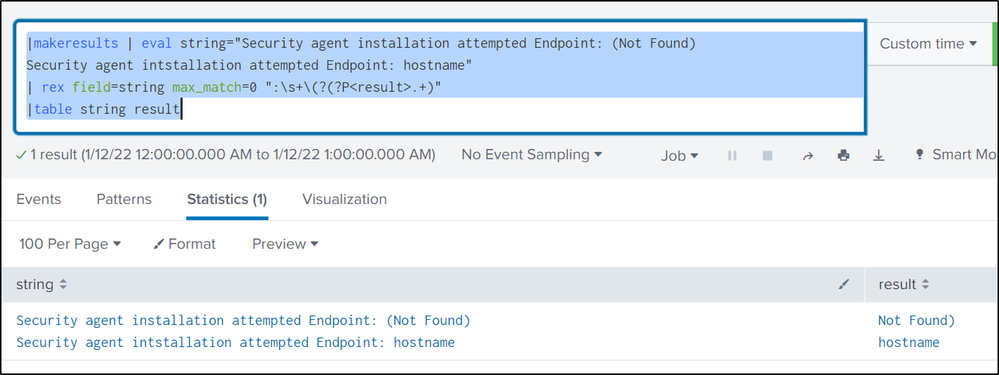
- Mark as New
- Bookmark Message
- Subscribe to Message
- Mute Message
- Subscribe to RSS Feed
- Permalink
- Report Inappropriate Content

Hi @7ryota,
you could use two regexes like the following:
| rex ":\s+\(*(?<result>.+)"
| rex field=result "^(?<result>[^)]+)"
The first extract the full value and the second deletes the parenthesis when present.
Ciao.
Giuseppe
- Mark as New
- Bookmark Message
- Subscribe to Message
- Mute Message
- Subscribe to RSS Feed
- Permalink
- Report Inappropriate Content
| rex ":\s+\(*(?<result>[^)]+)"- Mark as New
- Bookmark Message
- Subscribe to Message
- Mute Message
- Subscribe to RSS Feed
- Permalink
- Report Inappropriate Content
Hi @ITWhisperer ... i am trying to learn and understand your rex, as i ran it, but it does not fetch the string.. not sure what went wrong.. please suggest.
i used this search:
|makeresults | eval string="Security agent installation attempted Endpoint: (Not Found)
Security agent intstallation attempted Endpoint: hostname"
| rex ":\s+\(*(?<result>[^)]+)"
|table string result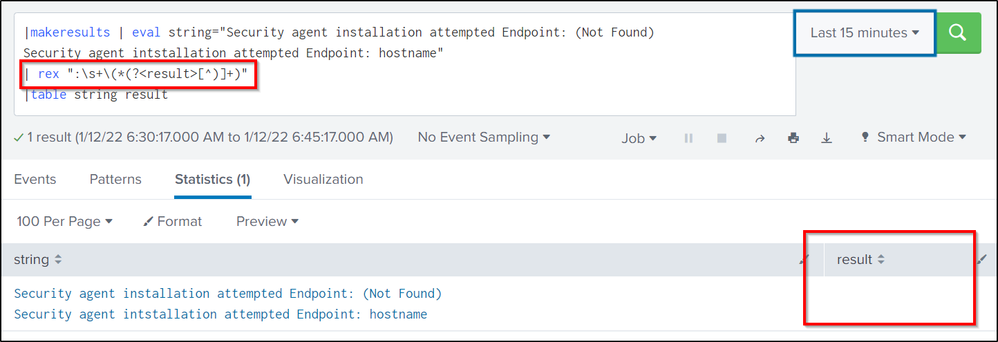
- Mark as New
- Bookmark Message
- Subscribe to Message
- Mute Message
- Subscribe to RSS Feed
- Permalink
- Report Inappropriate Content
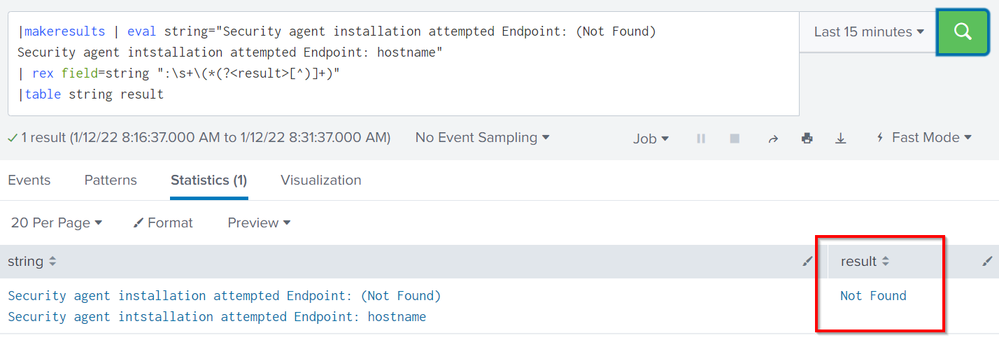
By default, rex operates on the _raw field. Either change your eval so it assigns to _raw rather than string or add field=string to the rex
- Mark as New
- Bookmark Message
- Subscribe to Message
- Mute Message
- Subscribe to RSS Feed
- Permalink
- Report Inappropriate Content
Sure @ITWhisperer , but, still it found only first match.. the "hostname" was not matched..
- Mark as New
- Bookmark Message
- Subscribe to Message
- Mute Message
- Subscribe to RSS Feed
- Permalink
- Report Inappropriate Content
You can use rex max_match=0 to get multiple matches


Join the Splunk Community Slack to learn, troubleshoot, and make connections with fellow Splunk practitioners in real time!
Join Splunk User Groups to connect and learn in-person by region or remotely by topic or industry.
Persistent Queue at TcpOut — One of Splunk's Most Practical Features
Skip the Awkward Silence: Have a .conf-ersation at .conf26
Rethinking Zero Trust: From Product Purchases to Logical Control Evidence
